Apps missing from Location Service on macOS Sonoma [Fix]
In this guide, we will show you a nifty workaround to mitigate the issue of apps missing from Location Service on macOS Sonoma. The fourteenth iteration of the OS has bought in a slew of intriguing goodies, including the likes of Widgets on the desktop, Video conferencing effects, and tons of new additions to Safari. On the flip side though, there are still a few rough edges that need polishing.
One among them is the fact that many users are unable to allow apps to access location on macOS Sonoma. If they head over to Privacy and Security > Location Services, then there are a few apps present there, however, most of the browser apps [such as Chrome, Edge, and Firefox] are missing from that list. If you are also facing a similar issue, then this guide will make you aware of a workaround to bypass this issue. Follow along.
Fix Apps missing from Location Service on macOS Sonoma
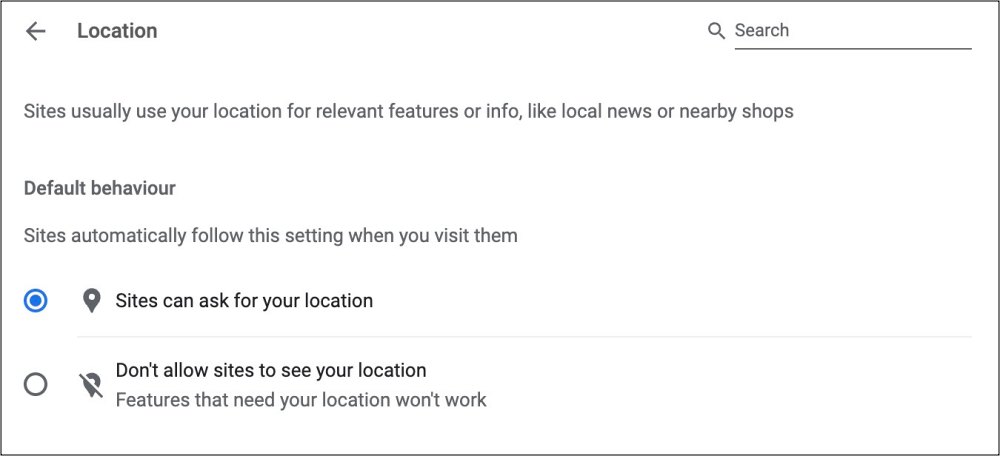
As of now, your only workaround is to manage the location settings from the browser itself. For instance, in the case of Chromium-based browsers, you should head over to the below URL and select Sites can ask for your location.
chrome://settings/content/location
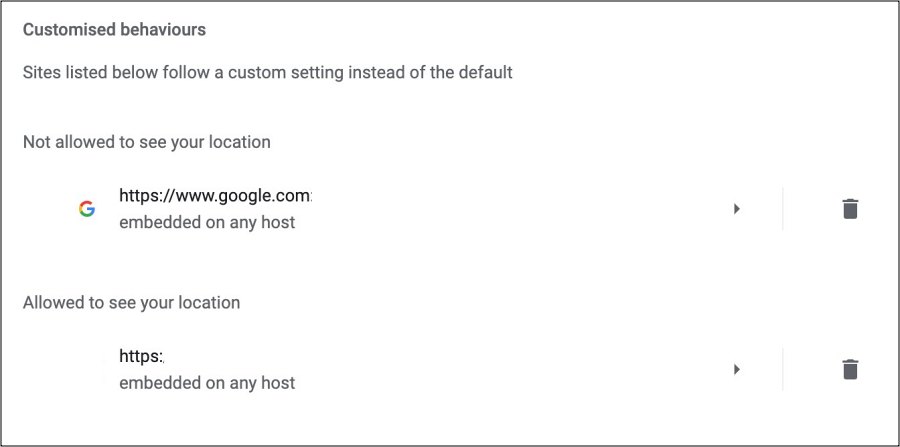
After that, go to the Customized Behavior section and add or remove websites according to your need from the “Not allowed to see your location” and “Allowed to see your location” sections.
That’s it. As of now, this is the only workaround that should help you mitigate the issue of Apps missing from Location Service on macOS Sonoma. As and when there is any further development [rectification measures or official acknowledgment] surrounding this bug, we will update this guide accordingly. In the meantime, the aforementioned workarounds are your best bet.
- macOS Sonoma Google Chrome is sharing your screen [Fix]
- Chrome not working in macOS Sonoma: How to Fix
- Cannot Close Ventura (Wallpaper) Process in macOS Sonoma [Fix]
- Safari Browser Profiles not working on macOS Sonoma: How to Fix

- Aviansh 2 years ago Reply This doesn’t work
- Ryan 3 years ago Reply This doesnt work
(Cancel Reply)
Δ
