Bypass Login MSM Download Tool OnePlus 10 Pro
In this guide, we will show you the steps to bypass MSM Download Tool login for your OnePlus 10 Pro. While the OEM had picked up the downward trajectory for the past couple of years [all thanks to the incorporation of the ColorOS into OxygenOS], for us, the tech enthusiast, it was still the go-to choice. The major reason for the same was the fact OnePlus was among the very few OEMs whose devices could easily be unbricked right from the comfort of your home.
All that you needed to do was to boot your device to EDL Mode and then flash the OFP unbrick firmware via MS Tool. However, every good thing must come to an end. And same was the case with this tool as well, again all thanks to Oppo. You now required an authorized account to gain access to this tool. But in my experience in the custom development, these restrictions don’t last long either!
And guess what, we have already found a way out of this constraint as well. Thanks to this nifty method shared by XDA Member grovez , you could now easily bypass MSM Download Tool login for your OnePlus 10 Pro. And in this guide, we will show you how to do just that. So without further ado, let’s get started.
How to Bypass Login MSM Download Tool OnePlus 10 Pro
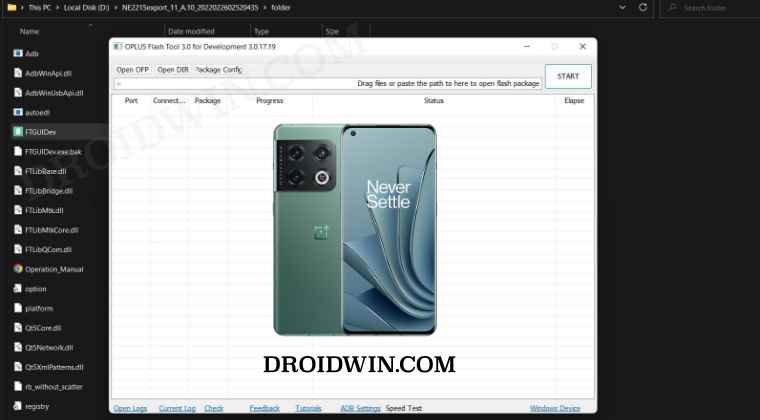
- To begin with, download the MSM Download Tool for the OnePlus 10 Pro.
- Then download 7ZIP [ it will be used to extract the EXE file] and HxD Hex Editor [it will be used to edit the EXE File].
- Now go to the extracted MSM Tool folder, right-click on the MSMDownlodTool.exe file, and select 7ZIP > Open Archive.
- Then extract the entire folder [though we only need the FTGUIDev.exe file, but it is dependent on other files, so extract all].
- Now open the Hex Editor, and drag and drop the FTGUIDev.exe file [present in the extracted folder] to the Hex Editor.
- After that, press Ctrl+F to bring up Find. Then go to the Hex-values tab, type in the below value, and hit OK. 0f 84 e7000000b
- It will highlight the said value.
- Now change 84 in the above command to 85 and save the file via Ctrl+S. The above command will now become 0f 85 e7000000b
- Now launch this edited FTGUIDev.exe file. It will bring up the login box. Select any region except for In Company.
- Then type in any random values in the User ID, Password, and Verify Code and click on Login.
- That’s it. You have now successfully bypassed the login screen on the MSM Download Tool login for your OnePlus 10 Pro.
Now that has been done, you will have to boot your device to the EDL Mode, install the Qualcomm H USB drivers, and then flash the unbrick firmware. To do so, you may refer to our detailed guide on How to Unbrick any OnePlus Device using MSM Download Tool . So on that note, we round off this guide on how you could bypass the MSM Download Tool login for your OnePlus 10 Pro.
UPDATE: New OnePlus EDL Flash Tool Leaked!
A new EDL Flash Tool for OnePlus, Oppo, and Realme has been leaked! Refer to this guide to bypass the login and flash the OFP Firmware to unbrick your device: Leaked EDL Flash Tool for OnePlus, Realme, and Oppo is here!
- How to Fix Stuck in Param Preload error MSM Download Tool
- Device not match image error in MSM Download Tool [Fixed]
- No valid trg ID Error in MSM Download Tool: How to Fix
- Fix Sahara communication failed error in MSM Download Tool

- Grigoriy 3 months ago Reply [2025/11/14 03:47:45][tid:0x32d8] [2BF677D6] [COM3] New SW Version: 96a6858ded10fb6aef4c84e2faa220289b4067a7a1b34e8d84b8a334ca10e9cc [2025/11/14 03:47:45][tid:0x32d8] [2BF677D6] [COM3] Old SW Version: d1dde2c3c70b21fe59568ce768f10c8f318ac313793e88b639d9cbf7f7cc61fa [2025/11/14 03:47:45][tid:0x32d8] [2BF677D6] [COM3] ERROR: Failed to get flash sign. [2025/11/14 03:47:45][tid:0x32d8] [2BF677D6] [COM3] ERROR: Error occurred when signing data. Status = , Message = I tried three different firmware versions, none of them worked. Is there a helpful post for the OnePlus 10 Pro?
- Hector 2 years ago Reply Esto funcionara para un One Plus Gn2200 lo tengo con frp
- Niamotullah 2 years ago Reply My phone is bricked, it is in bootloop, i can’t go into fastboot mode, but i can boot into 9008 mode..Which firmware i should use for my OnePlus 10 pro (NE2217) TMobile variants?
- thomas 2 years ago Reply Yeaa me too
- mazin 2 years ago Reply tried many times but did not worked, at the end contacted the guy from ministry of solutions website and unbrick my phone
- misternazrin 3 years ago Reply I follow all step but when I click to start stuck in Authenticating
- GsmHira 3 years ago Reply Hi I want to login tool to get ID password what should I do please help
- stranger 3 years ago Reply man you are genious but one thing can i use other phones ofp like realme or oppo snapdragon variant phones to flash it through
- masoom khan 3 years ago Reply I follow all step FOR NE2213 but when I click to start stuck in Authenticating
- Abod 3 years ago Reply MSM not working with me Can you help me
- ABDELILAH 3 years ago Reply Not working always in progress in 3 percent but terminated faild method
- Boot loop OnePlus 10T 5G 3 years ago Reply Hi Unfortunately I got my new OP 10t 5g into a boot loop when I wanted to lock the bootloader again. If I had access to the appropriate MSM download tool and the ofp file for the CPH2415, I could try unbrick. Now I only get the device to EDL but the MSM download tool for OP 10 Pro doesn’t see it. Thanks for the help. slavekve
- Juxhin 3 years ago Reply Hi, I somehow cannot put my Oneplus 10 Pro on EDL and gets on Lockscreen Number Input. And my computer cannot see the phone. Any ideas?
- Bort 3 years ago Reply I was unable to find “0f84e7000000b” but i was able to find “0f84e70” and match it up, making the same adjustment worked for me. This is interesting. I have a 10T and it is not bricked. I’m told someone has already tried this but i want to see if my phone is recognized and what the next step would be. i don’t really mind bricking it, I may return it anyway Sadique Hassan 3 years ago Reply Well, that’s interesting Bort. Could you let me know the MSM Tool version that you tried, it would help the rest of us. And just to re-verify, you changed 0f84e70 to 0f85e70 and were able to successfully bypass the login, right? Alex 3 years ago Reply Yes. Just tried this method. I launched the MSM Download Tool Now we need to find a brick, test Boot loop OnePlus 10T 5G 3 years ago Reply Hi Unfortunately I got my new OP 10t 5g into a boot loop when I wanted to lock the bootloader again. If I had access to the appropriate MSM download tool and the ofp file for the CPH2415, I could try unbrick. Now I only get the device to EDL but the MSM download tool for OP 10 Pro doesn’t see it. Thanks for the help. slavekve Bort 3 years ago Reply I don’t know for sure which version I used. I’m not sure if it was from this site or xda or Chinese site. But yes, I was still able to bypass login in the same way as you describe. I read on xda that it requires VIP signing now? An active connection to Oppo’s servers that exchanges keys/values as the flashing process is underway. Without that active session open to sign code during the flashing process, it can not continue, is my understanding. Does this tool successfully flash the 10 Pro as outlined above or does it need additional VIP signing to continue as well? (This is too much of a headache. This phone doesn’t even have functional Netflix with root. (I’m not even able to get widevine l3 SD quality to work). The phone has good specs for the price but this is no longer a real OnePlus experience. I’m not sure where else to go. I already tried Pixel. Rip fun Android 2022)
- Oneplususer 3 years ago Reply Hey, my device doesn’t show up in msm tool, are you able to provide link to your version of msm tool? Thanks Sadique Hassan 3 years ago Reply Hi Mate, is your device booted to EDL Mode, and more importantly have you installed Qualcomm HS USB Drivers? Also, make sure to use the original USB cable and use the USB 2.0 port. It doesn’t matter which version of MSM Tool you use, if one is not able to detect your device, then others won’t be able to either. Anyways, I upload my version of the tool shortly. Oneplususer 3 years ago Reply Hey, yea I have all drivers installed. What’s wierd is my device shows up I’m one plus 9 pro msm tools but not one plus 10, that’s why I think it’s an issue with the software. Thanks
- Alaf 3 years ago Reply Hey, can you provide a download link for version NE2215EXPORT, please
- Marcus 3 years ago Reply I have hit a roadblock in your instructions on step 6. I have the Chinese version of the phone and am using this file: NE2210domestic_11_A.07_2022011114400122.zip When I control+f looking for value 0f85e7000000b the hex editor pops up a message saying the value cannot be found. Additional question: As I am ultimately trying to convert the phone to OxygenOS would it be suitable to use one of these other files for the MSM tool instead? NE2211export_11_A.14_2022051701530552_Droidwin.7z NE2213GDPR_11_A.12_2022032622560000_2.7z Sadique Hassan 3 years ago Reply Hi Marcus, you could try the NE2215export_11_A.10 and let me know the results. Jason 3 years ago Reply Are you able to link us to version NE2215export_11_A.10?
(Cancel Reply)
Δ
