Can’t Install Apps from Unknown Sources: Samsung One UI 6 [Fix]
In this guide, we will make you aware of the reason and more importantly, the steps to fix the “Can’t Install Apps from Unknown Sources” error on your Samsung device running One UI 6. Sideloading apps is a necessary evil. While on one hand, it does bring in a slew of risks with itself, however, in some instances, you might have no choice but to be dependent on third-party sites to get hold of the app.
For example, there could be the inviability of the app due to region restrictions or the developer refusing to accept the hefty pay cut and hence deciding not to host its apps on the store [such as Epic]. Likewise, if you are planning to download an older version of an app, then sideloading is the only way out. However, due to the risks invoked, numerous OEMs have started placing restrictive measures on this approach. And Samsung is one of them.
Owing to this, if you try to sideload an app on your Samsung device running the latest One UI 6, you’ll be greeted with the “Can’t Install Apps from Unknown Sources” error. Fortunately though, the South Korean conglomerate has given us granular control over this functionality and you could easily disable it as per your need. So without further ado, let’s check out how this could be done.
Fix ‘Can’t Install Apps from Unknown Sources’ on Samsung One UI 6
The reason you’re getting this error is due to the newly introduced feature named Auto Blocker. For the unaware, this feature protects your Galaxy device and data by preventing the installation of applications from unauthorized sources, checking for malware, and blocking malicious activity. When enabled, it will straightaway block any and every attempt to sideload apps and you’ll be instead greeted with the aforementioned error.
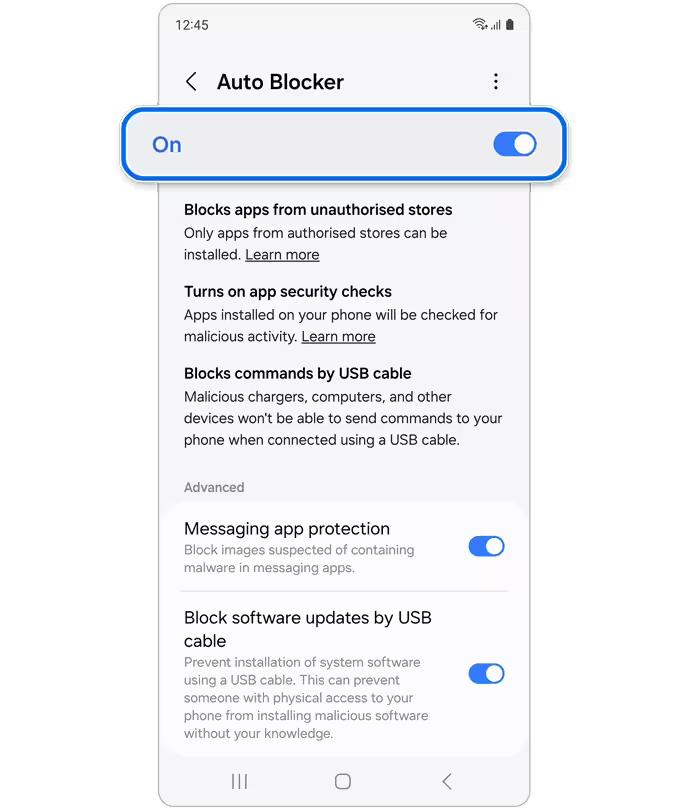
Credits: Samsung
- Adaptive Battery Protection Missing in Galaxy S24 Ultra [Fix]
- Choose Different SIMs for Call/Message/Data in Galaxy S24 Ultra?
- How to Change CSC on Galaxy S24 Ultra
- Android Auto not working with Galaxy S24 Ultra [Fixed]

(Cancel Reply)
Δ
