Debloat/Remove Bloatware from Motorola Devices via ADB Commands
In this guide, we will show you the steps to remove bloatware from your Motorola device and hence debloat it. Various OEMs ships their device with a few built-in apps, and Motorola is no different. Their reasoning for bloating the device with these apps is for the ease of user’s convenience as these users wouldn’t have to manually head over to Play Store and download one of those apps. Well, we all know that isn’t really the case and these apps are preinstalled from the revenue point of view or just to promote their own apps. Most of these apps aren’t even used by the users.
On the flip side, these apps not only consume necessary storage space but also tends to exhaust the battery life by constantly running in the background. So can’t we just uninstall this app? Well, not really, as these apps are treated as system apps and hence you wouldn’t be able to remove them the normal way (from the Settings menu). With that said, there does exist a nifty method through which you debloat and remove these bloatware from your Motorola device. And that is possible via ADB Commands . So without any further ado, let’s check it out.
- How to Debloat/Remove Bloatware from Motorola Devices STEP 1: Install Android SDK STEP 2: Enable USB Debugging STEP 3: Establish ADB Shell Connection STEP 4: ADB Commands to Debloat/Remove Bloatware from Motorola STEP 5A: List of all Installed Apps in Motorola STEP 5B: Safe to Remove Bloatware Apps from Motorola Motorola Apps Facebook Apps Google Apps
- How to Re-Install Bloatware Apps on Motorola
- How to Disable/Re-Enable Bloatware Apps in Motorola
How to Debloat/Remove Bloatware from Motorola Devices
The below instructions are listed under separate sections for ease of understanding. Make sure to follow in the exact same sequence as mentioned. Droidwin and its members wouldn’t be held responsible in case of a thermonuclear war, your alarm doesn’t wake you up, or if anything happens to your device and data by performing the below steps to debloat and remove bloatware from your Motorola device.
STEP 1: Install Android SDK
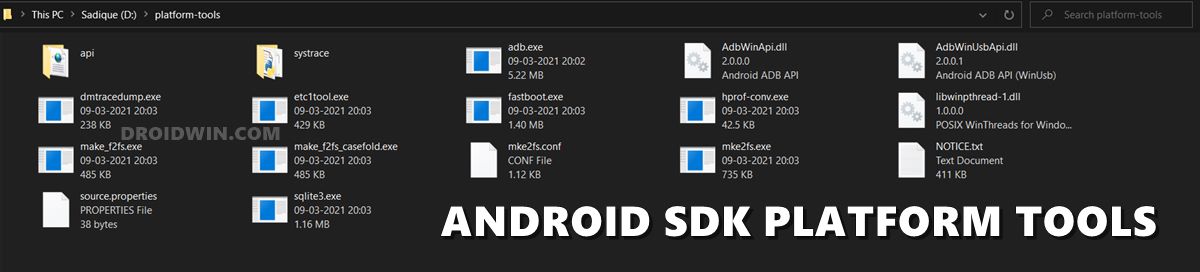
First and foremost, you will have to install the Android SDK Platform Tools on your PC. This is the official ADB and Fastboot binary provided by Google and is the only recommended one. So download it and then extract it to any convenient location on your PC. Doing so will give you the platform-tools folder, which will be used throughout this guide.
STEP 2: Enable USB Debugging
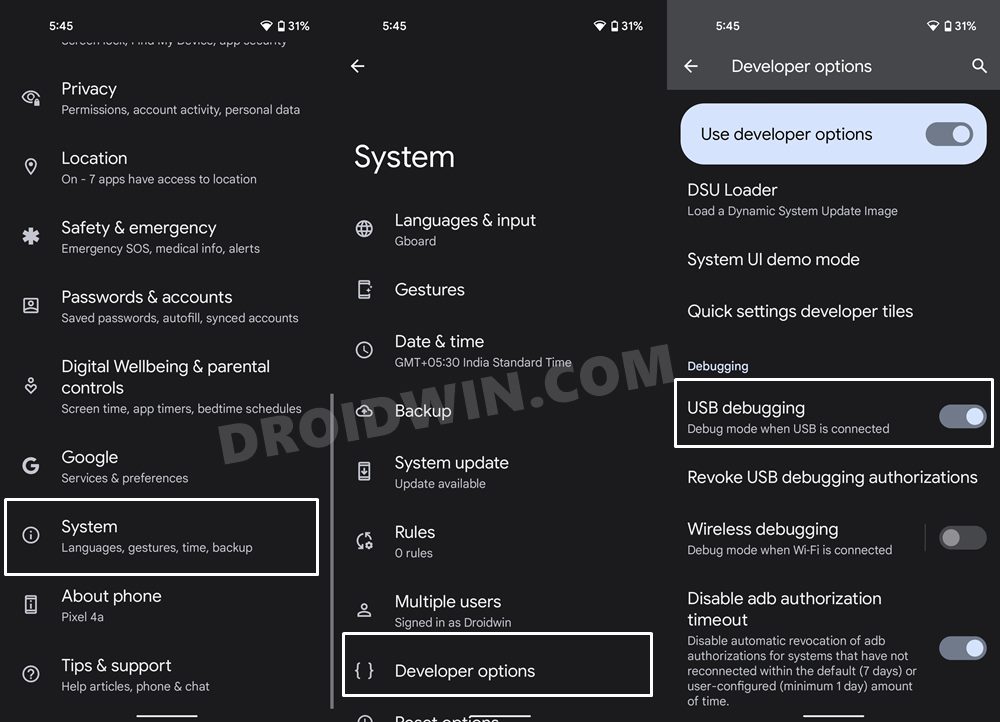
Next up, you will have to enable USB Debugging on your device so that it is recognizable by the PC in ADB mode. So head over to Settings > About Phone > Tap on Build Number 7 times > Go back to Settings > System > Advanced > Developer Options > Enable USB Debugging.
Reference Image
STEP 3: Establish ADB Shell Connection
- To begin with, connect your device to the PC via USB cable. Make sure USB Debugging is enabled.
- Then head over to the platform-tools folder, type in CMD in the address bar, and hit Enter. This will launch the Command Prompt.
- Now in the following command in the CMD window to verify the ADB connection: adb devices
- If you get the device ID, then the connection stands successful. Now type in the below command to open the Shell environment: adb shell
- It will now list out your device codename, which means that the shell connection has been successfully established as well, and you are good to go ahead to debloat or remove bloatware from Motorola.
NOTE: If you don’t wish to take the extreme measure of uninstalling the bloatware from your device, then you could also disable these bloatware, the steps for which are mentioned at the end of this guide.
STEP 4: ADB Commands to Debloat/Remove Bloatware from Motorola
- In order to find the list of all the apps installed as well as their package names, you may execute the below command: pm list packages
- Now, the generic command to uninstall any bloatware from a device is: pm uninstall -k –user 0 PackageName
- For example, if you wish to remove the Moto Help app whose package name is com.motorola.genie, then you will have to execute the below command: pm uninstall -k –user 0 com.motorola.genie
- In the same manner, you may now directly copy the bloatware removal command corresponding to their app from the below list and paste it into the CMD window [just remove the ‘package:’ from the start].
STEP 5A: List of all Installed Apps in Motorola
Given here are the list of all the installed apps on your device. These include both the system and bloatware apps. If you are looking just for the bloatware apps, then scroll down to the next section, aka STEP 5B.
package:com.qualcomm.qti.qms.service.telemetry

package:com.google.android.youtube

package:com.vzw.apnlib

package:com.motorola.comcastext

package:com.android.internal.display.cutout.emulation.corner

package:com.google.android.ext.services

package:com.motorola.motocare

package:com.android.internal.display.cutout.emulation.double

package:com.android.providers.telephony

package:com.android.dynsystem

package:cci.usage

package:com.motorola.remoteconfig

package:com.google.android.googlequicksearchbox

package:com.android.providers.calendar

package:com.google.android.apps.googleassistant

package:com.motorola.vzw.pco.extensions.pcoreceiver

package:com.motorola.launcher.secondarydisplay

package:com.android.providers.media

package:com.android.theme.icon.square

package:com.google.android.onetimeinitializer

package:com.google.android.ext.shared

package:com.motorola.brapps

package:com.motorola.bug2go

package:com.android.internal.systemui.navbar.gestural_wide_back

package:com.android.wallpapercropper

package:com.motorola.gesture

package:com.android.theme.color.cinnamon

package:com.android.theme.icon_pack.rounded.systemui

package:com.qualcomm.qti.gpudrivers.sm7250.api29

package:com.motorola.ccc.devicemanagement

package:com.speedsoftware.rootexplorer

package:com.motorola.android.fmradio

package:com.motorola.setup.overlay.pai

package:com.android.phone.overlay.motcommon

package:com.android.systemuisprintoverlay

package:com.android.externalstorage

package:com.motorola.omadm.service

package:com.android.htmlviewer

package:com.qualcomm.qti.uceShimService

package:com.android.companiondevicemanager

package:com.android.mms.service

package:com.android.theme.font.barlowsource

package:com.qualcomm.qti.qms.service.connectionsecurity

package:com.android.providers.downloads

package:com.motorola.coresettingsext

package:com.google.android.apps.messaging

package:com.android.networkstack.inprocess

package:com.roaming.android.gsimcontentprovider

package:com.android.theme.icon_pack.rounded.android

package:vendor.qti.hardware.cacert.server

package:com.motorola.entitlement

package:com.motorola.att.phone.extensions

package:com.motorola.setup.overlay.comcast

package:com.motorola.programmenu

package:com.qualcomm.qti.telephonyservice

package:com.motorola.launcherconfig.overlay.playpl

package:com.motorola.ccc.mainplm

package:com.motorola.omadm.vzw

package:com.android.theme.icon_pack.circular.themepicker

package:com.google.android.overlay.gmsgsaconfig

package:vendor.qti.iwlan

package:com.google.android.configupdater

package:com.motorola.camera3

package:com.google.android.overlay.modules.permissioncontroller

package:com.android.theme.color.parasailing

package:com.motorola.appforecast

package:com.motorola.nfwlocationattribution

package:com.motorola.ccc.ota

package:com.motorola.ccc.notification

package:com.google.ar.core

package:com.android.providers.downloads.ui

package:com.android.vending

package:com.android.pacprocessor

package:com.android.simappdialog

package:com.motorola.pgmsystem2

package:com.motorola.faceunlock

package:com.motorola.demo.env

package:com.android.internal.display.cutout.emulation.tall

package:com.android.certinstaller

package:com.android.theme.color.black

package:com.android.carrierconfig

package:com.google.android.marvin.talkback

package:com.android.theme.color.green

package:com.android.theme.color.ocean

package:com.android.theme.color.slate

package:com.android.theme.color.space

package:com.android.internal.systemui.navbar.threebutton

package:com.google.android.apps.work.oobconfig

package:com.qti.qualcomm.datastatusnotification

package:com.motorola.launcherconfig.overlay.fi

package:android

package:com.android.hotwordenrollment.xgoogle

package:com.motorola.android.provisioning

package:com.vzw.apnservice

package:com.android.theme.icon_pack.rounded.launcher

package:com.motorola.imagertuning_foles

package:com.google.android.documentsui.overlay

package:com.google.android.overlay.gmsficonfig

package:com.motorola.hiddenmenuapp

package:com.android.egg

package:com.android.mtp

package:com.android.nfc

package:com.android.ons

package:com.android.stk

package:com.motorola.photoeditor

package:com.android.backupconfirm

package:com.motorola.timeweatherwidget

package:com.verizon.loginengine.unbranded

package:com.google.android.deskclock

package:com.motorola.screenshoteditor

package:org.codeaurora.ims

package:com.android.statementservice

package:com.android.hotspot2

package:com.google.android.gm

package:com.google.android.apps.tachyon

package:com.android.theme.color.saffron

package:com.motorola.callredirectionservice

package:com.motorola.motocit

package:com.android.settings.intelligence

package:com.motorola.settings

package:com.android.internal.systemui.navbar.gestural_extra_wide_back

package:com.google.android.permissioncontroller

package:com.qualcomm.qti.dynamicddsservice

package:com.google.android.setupwizard

package:com.qualcomm.qcrilmsgtunnel

package:com.android.providers.settings

package:com.android.sharedstoragebackup

package:com.facebook.services

package:com.android.printspooler

package:com.android.hotwordenrollment.okgoogle

package:com.android.theme.icon_pack.filled.settings

package:com.android.dreams.basic

package:com.google.android.overlay.modules.ext.services

package:com.lenovo.lsf.user

package:com.android.se

package:com.android.inputdevices

package:com.google.android.apps.wellbeing

package:com.motorola.android.nativedropboxagent

package:com.google.android.dialer

package:com.motorola.nfc

package:com.android.bips

package:com.qti.dpmserviceapp

package:com.google.android.apps.nbu.files

package:com.motorola.android.jvtcmd

package:com.motorola.motosignature.app

package:com.android.theme.icon_pack.circular.settings

package:com.google.android.overlay.gmsconfig

package:com.google.android.apps.docs

package:com.google.android.apps.maps

package:com.google.android.modulemetadata

package:com.orange.update

package:com.motorola.comcast.settings.extensions

package:com.android.cellbroadcastreceiver

package:com.motorola.invisiblenet

package:com.google.android.webview

package:com.android.theme.icon.teardrop

package:com.amazon.appmanager

package:com.google.android.contacts

package:com.motorola.contacts.preloadcontacts

package:com.android.server.telecom

package:com.google.android.syncadapters.contacts

package:com.motorola.android.providers.settings

package:com.android.keychain

package:com.google.android.calculator

package:com.android.chrome

package:com.android.systemuiusccoverlay

package:com.android.theme.icon_pack.filled.systemui

package:com.google.android.packageinstaller

package:com.google.android.gms

package:com.google.android.gsf

package:com.google.android.ims

package:com.google.android.tag

package:com.google.android.tts

package:com.android.phone.overlay.common

package:com.google.android.apps.walletnfcrel

package:com.android.calllogbackup

package:com.google.android.partnersetup

package:com.motorola.genie

package:com.motorola.setup

package:com.android.localtransport

package:com.google.android.videos

package:com.android.carrierdefaultapp

package:com.qualcomm.qti.remoteSimlockAuth

package:com.motorola.livewallpaper3

package:com.qualcomm.qti.devicestatisticsservice

package:com.motorola.lifetimedata

package:com.motorola.appdirectedsmsproxy

package:com.android.theme.font.notoserifsource

package:com.android.theme.icon_pack.filled.android

package:com.android.proxyhandler

package:com.android.theme.icon_pack.circular.systemui

package:com.google.android.overlay.modules.permissioncontroller.forframework

package:com.google.android.feedback

package:com.topjohnwu.magisk

package:com.google.android.printservice.recommendation

package:com.google.android.apps.photos

package:com.google.android.calendar

package:com.android.managedprovisioning

package:com.motorola.launcherconfig

package:com.google.android.documentsui

package:com.motorola.gamemode

package:com.motorola.demo

package:com.motorola.help

package:com.motorola.moto

package:com.motorola.paks

package:com.facebook.katana

package:com.android.providers.partnerbookmarks

package:com.motorola.dynamicvolume

package:com.android.wallpaper.livepicker

package:com.motorola.carriersettingsext

package:com.android.systemuiattoverlay

package:com.motorola.motocare.internal

package:com.facebook.system

package:com.android.theme.icon.squircle

package:com.motorola.fmplayer

package:com.android.systemuitmooverlay

package:com.motorola.launcherconfig.overlay.comcast

package:com.android.storagemanager

package:com.motorola.telprov

package:com.motorola.msimsettings

package:com.android.bookmarkprovider

package:com.android.settings

package:com.qualcomm.qti.cne

package:com.qualcomm.qti.lpa

package:com.qualcomm.qti.uim

package:com.motorola.launcherconfig.overlay.amxar

package:com.motorola.launcherconfig.overlay.amxbr

package:com.motorola.launcherconfig.overlay.amxcl

package:com.motorola.launcherconfig.overlay.amxco

package:com.motorola.launcherconfig.overlay.amxla

package:com.motorola.launcherconfig.overlay.amxmx

package:com.motorola.launcherconfig.overlay.amxpe

package:com.google.android.wfcactivation

package:com.motorola.launcherconfig.overlay.oraeu

package:com.motorola.launcherconfig.overlay.timit

package:com.android.theme.icon_pack.filled.launcher

package:com.android.networkstack.permissionconfig

package:android.autoinstalls.config.motorola.layout

package:com.google.android.projection.gearhead

package:com.qualcomm.location

package:com.google.android.apps.turbo

package:com.android.cts.ctsshim

package:com.motorola.launcher3

package:com.android.theme.color.cherry

package:com.lmi.motorola.rescuesecurity

package:com.motorola.slpc_sys

package:com.android.theme.font.quicksandsource

package:com.motorola.actions

package:com.android.theme.color.magentahaze

package:com.android.theme.icon_pack.circular.launcher

package:com.qualcomm.qti.uimGbaApp

package:com.android.wallpaper

package:com.android.vpndialogs

package:com.google.android.apps.wallpaper

package:com.motorola.bach.modemstats

package:com.android.phone

package:com.android.shell

package:com.android.theme.icon_pack.filled.themepicker

package:com.android.wallpaperbackup

package:com.android.providers.blockednumber

package:com.android.theme.color.darklake

package:com.motorola.camera2.content.ai

package:com.android.providers.userdictionary

package:com.android.emergency

package:com.google.android.gms.location.history

package:com.android.internal.systemui.navbar.gestural

package:com.android.location.fused

package:com.android.theme.color.orchid

package:com.android.systemui

package:com.motorola.motodisplay

package:com.google.android.apps.youtube.music

package:com.android.theme.color.purple

package:com.motorola.easyprefix

package:com.android.bluetoothmidiservice

package:com.facebook.appmanager

package:com.android.traceur

package:com.orange.aura.oobe

package:android.auto_generated_rro_product__

package:com.motorola.audiofx

package:com.google.android.apps.gcs

package:com.android.bluetooth

package:com.qualcomm.timeservice

package:com.qualcomm.atfwd

package:com.qualcomm.embms

package:com.motorola.config.wifi

package:com.android.providers.contacts

package:com.android.captiveportallogin

package:com.android.theme.icon.roundedrect

package:com.android.internal.systemui.navbar.gestural_narrow_back

package:com.android.theme.icon_pack.rounded.settings

package:com.roaming.android.gsimbase

package:com.google.android.inputmethod.latin

package:com.motorola.android.providers.chromehomepage

package:com.motorola.attvowifi

package:com.motorola.systemserver

package:com.motorola.VirtualUiccPayment

package:android.auto_generated_rro_vendor__

package:com.android.theme.icon_pack.circular.android

package:com.google.android.apps.restore
STEP 5B: Safe to Remove Bloatware Apps from Motorola
These are the bloatware apps that we found are safe to remove from our Motorola device without any issues.
Motorola Apps
com.motorola.android.fmradio (FM Radio)

com.motorola.fmplayer (FM Radio)

com.motorola.genie (Moto Help)

com.motorola.moto (Moto)
Facebook Apps
com.facebook.services

com.facebook.katana

com.facebook.system

com.facebook.appmanager
Google Apps
com.android.vending (Google Playstore)

com.android.chrome (Chrome Browser)

com.android.hotwordnerollment.okgoogle (Google Assistant Listening Device)

com.android.hotwordnerollment.xgoogle (Google Assistant Componenet)

com.google.android.gm (Gmail)

com.google.android.calculator (Calculator)

com.google.android.calendar (Calendar)

com.google.android.syncadapters.calendar (Calendar Sync)

com.google.android.contacts (Google Contacts)

com.google.android.syncadapters.contacts (Google Contacts Sync)

com.google.android.videos (Google Play Movies and TV)

com.google.android.googlequicksearchbox (Google Search Bar On Home Pg)

com.google.android.youtube (Youtube)

com.google.android.music (Google Play Music)

com.google.android.gms (Google Play Services)

com.google.android.gms.location.history (Google Play Tracking Location)

com.google.android.printservice.recommendation (Print Service)

com.google.android.apps.subscriptions.red (Google One)

com.google.android.apps.photos (Google Photos)

com.google.android.apps.docs (Google Drive)

com.google.android.apps.maps (Google Maps)

com.google.android.apps.youtube.music (Youtube Music)

com.google.android.apps.tachyon (Google Duo)

com.google.android.apps.walletnfcrel (Google Pay)

com.google.android.apps.wellbeing (Google Digital Well Being App)

com.google.android.apps.googleassistant (Google Assistant)
How to Re-Install Bloatware Apps on Motorola
If you have uninstalled any bloatware app but after that, your device or any of its apps isn’t functioning along the expected lines, then you could easily reinstall that app.
- For that, execute the below command (after executing the adb shell command). Make sure to replace PackageName accordingly: cmd package install-existing PackageName
- For example, if you wish to reinstall Motorola Help App whose app package name is com.motorola.genie, then the above command will transform to: cmd package install-existing com.motorola.genie
How to Disable/Re-Enable Bloatware Apps in Motorola
- In order to disable any bloatware app, execute the below command in the CMD window (make sure that you have executed the adb shell command beforehand) pm disable-user -–user 0 PackageName
- Replace PackageName accordingly from the above command. For example, if you wish to disable Motorola Help App, then its app package name is com.motorola.genie, so the above command will transform to: pm disable-user -–user 0 com.motorola.genie
- Now to re-enable any app, you will have to execute the following command: pm enable -–user 0 PackageName
- Say, if you wish to enable Motorola Help App that has the package name com.motorola.genie, the command will be: pm enable -–user 0 com.motorola.genie

- Aman Kumar Gupta 2 years ago Reply But removing moto app unables the user to use features like adaptive performance (settings->system ->performance) and also the optimised charging and overcharge protection features.
- Geraldo Karvalio 3 years ago Reply How to remove a package when the command fails and you get ” not installed for 0 (zero)”? sergio 3 years ago Reply that happend cuz the package donsen’t exist I mean its al ready uninstalled. or maybe you are writting the name wrong Reply Your comment is awaiting moderation. sergio 3 years ago Reply that happend cuz the package donsen’t exist I mean its al ready uninstalled. or maybe you are writting the name wrong
(Cancel Reply)
Δ
