Debloat/Remove Bloatware from Samsung Devices via ADB
This guide will show you the steps to debloat your Samsung device and remove bloatware from it via ADB Commands. Every OEM packs in quite a few pre-installed apps and then treats them as system apps so that you wouldn’t be able to easily uninstall them the normal way. And Samsung is no different either. Be it the ones from Google, Bixby, Dex, or AR-related Apps, there is a truckload of such apps that have made a permanent abode on your device.
Most of these apps aren’t linked with OneUI and hence wouldn’t have any negative consequences on the overall functioning of the OS. On the flip side though, these apps tend to consume unnecessary system resources in the background and also drain quite a lot of battery. Well, it might even slow down the device’s normal use case scenario. Hence the best bet is to bid adieu to these apps and in this guide, we will show you how to do just that. Given here are the detailed steps to debloat your Samsung device and remove bloatware from it via ADB Commands. Follow along.
- The Prerequisites to Debloat and Remove Bloatware from Samsung STEP 1: Install Android SDK STEP 2: Enable USB Debugging STEP 3: Verify ADB Connection
- ADB Commands Used in this Guide and their Usage adb shell pm list packages pm list packages | sort pm list packages google pm list packages samsung pm uninstall -k –user 0 package.name.example pm uninstall –user 0 package.name.example cmd package install-existing package.name.example pm disable-user –user 0 package.name.example pm enable –user 0 package.name.example
- List of ADB Commands to Debloat/Remove Bloatware from Samsung Devices Advertisement Apps ANT Apps Bixby Apps Dex Apps Printer Apps Facebook Factory Mode Apps Google Apps Hiya Camera AR Apps Knox Apps Microsoft NetFlix General Samsung and Android Apps Samsung Cocktailbar Apps Fonts Apps Spotify Swift Key
- Apps that you Shouldn’t Uninstall Apps Automatically Reinstalling After a Reboot Apps Required by Bixby and AR Settings Apps Permission Management App that Shows up Warning at Boot up App Needed to Sign in to Samsung Apps Needed for the Settings Menu
- How to Debloat Samsung via ADB App Control
The Prerequisites to Debloat and Remove Bloatware from Samsung
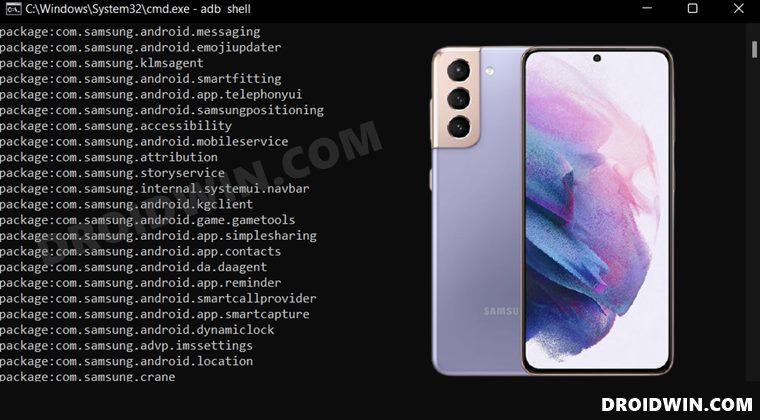
First off, we will make you aware of all the prerequisites that you need to checkmark off the list. After that, we will list out the ADB Commands and then explain their usage as well. Finally, the ADB Commands for each individual app will be mentioned that you just need to copy-paste in the CMD window. So without any further ado, let’s get started.
STEP 1: Install Android SDK
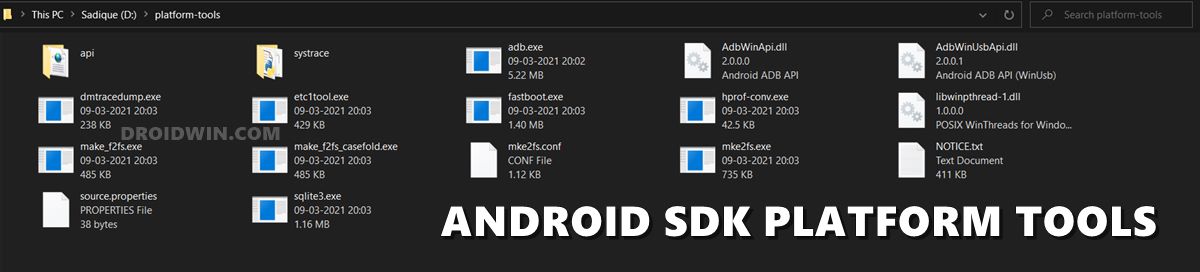
First and foremost, you will have to install the Android SDK Platform Tools on your PC. This is the official ADB and Fastboot binary provided by Google and is the only recommended one. So download it and then extract it to any convenient location on your PC. Doing so will give you the platform-tools folder, which will be used throughout this guide.
STEP 2: Enable USB Debugging
Next up, you will have to enable USB Debugging on your device so that it is recognizable by the PC in ADB mode. So head over to Settings > About Phone > Tap on Build Number 7 times > Go back to Settings > System > Advanced > Developer Options > Enable USB Debugging.
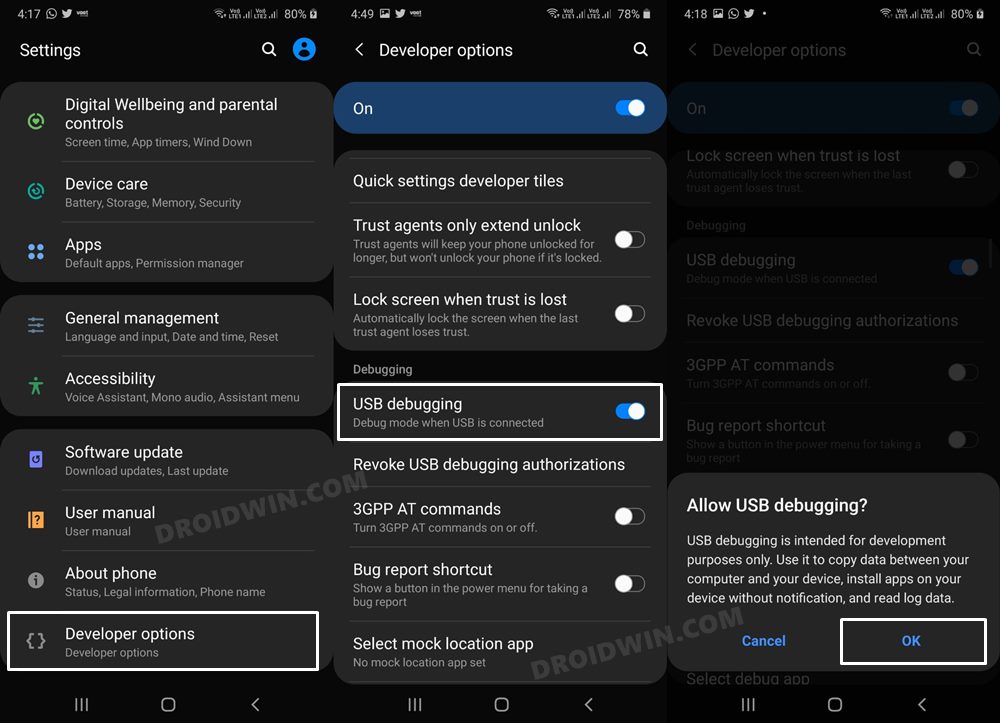
STEP 3: Verify ADB Connection
- To begin with, connect your device to the PC via USB cable. Make sure USB Debugging is enabled.
- Then head over to the platform-tools folder, type in CMD in the address bar, and hit Enter. This will launch the Command Prompt.
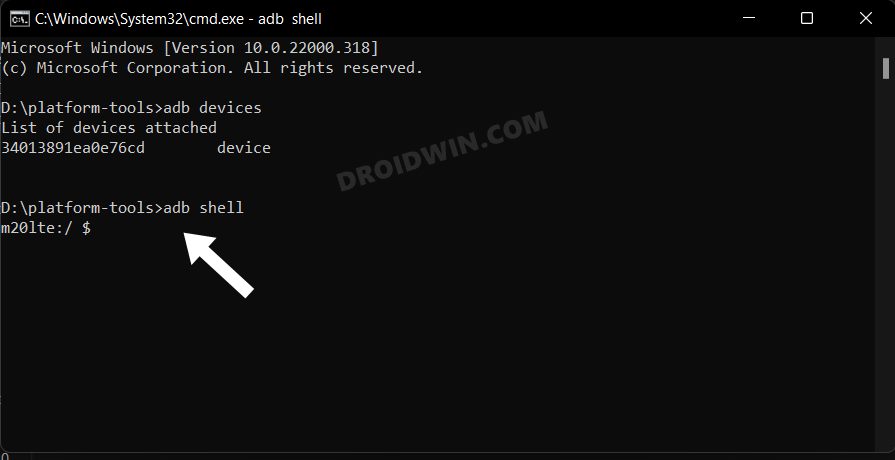
- Now in the following command in the CMD window to verify the ADB connection: adb devices
- If you get the device ID, then the connection stands successful. Now type in the below command to open the Shell environment: adb shell
- It will now list out your device codename, which means that the shell connection has been successfully established as well, and you are good to go ahead.
ADB Commands Used in this Guide and their Usage
Here are all the commands that we will be using in this guide to debloat your Samsung device and remove bloatware from it via ADB Commands. You just need to replace the package.name.example with the package ID of the app that you wish to remove. You could check out our guide on How to Get App Package Name on Android [3 Methods] or refer to the commands that we have shared in the subsequent sections of this guide.
adb shell
It will open the shell environment inside which you could easily uninstall the app of your choice. We have already executed this command in the Prerequisites section itself.
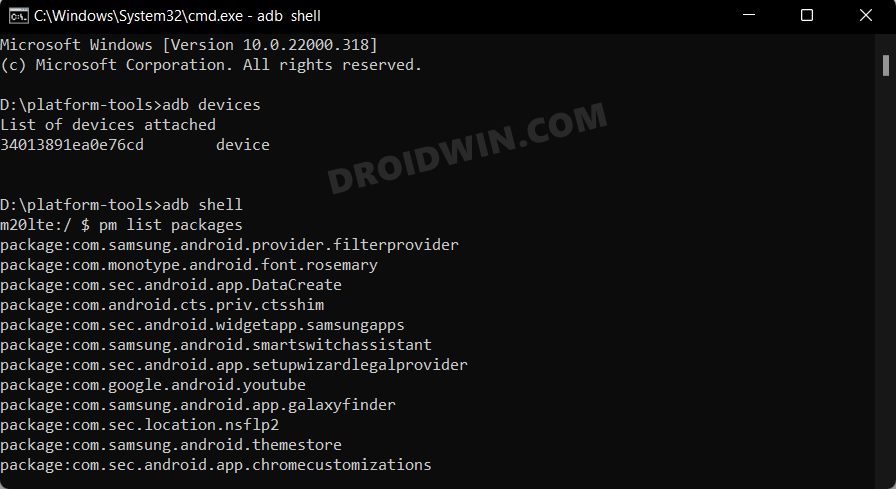
pm list packages
It will list out the packages names of all the apps installed on your device.
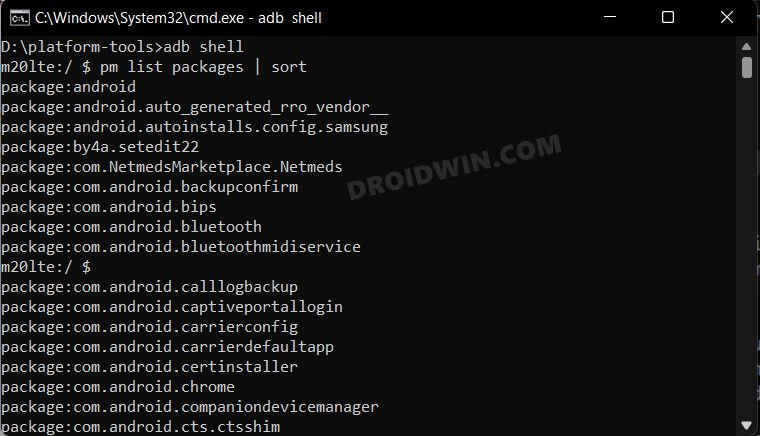
pm list packages | sort
It will bring up the list of all the installed apps after sorting them in alphabetical order.
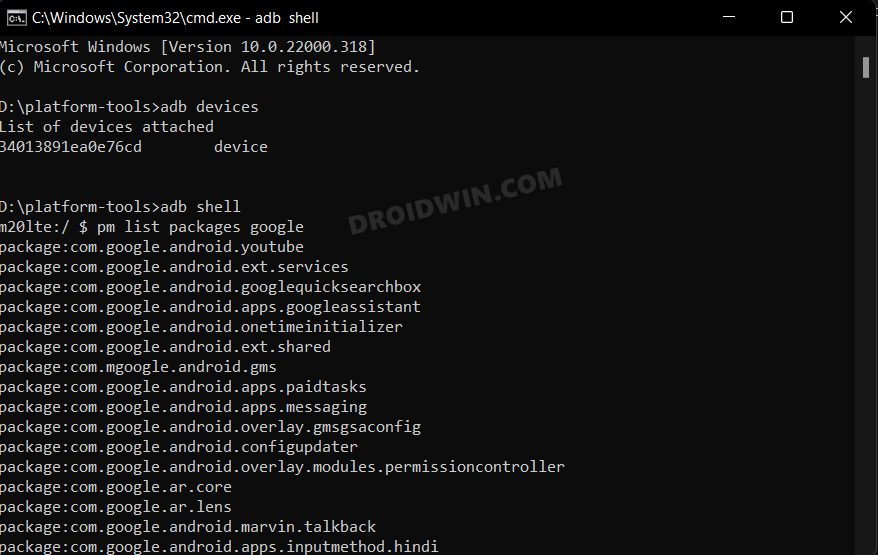
pm list packages google
This command will bring up a list of all the Google apps installed on your device.
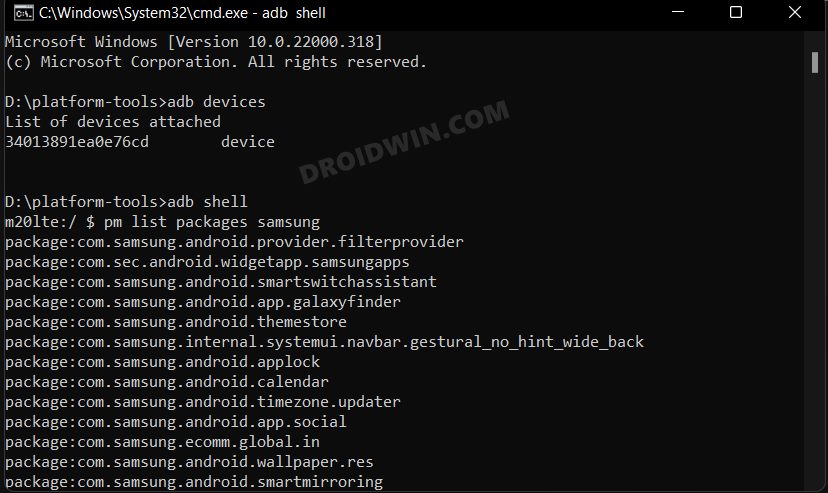
pm list packages samsung
This command will bring up a list of all the Samsung apps installed on your device.
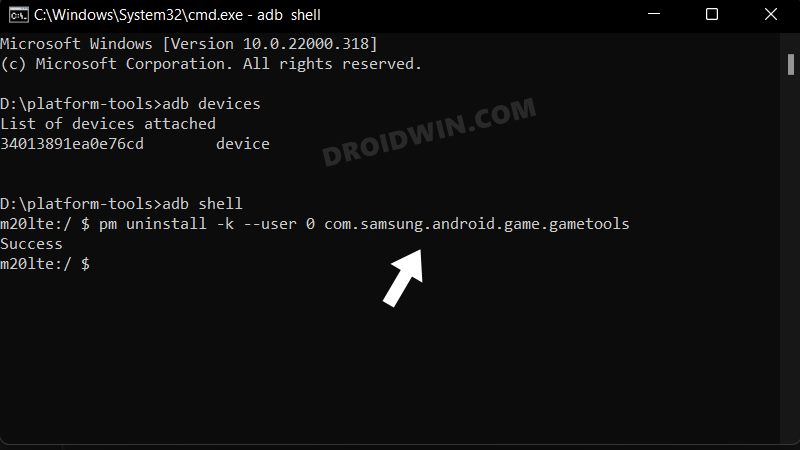
pm uninstall -k –user 0 package.name.example
NOTE: There's a double dash before 'user' in the above command, see below screenshot for reference
Use this command to uninstall the desired bloatware app from your Samsung device. However, it will still retain the app’s data and cache, so that when you restore that app, it will start from that last point itself. Just make sure to replace the package.name.example with the app package’s name. You could get a hold of the same from our another guide, via the list packages command that you have expected above or using the commands that we have shared below (recommended).
pm uninstall –user 0 package.name.example
If the app isn’t working along the expected lines or if its data has got corrupted, then the above command might not be the right one. Rather, you should completely remove that app from your device and install its fresh build from scratch. And for that, this command should be your go-t0 choice. Again, make sure to replace the package.name.example with the app package’s name
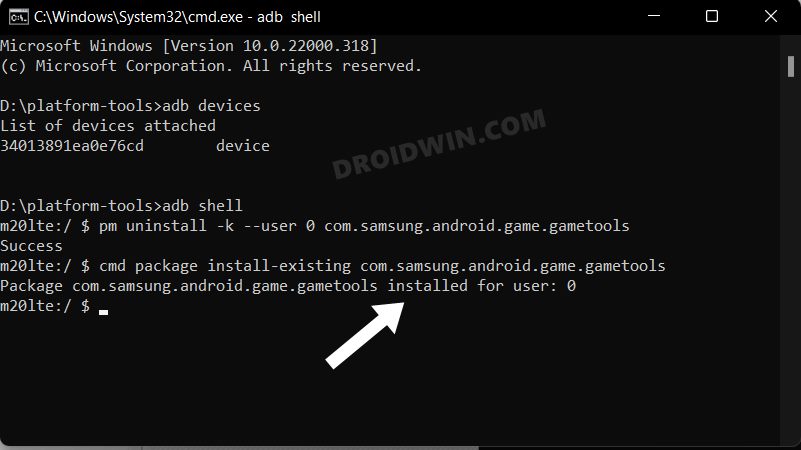
cmd package install-existing package.name.example
In some instances, removing an app might have an adverse impact on other system apps. In that case, you could use this command to reinstall that app back. As before, make sure to replace the package.name.example with the app package’s name.
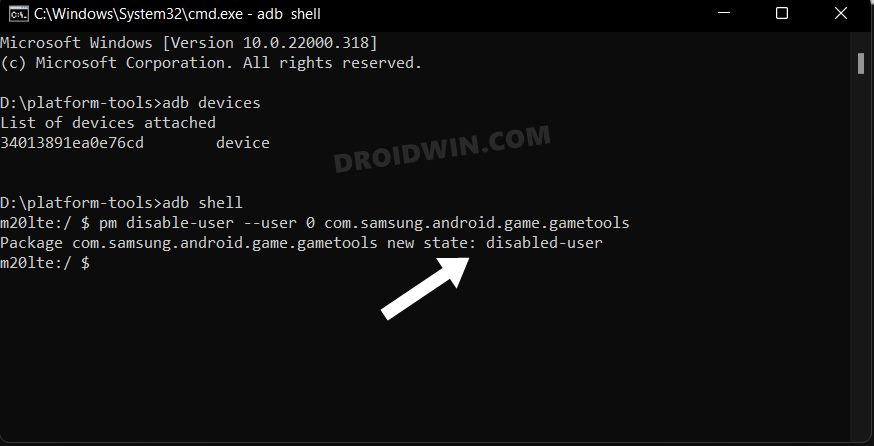
pm disable-user –user 0 package.name.example
If you are looking to just disable an app rather than completely uninstalling it, then this command shall come in handy. Just replace the package.name.example with the app package’s name and you are good to go.
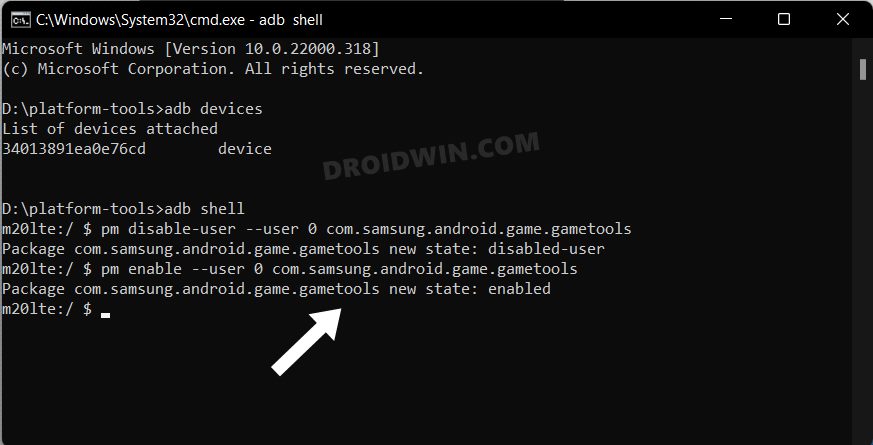
pm enable –user 0 package.name.example
Use this command to re-enable that disabled app, where the package.name.example will be the app package’s name of that disabled app.
List of ADB Commands to Debloat/Remove Bloatware from Samsung Devices
Here’s the list of the ADB Commands that you could use to uninstall the bloatware apps from your Samsung device and hence debloat it. Removal of these apps didn’t have any negative impact on my device, but I cannot vouch that the same will happen will you as well. So you should be the best judge as to which of the apps you should remove and which needs to stay. With that said, if the removal of an app leads to any issues, then you could easily reinstall them via the cmd package install-existing package.name.example.
Or a much safer approach will be to disable that app and then use your device for a few minutes. If everything’s working well and good, then you could probably remove that app from your device. Droidwin and its members wouldn’t be held responsible in case of a thermonuclear war, your alarm doesn’t wake you up, or if anything happens to your device and data by performing the below steps.
pm uninstall --user 0 com.amazon.appmanager

pm uninstall --user 0 com.amazon.mShop.android.shopping

pm uninstall --user 0 com.booking

pm uninstall --user 0 com.booking.aidprovider

pm uninstall --user 0 com.facebook.katana

pm uninstall --user 0 com.microsoft.office.officehubrow

pm uninstall --user 0 com.microsoft.office.outlook
ANT Apps
pm uninstall --user 0 com.dsi.ant.plugins.antplus

pm uninstall --user 0 com.dsi.ant.sample.acquirechannels

pm uninstall --user 0 com.dsi.ant.server

pm uninstall --user 0 com.dsi.ant.service.socket
Bixby Apps
pm uninstall --user 0 com.samsung.android.app.routines

pm uninstall --user 0 com.samsung.android.bixby.agent

pm uninstall --user 0 com.samsung.android.bixby.agent.dummy

pm uninstall --user 0 com.samsung.android.bixby.service

pm uninstall --user 0 com.samsung.android.app.settings.bixby

pm uninstall --user 0 com.samsung.systemui.bixby2

pm uninstall --user 0 com.samsung.android.bixby.wakeup
Dex Apps
pm uninstall --user 0 com.sec.android.app.dexonpc

pm uninstall --user 0 com.sec.android.desktopmode.uiservice

pm uninstall --user 0 com.sec.android.app.desktoplauncher

pm uninstall --user 0 com.samsung.desktopsystemui
Printer Apps
pm uninstall --user 0 com.android.printspooler

pm uninstall --user 0 com.android.bips

pm uninstall --user 0 com.google.android.printservice.recommendation
pm uninstall --user 0 com.facebook.appmanager

pm uninstall --user 0 com.facebook.katana

pm uninstall --user 0 com.facebook.services

pm uninstall --user 0 com.facebook.system
Factory Mode Apps
pm uninstall --user 0 com.sec.factory.camera

pm uninstall --user 0 com.sem.factoryapp

pm uninstall --user 0 com.sec.factory

pm uninstall --user 0 com.sec.factory.cameralyzer

pm uninstall --user 0 com.sec.android.app.factorykeystring

pm uninstall --user 0 com.sec.android.app.servicemodeapp

pm uninstall --user 0 com.sec.android.RilServiceModeApp

pm uninstall --user 0 com.sec.android.app.bluetoothtest

pm uninstall --user 0 com.sec.android.app.hwmoduletest

pm uninstall --user 0 com.sec.android.app.wlantest

pm uninstall --user 0 com.sec.epdgtestapp
Google Apps
pm uninstall --user 0 com.google.android.apps.docs

pm uninstall --user 0 com.google.android.apps.photos

pm uninstall --user 0 com.google.android.videos

pm uninstall --user 0 com.google.android.apps.youtube.music

pm uninstall --user 0 com.android.chrome

pm uninstall --user 0 com.google.android.apps.turbo

pm uninstall --user 0 com.google.android.as

pm uninstall --user 0 com.google.android.gm

pm uninstall --user 0 com.google.android.googlequicksearchbox

pm uninstall --user 0 com.google.android.partnersetup

pm uninstall --user 0 com.google.ar.core

pm uninstall --user 0 com.android.vending

pm uninstall --user 0 com.google.android.gms

pm uninstall --user 0 com.google.android.gsf

pm uninstall --user 0 com.google.android.tts

pm uninstall --user 0 com.google.android.gms.location.history

pm uninstall --user 0 com.google.android.apps.maps

pm uninstall --user 0 com.google.android.feedback

pm uninstall --user 0 com.android.hotwordenrollment.okgoogle

pm uninstall --user 0 com.android.hotwordenrollment.xgoogle

pm uninstall --user 0 com.google.android.youtube

pm uninstall --user 0 com.google.android.apps.tachyon

pm uninstall --user 0 com.google.audio.hearing.visualization.accessibility.scribe

pm uninstall --user 0 com.google.android.projection.gearhead

pm uninstall --user 0 com.google.android.apps.restore

pm uninstall --user 0 com.google.android.configupdater

pm uninstall --user 0 com.google.android.syncadapters.contacts

pm uninstall --user 0 com.google.android.syncadapters.calendar

pm uninstall --user 0 com.google.android.onetimeinitializer
Hiya
pm uninstall --user 0 com.hiya.star

pm uninstall --user 0 com.samsung.android.smartcallprovider
Camera AR Apps
pm uninstall --user 0 com.samsung.android.visionarapps

pm uninstall --user 0 com.samsung.android.aremoji

pm uninstall --user 0 com.samsung.android.aremojieditor

pm uninstall --user 0 com.sec.android.mimage.avatarstickers

pm uninstall --user 0 com.samsung.android.ardrawing

pm uninstall --user 0 com.samsung.android.arzone

pm uninstall --user 0 com.samsung.android.app.camera.sticker.facearavatar.preload

pm uninstall --user 0 com.samsung.android.livestickers

pm uninstall --user 0 com.sec.android.app.pink

pm uninstall --user 0 com.samsung.android.stickercenter

pm uninstall --user 0 com.samsung.android.scan3d
Knox Apps
pm uninstall --user 0 com.samsung.android.knox.containeragent

pm uninstall --user 0 com.samsung.android.knox.analytics.uploader

pm uninstall --user 0 com.sec.enterprise.knox.cloudmdm.smdms

pm uninstall --user 0 com.samsung.android.knox.attestation

pm uninstall --user 0 com.sec.enterprise.knox.attestation

pm uninstall --user 0 com.samsung.android.knox.containercore

pm uninstall --user 0 com.samsung.knox.securefolder

pm uninstall --user 0 com.samsung.android.bbc.bbcagent

pm uninstall --user 0 com.android.managedprovisioning

pm uninstall --user 0 com.samsung.knox.keychain

pm uninstall --user 0 com.knox.vpn.proxyhandler

pm uninstall --user 0 com.samsung.ucs.agent.ese
Microsoft
pm uninstall --user 0 com.microsoft.appmanager

pm uninstall --user 0 com.microsoft.office.officehubrow

pm uninstall --user 0 com.microsoft.office.outlook

pm uninstall --user 0 com.microsoft.skydrive

pm uninstall --user 0 com.linkedin.android
NetFlix
pm uninstall --user 0 com.netflix.mediaclient

pm uninstall --user 0 com.netflix.partner.activation
General Samsung and Android Apps
Always reverify before uninstalling an app. While you could easily reinstall any app as and when required, but still better to practice caution beforehand.
pm uninstall --user 0 com.samsung.sree

pm uninstall --user 0 com.samsung.android.voc

pm uninstall --user 0 com.samsung.android.drivelink.stub

pm uninstall --user 0 com.samsung.android.forest

pm uninstall --user 0 com.samsung.android.fmm

pm uninstall --user 0 com.samsung.android.game.gametools

pm uninstall --user 0 com.samsung.android.game.gamehome

pm uninstall --user 0 com.samsung.android.game.gos

pm uninstall --user 0 com.samsung.android.calendar

pm uninstall --user 0 com.samsung.android.app.ledbackcover

pm uninstall --user 0 com.samsung.android.app.simplesharing

pm uninstall --user 0 com.samsung.android.app.social

pm uninstall --user 0 com.samsung.android.rubin.app

pm uninstall --user 0 com.samsung.android.coldwalletservice

pm uninstall --user 0 com.samsung.android.scloud

pm uninstall --user 0 com.samsung.android.app.spage

pm uninstall --user 0 com.samsung.android.mdx

pm uninstall --user 0 com.samsung.android.kidsinstaller

pm uninstall --user 0 com.samsung.android.app.mirrorlink

pm uninstall --user 0 com.samsung.android.samsungpass

pm uninstall --user 0 com.samsung.android.samsungpassautofill

pm uninstall --user 0 com.samsung.android.authfw

pm uninstall --user 0 com.samsung.android.spayfw

pm uninstall --user 0 com.samsung.android.svoiceime

pm uninstall --user 0 com.samsung.android.fast

pm uninstall --user 0 com.samsung.sec.android.teegris.tui_service

pm uninstall --user 0 com.samsung.android.smartswitchassistant

pm uninstall --user 0 com.samsung.klmsagent

pm uninstall --user 0 com.samsung.android.app.tips

pm uninstall --user 0 com.samsung.android.themestore

pm uninstall --user 0 com.samsung.android.themecenter

pm uninstall --user 0 com.samsung.android.mdecservice

pm uninstall --user 0 com.samsung.android.sm.devicesecurity

pm uninstall --user 0 com.samsung.android.oneconnect

pm uninstall --user 0 com.samsung.android.beaconmanager

pm uninstall --user 0 com.samsung.android.messaging

pm uninstall --user 0 com.samsung.android.app.reminder

pm uninstall --user 0 com.samsung.android.aware.service

pm uninstall --user 0 com.samsung.android.app.sharelive

pm uninstall --user 0 com.samsung.android.mateagent

pm uninstall --user 0 com.samsung.android.app.omcagent

pm uninstall --user 0 com.samsung.android.securitylogagent

pm uninstall --user 0 com.samsung.klmsagent

pm uninstall --user 0 com.samsung.android.brightnessbackupservice

pm uninstall --user 0 com.samsung.android.shortcutbackupservice

pm uninstall --user 0 com.samsung.gamedriver.S11MaliG77

pm uninstall --user 0 com.samsung.accesory

pm uninstall --user 0 com.samsung.android.dynamiclock

pm uninstall --user 0 com.samsung.clipboardsaveservice

pm uninstall --user 0 com.samsung.android.icecone

pm uninstall --user 0 com.samsung.android.mobileservice

pm uninstall --user 0 com.samsung.sait.sohservice

pm uninstall --user 0 com.samsung.crane

pm uninstall --user 0 com.samsung.android.sdm.config

pm uninstall --user 0 com.samsung.android.allshare.service.mediashare

pm uninstall --user 0 com.samsung.android.mdm

pm uninstall --user 0 com.samsung.android.cidmanager

pm uninstall --user 0 com.samsung.android.smartmirroring

pm uninstall --user 0 com.samsung.android.mdx.kit

pm uninstall --user 0 com.samsung.android.service.tagservice

pm uninstall --user 0 com.samsung.android.easysetup

pm uninstall --user 0 com.samsung.android.net.wifi.wifiguider

pm uninstall --user 0 com.samsung.android.app.watchmanagerstub

pm uninstall --user 0 com.samsung.ucs.agent.boot

pm uninstall --user 0 com.samsung.android.dqagent

pm uninstall --user 0 com.samsung.android.aircommandmanager

pm uninstall --user 0 com.samsung.android.samsungpositioning

pm uninstall --user 0 com.samsung.android.ipsgeofence

pm uninstall --user 0 com.samsung.android.mcfserver

pm uninstall --user 0 com.samsung.android.svcagent

pm uninstall --user 0 com.samsung.storyservice

pm uninstall --user 0 com.samsung.android.da.daagent

pm uninstall --user 0 com.samsung.ipservice

pm uninstall --user 0 com.samsung.safetyinformation

pm uninstall --user 0 com.samsung.android.sm.policy

pm uninstall --user 0 com.samsung.android.tadownloader

pm uninstall --user 0 com.samsung.android.tapack.authfw

pm uninstall --user 0 com.samsung.android.location

pm uninstall --user 0 com.samsung.android.camerasdkservice

pm uninstall --user 0 com.samsung.android.cameraxservice

pm uninstall --user 0 com.samsung.android.smartcallprovider

pm uninstall --user 0 com.samsung.faceservice

pm uninstall --user 0 com.samsung.android.smartface

pm uninstall --user 0 com.samsung.sec.android.application.csc

pm uninstall --user 0 com.samsung.aasaservice

pm uninstall --user 0 com.samsung.android.digitalkey

pm uninstall --user 0 com.sec.android.app.sbrowser

pm uninstall --user 0 com.sec.android.easyMover

pm uninstall --user 0 com.sec.android.easyMover.Agent

pm uninstall --user 0 com.sec.android.cover.ledcover

pm uninstall --user 0 com.sec.android.daemonapp

pm uninstall --user 0 com.sec.android.app.parser

pm uninstall --user 0 com.sec.android.app.shealth

pm uninstall --user 0 com.sec.android.sdk.health

pm uninstall --user 0 com.sec.android.service.health

pm uninstall --user 0 com.sec.android.app.billing

pm uninstall --user 0 com.sec.android.widgetapp.webmanual

pm uninstall --user 0 com.sec.android.app.SecSetupWizard

pm uninstall --user 0 com.sec.android.app.setupwizardlegalprovider

pm uninstall --user 0 com.sec.android.app.myfiles

pm uninstall --user 0 com.sec.android.app.ringtoneBR

pm uninstall --user 0 com.sec.android.soagent

pm uninstall --user 0 com.sec.android.app.setupwizardlegalprovider

pm uninstall --user 0 com.sec.android.diagmonagent

pm uninstall --user 0 com.sec.android.app.DataCreate

pm uninstall --user 0 com.sec.android.app.samsungapps

pm uninstall --user 0 com.sec.android.app.chromecustomizations

pm uninstall --user 0 com.sec.android.preloadinstaller

pm uninstall --user 0 com.sec.android.app.popupcalculator

pm uninstall --user 0 com.sec.android.widgetapp.easymodecontactswidget

pm uninstall --user 0 com.sec.android.systemupdate

pm uninstall --user 0 com.sec.android.app.personalization

pm uninstall --user 0 com.sec.android.sdhms

pm uninstall --user 0 com.sec.android.emergencymode.service

pm uninstall --user 0 com.sec.android.emergencylauncher

pm uninstall --user 0 com.sec.android.provider.emergencymode

pm uninstall --user 0 com.sec.android.app.apex

pm uninstall --user 0 com.sec.android.app.applinker

pm uninstall --user 0 com.sec.android.uibcvirtualsoftkey

pm uninstall --user 0 com.sec.android.app.ocrservice

pm uninstall --user 0 com.sec.location.nsflp2

pm uninstall --user 0 com.sec.spp.push

pm uninstall --user 0 com.sec.mhs.smarttethering

pm uninstall --user 0 com.sec.mldapchecker

pm uninstall --user 0 com.sec.enterprise.mdm.services.simpin

pm uninstall --user 0 com.sec.sve

pm uninstall --user 0 com.sec.bcservice

pm uninstall --user 0 com.sec.samsung.advp.imssettings

pm uninstall --user 0 com.sec.modem.settings

pm uninstall --user 0 com.android.cts.ctsshim

pm uninstall --user 0 com.android.cts.priv.ctsshim

pm uninstall --user 0 com.android.bookmarkprovider

pm uninstall --user 0 com.android.egg

pm uninstall --user 0 com.android.emergency

pm uninstall --user 0 com.android.wallpaperbackup

pm uninstall --user 0 com.android.dynsystem

pm uninstall --user 0 com.android.apps.tag

pm uninstall --user 0 com.android.providers.partnerbookmarks

pm uninstall --user 0 com.android.providers.calendar

pm uninstall --user 0 com.android.calllogbackup

pm uninstall --user 0 com.android.providers.userdictionary

pm uninstall --user 0 com.android.autoinstalls.config.samsung

pm uninstall --user 0 android.autoinstalls.config.samsung

pm uninstall --user 0 com.wssyncmldm

#pm uninstall --user 0 com.osp.app.signin

pm uninstall --user 0 com.skms.android.agent

pm uninstall --user 0 com.diotek.sec.lookup.dictionary

pm uninstall --user 0 com.google.android.setupwizard

pm uninstall --user 0 com.samsung.android.cmfa.framework

pm uninstall --user 0 com.samsung.gpuwatchapp

pm uninstall --user 0 com.samsung.android.hdmapp

pm uninstall --user 0 com.samsung.android.knox.pushmanager

pm uninstall --user 0 com.samsung.android.mapsagent

pm uninstall --user 0 com.google.android.cellbroadcastreceiver

pm uninstall --user 0 com.samsung.oda.service

pm uninstall --user 0 com.samsung.android.accessibility.talkback
Samsung Cocktailbar Apps
pm uninstall --user 0 com.samsung.android.service.peoplestripe

pm uninstall --user 0 com.samsung.android.app.sbrowseredge
Fonts Apps
pm uninstall --user 0 com.monotype.android.font.foundation

pm uninstall --user 0 com.monotype.android.font.samsungone

pm uninstall --user 0 com.android.theme.font.notoserifsource
Spotify
pm uninstall --user 0 com.spotify.music
Swift Key
pm uninstall --user 0 com.touchtype.swiftkey

pm uninstall --user 0 com.swiftkey.swiftkeyconfigurator
Apps that you Shouldn’t Uninstall
Here are al the apps that you probably shouldn’t uninstall from your device as it might end up doing more harm than good.
Apps Automatically Reinstalling After a Reboot
These are the apps that seem to be reinstalling themselves after a reboot. So the only way to remove these apps is by rooting your device, accessing the data directory (via a File Explorer that supports root, such as Solid Explorer), and then deleting that app’s data.
com.sec.android.sdhms

com.samsung.android.game.gos
Apps Required by Bixby and AR
These are the apps that are required for the proper functioning of Bixby as well as some camera-related AR and AI stuff.
com.samsung.android.visionintelligence

com.samsung.android.bixbyvision.framework

com.google.android.gsfr device.

com.google.android.gms
Settings Apps Permission Management
Removing the below app seems to be stopping the settings permission management. So a safe bet will be to leave that app on your device.
com.google.android.modulemetadata
App that Shows up Warning at Boot up
It is highly recommended that you don’t uninstall this app from your device:
com.samsung.android.kgclient
App Needed to Sign in to Samsung Apps
The below app provides you the platform to sign in/ log in to the Samsung apps and hence shouldn’t be removed:
com.osp.app.signin
Needed for the Settings Menu
This app is needed for the proper functioning of the Settings and hence shouldn’t be removed:
com.osp.app.signin
How to Debloat Samsung via ADB App Control
- To begin with, download and install the ADB App Control on your PC.
- Then launch it and check the desired number of apps that you want to disable/uninstall.
- Note: The developer has also provided its list of bloatware, to use that, click on Load Preset. Credits: XDA Senior Member malikin
- If you want to delete those app’s data as well, then check Delete Data and Cache.
- Now click on the drop-down menu at the bottom right and select either Uninstall or Disable.
- Finally, click on the Disable/Uninstall button at the bottom right and wait for it to complete.
- Remove/Uninstall Bloatware Apps from Android via ADB
- How to Uninstall Google App on Android via ADB Command
- How to Uninstall YouTube App from Android via ADB Command
- Stop Windows 11 from Automatically Installing Bloatware Apps

- anonymous coward 2 years ago Reply hey chief. that list of “dex apps” could waste a lot of people a lot of time
- Some 2 years ago Reply There is a list on reddit. https://www.reddit.com/r/samsung/comments/rzhz13/ultimate_samsung_oneui_debloat_privacy/ Would use that over this page..
- Theo 3 years ago Reply Removing Knox Apps removed allmost everything. had to do a factory reset.
(Cancel Reply)
Δ
