Disable RCS and Save Battery on your Pixel 7 Pro!
In this guide, we will show you the steps to disable the RCS and hence save a few additional battery juice on your Pixel 7 Pro. Since Apple has no plans to roll out its iMessage over to the Android ecosystem, Google has come up with its own offering in the form of Rich Communication Services. For the unaware, this feature allows you to easily send large files, react to messages, view read receipts and typing indicators, and share locations, among others.
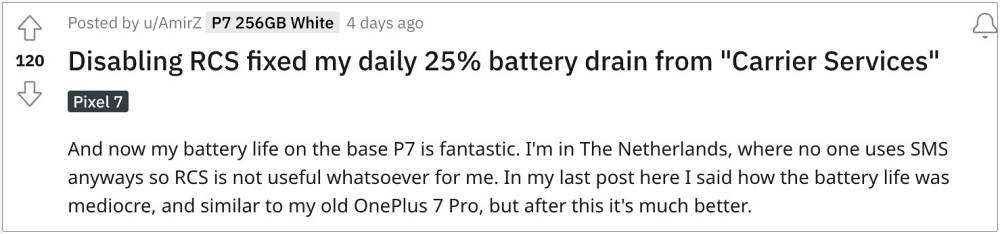
However, some users have also reported that the RCS functionality is also consuming an astronomical amount of battery life on their Pixel 7/Pro. Upon disabling it [and deleting its associated app data], they were able to preserve a significant amount of battery. Moroever, RCS still has a long way to go before users truly adopt it because we already have all these features on numerous instant messaging apps like WhatsApp.
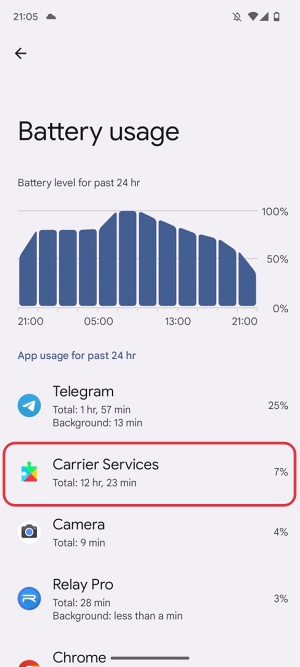
Furthermore, convincing users to make a switch over to RCS is no easy job in itself [and finding a justifiable reason to do is even more challenging, at least as of now!]. So if you are also one of those users who hardly ever use this feature, then your best bet is to disable this feature and gift your device some extra battery percentage over the course of the day. Here’s how it could be done.
How to Disable RCS and Save Battery on Pixel 7 Pro
- Launch the Google Messages app and tap on the overflow icon situated at the top right.
- Then select Messages Settings and go to Chat Features.
- Now disable the toggle next to Enable Chat Features.
- After that, go to Settings > Apps > See All Apps and select Carrier Services.
- Now go to its Storage & Cache section and tap on Clear Storage > Delete.
- Cannot Send RCS Messages via Google Messages [Fix]
- Excessive Battery Drain on Pixel 7/Pro: How to Fix
- Pixel 7 Pro Connected but not charging: How to Fix
- Pixel 7 Pro Restart Randomly: How to Fix

(Cancel Reply)
Δ
