Download Google Camera GCam Port for all Android Devices
From this guide, you could download the Google Camera GCam Port for all Android Devices. Currently, this guide contains all the OnePlus models and some devices belonging to the Xiaomi brand. The guide will be weekly updated with various new devices. Google Camera is the stock camera app that comes pre-installed on various Nexus and Pixel devices. Apart from receiving timely system updates, one thing that Pixel devices are known for is their amazing camera quality.
Owing to the massive popularity and demand, some modders finally decided to port it on various Android devices. Huge kudos to Arnova8G2, BSG, and Urnyx05 and tons of other developers who worked day and night to port these Google Camera (more popularly known as GCam) to various devices. But why are the GCam so famous after all? Read the below section to know more.
- Why Install GCam?
- Setting up the GCam Port for Android Devices How to Install the Config File for Google Camera Port Google Camera GO For All Android Download ULTRACVM V.4.0 Google Camera GCam v7.3.020 Modded Google Camera GCam Port Xiaomi Xiaomi Mi 9 Xiaomi Pocophone F1 (Poco F1) Xiaomi Mi A1 Xiaomi Mi A2 Xiaomi Mi 5 Xiaomi Mi 5S Xiaomi Mi 6 Xiaomi Mi 8 Xiaomi Mi 8 Lite Xiaomi Mi Mix 2S Xiaomi Mi Mix 2 Xiaomi Mi Mix Xiaomi Mi Note 3 Xiaomi Redmi 3S Xiaomi Redmi 4X Xiaomi Redmi 4 Prime Xiaomi Redmi 5A Xiaomi Redmi Note 5 / 5 Plus Xiaomi Redmi Note 5 Pro Xiaomi Redmi Note 4 Xiaomi Redmi Note 3 Xiaomi Redmi Note 2 Xiaomi Redmi Note 7/Note 7 Pro Xiaomi Redmi K20 Pro Xiaomi Mi Max 3 Xiaomi Mi Mix 3 Xiaomi Redmi Note 8 Pro OnePlus OnePlus 7 / OnePlus 7T / OnePlus 7 Pro/ OnePlus 7T Pro OnePlus 6/6T OnePlus 5/5T OnePlus 3/3T Samsung Samsung Galaxy Note 10/+ Samsung Galaxy S10/+/e Samsung Galaxy Note 9 Samsung Galaxy S9/S9+ Samsung Galaxy S8 Samsung Galaxy Note 8 Samsung Galaxy S7 Samsung Galaxy A70 Galaxy phones running Android 10, 9, or 8 (Exynos & Snapdragon) Nokia Nokia 8.1 Nokia 8 Nokia 7 Plus Nokia 7.2 Nokia 6 Nokia 5 Motorola Moto G5 Plus Moto G5S Moto G5S Plus Moto X4 Motorola One Motorola One Power Moto Z2 Play Moto G7 Moto G7 Plus Moto G7 Power Moto Z Moto Z3 Play Google Google Pixel/Pixel XL Google Pixel 2/Pixel 2 XL Google Pixel 3/Pixel 3 XL Google Pixel 3/Pixel 3 XL Google Pixel 3a/Pixel 3a XL Google Pixel 4/Pixel 4 XL Asus Asus ZenFone Max Pro M1 Asus ZenFone Max Pro M2 Asus ZenFone 5Z Asus ZenFone 6 Asus ROG Phone II HTC HTC 10 HTC U11 HTC U Ultra HTC U12+ LG LG G4 LG G5 LG G6 LG G7 ThinQ LG G8 ThinQ LG V20 LG V30 LG V40 ThinQ Lenovo Lenovo K6 Lenovo P2 Lenovo ZUK Z2 Pro Lenovo ZUK Z2 Plus Essential Essential Phone PH-1 Razer Razer Phone Razer Phone 2 ZTE Axon 7 LeEco LeEco Le Max 2 LeEco Le Pro3
- Conclusion
Why Install GCam?
The reason for installing the Google Camera GCam Port on Android devices is aplenty. Let’s have a look at some of its amazing feature:
- HDR+ : Not just the traditional HDR mode, but its much more. It employs image stacking to control the exposure limit. Plus it is also used to preserve image details, reduce noise, increase sharpness, i.e. a complete all-in-one package. Read More
- HDR+ Enhanced Mode : In Nexus 6P and 5Z we had the HDR+ mode. Now that has been replaced with HDR+ Enhanced Mode. Let’s understand it in simpler terms: In HDR+ what used to happen was when you clicked the shutter button, a small circle will keep moving around while it captured images you needed for the burst. But with the Enhanced Mode, that has completely changed. Now, the moment you press the shutter button, it is not capturing the images, the images have already been captured. When you press the shutter button, it just marks the time when it was pressed- the pictures have already been captured way before. Then, it combines both the images (captured before and the current image) to give you a complete image.
- Portrait Mode: This mode is used to separate the object in focus from the background image, making the background appear to blur.
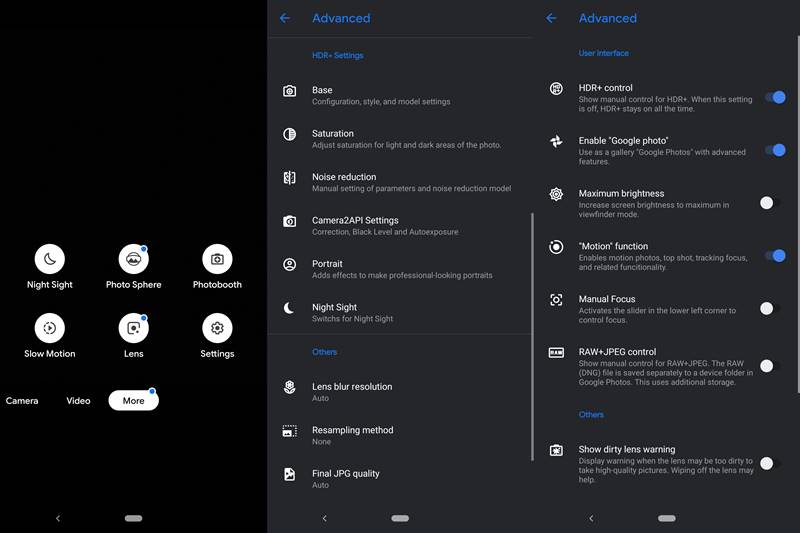
- Motion Photos: It is used to provide short clips of moments, before and after you click a picture. “Much more than a GIF, less than a video”. Read More.
- Top Shot : As the name suggests, Google Camera will only click a picture when it’s a ‘top shot’. For example, if someone blinked while the picture is being taken, then it would recommend you to retake that photo.
- Photobooth : Automatically clicks the picture when the Google Camera detects a smile or even a silly face!
- Super Res Zoom : Available in very few GCam, it enhances the image quality of the zoomed picture. It does so by shifting the camera module using Optical Image Stabilization. Read More.
- Night Sight : Considerably improves the images taken under extremely low light conditions. Although each device has its own Night Mode, yet it manages to out beat them all.
- Video Stabilization : As is evident by its name, it tends to provide an impressive level of video stabilization when you’re recording videos while on a moving subject, such as any means of transport. If your device has an OIS and or EIS, then this feature will come into action with even better mileage.
Setting up the GCam Port for Android Devices
From the below guide you could download the Google Camera GCam Port for various Android Devices . Currently, all the OnePlus devices and some of the Xiaomi devices are included in this guide. Along with the GCam APK File, some devices also have a configuration file that needs to be setup. Though different devices have different config files, yet setting up these configurations are same for all the device. So follow the below guide to set up the config file for the proper working of the Google Camera Port on various Android Devices.
How to Install the Config File for Google Camera Port
- Download the Google Camera GCam Port APK File.
- Also, download the corresponding config file.
- Transfer both the files to your internal storage.
- Inside the internal storage, create a folder named ‘GCam’.
- Inside GCam, create another folder by the name ‘Configs’.
- Place the configuration file inside the Configs folder.
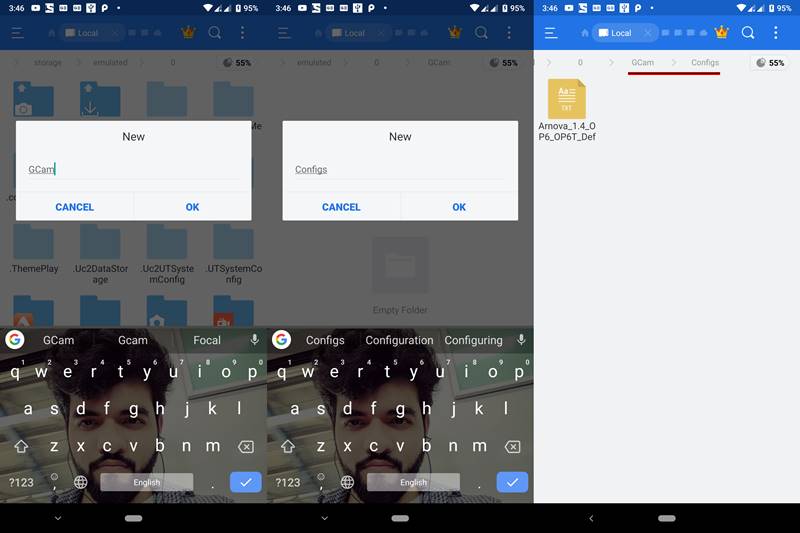
- Now install the Google Camera GCam Port file as you install any normal APK file.
- Open and grant it all the required permissions.
- Double-tap on the black region right next to the shutter button.
- ‘Chose config’ dialog box would appear.
- Tap on the ‘RESTORE’ button.
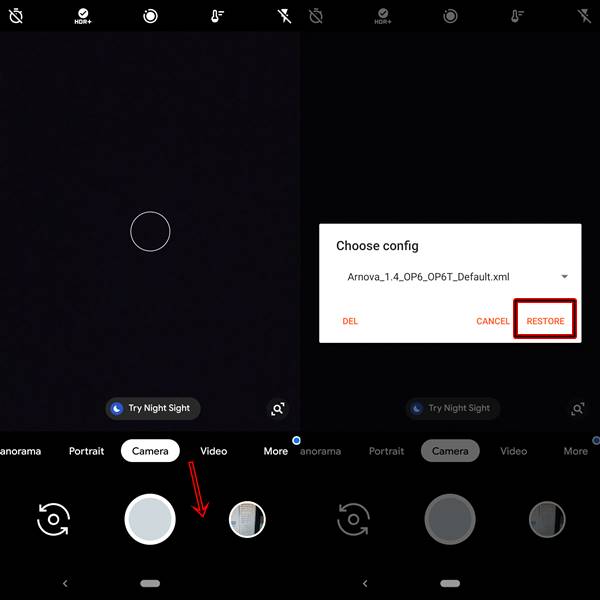
That’s it. You have successfully installed the config files for the Google Camera Port. However, if you aren’t satisfied with the results, head over to the ‘Settings’ menu. There are tons of other options available there. Tweak it as per your preference. Now, download the Google Camera for your OEM from below
Google Camera GO For All Android
Download the latest Google Camera GCam GO for all android devices from the given links: APK download | Box Mirror | SourceForge
Download ULTRACVM V.4.0
ULTRACVM V.4.0 is thenewest player in town and created quite a buzz since its inception. The reason? Well it is due to its ton of new and amazing features, and unlinke the regular GCam or Google Camera, it is supported across many Android devices. here are some of its noteworthy features
v4 own features:
- Returned to natural look (thx r0m10 for cooperation on this)
- Got rid of compression
- Got rid of downsampling
- Bilateral filter retweaked
- Sabre slightly retweaked
- Exposure slightly retweaked
Camera:
- Tuned for best possible picture quality (tested on Imx586)
- Redid & fixed Libpatcher
- Added spatial denoise
- Added option to use OEM noise model from rom libs
- New shutter control
- Added exposure compensation
- Added AWB per AUX (thx Arnova for helping with that)
- Ported Xiaomi API2 camera & AI keys
- Added experimental Qualcomm HDR bracketing mode
- Added awesome Tone & Gamma graph UI (thx Overwhelmer for helping with them)
- New video bitrate options (thx Urnyx for helping with this)
- Added all my v3 NoiseModels with auto-detection per sensor (thx Overwhelmer for helping)
- IMX586 Per-channel noisemodeller (v4 retweaked and fixed thx to Savitar)
- S5KHMX noisemodeller
- IMX686 noisemodeller
- IMX582 noisemodeller
- S5KGM1 noisemodeller
- S5KGW1 noisemodeller (credit goes to Wave_Generator)
- IMX363 noisemodeller
- Added new model for the selfie cam
- – Fully reskinned settings & UI (thx The_Dise for helping with this)
- New Logo
Download UltraCVM for All Android devices: UltraCVM_v4.apk
Google Camera GCam v7.3.020
Download Google Camera 7.3.020 APK: Google drive | Box mirror (77 MB)
Modded Google Camera GCam Port
Download the Modded version of Google Camera GCam port: MGC_7.3.017_Parrot043-v1.apk
Xiaomi
| Phone | Google Camera Port |
|---|---|
| Xiaomi Mi 9 | ( MIUI 10) PMGC_7.0.009_ConfigsVersion_V3 |
| Xiaomi Pocophone F1 (Poco F1) | Modded Gcam with HDR+, Night Sight |
| Xiaomi Mi A1 | GCam5.1.018-Arnova8G2-V1.4 Google Camera with telephoto lens Magisk Module ARCore Magisk Module AR Stickers without root |
| Xiaomi Mi A2 | DMGC_6.2.030_ver.1.6-PE |
| Xiaomi Mi 5 | GCam_5.3.015-Pixel3Mod-Arnova8G2-v4Beta1 |
| Xiaomi Mi 5S | GCam5.1.018-Arnova8G2-V1.5Beta2 ARCore Magisk Module |
| Xiaomi Mi 6 | GCam discussion thread Another GCam discussion thread |
| Xiaomi Mi 8 | B-S-G Google Camera Port (with Night Sight) |
| Xiaomi Mi 8 Lite | PMGC_7.0.009_ConfigsVersion_V3 |
| Xiaomi Mi Mix 2S | GCam-Pixel2Mod-Arnova8G2-V7beta-test-9 |
| Xiaomi Mi Mix 2 | GCam Pixel2Mod-Arnova8G2-V8.1 |
| Xiaomi Mi Mix | GCam5.1.018-Arnova8G2-V1.5Beta2 |
| Xiaomi Mi Note 3 | GCam5.1.018-Arnova8G2-V1.7Beta2 |
| Xiaomi Redmi 3S | GoogleCamera-Pixel2Mod-Arnova8G2-V2 |
| Xiaomi Redmi 4X | GCam5.1.018-Arnova8G2-V1.4 |
| Xiaomi Redmi 4 Prime | PMGC_7.0.009_ConfigsVersion_V3 |
| Xiaomi Redmi 5A | GoogleCamera-Pixel2Mod-Arnova8G2-V8 |
| Xiaomi Redmi Note 5 / 5 Plus | PMGC_7.0.009_ConfigsVersion_V3 |
| Xiaomi Redmi Note 5 Pro | PMGC_7.0.009_ConfigsVersion_V3 |
| Xiaomi Redmi Note 4 | PMGC_7.0.009_ConfigsVersion_V3 |
| Xiaomi Redmi Note 3 | GCam5.1.018-Arnova8G2-V1.5Beta2 |
| Xiaomi Redmi Note 2 | WORKING Google Camera! [All ROMs] |
| Xiaomi Redmi Note 7/Note 7 Pro | PMGC_7.0.009_ConfigsVersion_V3 |
| Xiaomi Redmi K20 Pro | Google Camera by Urnyx05 |
| Xiaomi Mi Max 3 | MGC_5.3.015_4 |
| Xiaomi Mi Mix 3 | Gcam 6 with manual focus and long exposure |
| Xiaomi Redmi Note 8 Pro | MGC_6.1.021_Rn8ProEdition_1.0_Wyroczen_STABLE Config: wyroczen_rn8pro_3.xml |
OnePlus
Here are the Google Camera GCam Port for all the OnePlus devices:
| Phone | Google Camera Port |
|---|---|
| OnePlus 7 / OnePlus 7T / OnePlus 7 Pro/ OnePlus 7T Pro | For Android 9 and Android 10: Urnyx’s v2.3 for GCam 7.2.010 XML Config file: nameless v6 For Ultrawide and Telephoto Lens: Flash Magisk Module for AUX |
| OnePlus 6/6T | GCam_6.1.013_stable_OP6 (with Night Sight) |
| OnePlus 5/5T | GCam-Pixel2Mod-Arnova8G2-V8.1 HEVC+SloMo GCam Magisk Module |
| OnePlus 3/3T | 6.2.030_TlnNeun_v.0.6b (Android 9+) |
Samsung
Here’s the Google Camera Port for all the Samsung Devices
| Phone | Google Camera Port |
|---|---|
| Samsung Galaxy Note 10/+ | Snapdragon: Google Camera 6.2.030 with working HDR+ |
| Samsung Galaxy S10/+/e | Snapdragon: Google Camera with aperture switching & night sight |
| Samsung Galaxy Note 9 | Snapdragon: GS9_GC_5.1.018_50frames_v1 Exynos: GC_5.1.018_IDan1109 |
| Samsung Galaxy S9/S9+ | Exynos: GC_5.1.018_IDan1109 Snapdragon: GS9_GC_5.1.018_50frames_v1 |
| Samsung Galaxy S8 | Exynos: GCam_5.1.018 8.3b Snapdragon: Castark v3.6 |
| Samsung Galaxy Note 8 | Exynos: Google Camera v8.3b Mod with HDR+ Snapdragon: Castark v3.6 |
| Samsung Galaxy S7 | Exynos: GCam_5.1.018_SG7Exy_V7 Android 7.0 : B-S-G’s Modded Google Camera 5.0.009 with HDR+ Edge: GCam_5.1.018_SG7Exy_V6 |
| Samsung Galaxy A70 | Arnova8G2 mod |
| Galaxy phones running Android 10, 9, or 8 (Exynos & Snapdragon) | Gcam_6.2.030_Advanced_V2.2.2beta2.190910.1840 |
Nokia
| Phone | Google Camera Port |
|---|---|
| Nokia 8.1 | MGC_6.1.021_F1_V1.7 |
| Nokia 8 | GCam-Pixel2Mod-Arnova8G2-V8 |
| Nokia 7 Plus | GCam_6.1.021_N7P |
| Nokia 7.2 | GCam_BSG_7.2 |
| Nokia 6 | scrubber_GCam_5.1.018_25 |
| Nokia 5 | scrubber_GCam_5.1.018_25 |
Motorola
| Phone | Google Camera Port |
|---|---|
| Moto G5 Plus | GCMod5 based on Mod By B-S-G |
| Moto G5S | Google Camera port with HDR+ |
| Moto G5S Plus | Google Camera port with HDR+ |
| Moto X4 | Scrubber Google Camera 5.1.018 |
| Motorola One | GoogleCamera_6.1.009.215420794-beta2 |
| Motorola One Power | AR Emojis and Night Sight |
| Moto Z2 Play | Google Camera 5.2.025 (HDR+, Portrait) |
| Moto G7 | GCam with portrait, night sight, video, Pano |
| Moto G7 Plus | GCam with working portrait and night sight |
| Moto G7 Power | Google Camera XT1955-4 |
| Moto Z | gcam_pixel3mod_1.1_build.6.1.021 |
| Moto Z3 Play | MGC_6.1.009_MI8_V1a |
| Phone | Google Camera Port |
|---|---|
| Google Pixel/Pixel XL | Google Camera 7.2 with Astro Mode, Super Res Zoom |
| Google Pixel 2/Pixel 2 XL | Google Camera 7.2 with Astro Mode, Super Res Zoom |
| Google Pixel 3/Pixel 3 XL | Google Camera 7.2 with Astro Mode, Super Res Zoom |
| Google Pixel 3/Pixel 3 XL | Google Camera 7.2 with Astro Mode, Super Res Zoom |
| Google Pixel 3a/Pixel 3a XL | Google Camera 7.2 with Astro Mode, Super Res Zoom |
| Google Pixel 4/Pixel 4 XL | Google Camera 7.2 with Astro Mode, Super Res Zoom |
Asus
| Phone | Google Camera Port |
|---|---|
| Asus ZenFone Max Pro M1 | Arnova8G2 v8 Camera2 API enabler |
| Asus ZenFone Max Pro M2 | GoogleCamera-Pixel2Mod-Arnova8G2-V8.1 |
| Asus ZenFone 5Z | MGC_6.1.021_XCAMBase_F1_v3 |
| Asus ZenFone 6 | UNI_CAM_v1.2a_Q.apk (Android 10) UNI_CAM_v1.2a_P.apk (Android 9) |
| Asus ROG Phone II | UNI_CAM_v1.2a_Q.apk (Android 10) UNI_CAM_v1.2a_P.apk (Android 9) |
HTC
| Phone | Google Camera Port |
|---|---|
| HTC 10 | skulshady_gcam_5.1.018_Mod_v3.0 Magisk Google Camera Port |
| HTC U11 | ArnovaG82 v5 ARCore with Magisk Module |
| HTC U Ultra | GCam_5.1.018_by_SerJo87 |
| HTC U12+ | MGC_6.1.021_MI8_V2 |
LG
| Phone | Google Camera Port |
|---|---|
| LG G4 | MGCamera_5.1.0.18_R4X_v.5.1.7 |
| LG G5 | cstark27 v4.2 |
| LG G6 | cstark27 v4.2 |
| LG G7 ThinQ | Standard Wide Angle |
| LG G8 ThinQ | Urnyx05 GCam |
| LG V20 | cstark27 v4.2 |
| LG V30 | cstark27 v4.2 |
| LG V40 ThinQ | Standard Wide Angle |
Lenovo
| Lenovo K6 | Arnova8G2 v6 |
|---|---|
| Lenovo P2 | GCam5.1.018_SerJo87_1.6RC2_test4d |
| Lenovo ZUK Z2 Pro | GCam-Pixel2Mod-Arnova8G2-V2 |
| Lenovo ZUK Z2 Plus | GCMod5 based on Mod By B-S-G |
Essential
| Phone | Google Camera Port |
|---|---|
| Essential Phone PH-1 | Google Camera TlnNeun build |
Razer
| Phone | Google Camera Port |
|---|---|
| Razer Phone | BSG v1.3.1 or TlnNeun v1.0.0 |
| Razer Phone 2 | MGC_6.1.021_RazerPhone2_V1c MGC_6.1.021_RazerPhone2_V2a |
ZTE
| Phone | Google Camera Port |
|---|---|
| Axon 7 | GCam-5.1.018-Pixel2Mod-Arnova8G2 |
LeEco
| Phone | Google Camera Port |
|---|---|
| LeEco Le Max 2 | GCMod5 based on B-S-G |
| LeEco Le Pro3 | Arnova8G2 v6 |
Conclusion

(Cancel Reply)
Δ
