Easily Complete Recent Discord Quest Using This Hack
In this guide, we will show you a nifty hack using which you can easily complete your recent Discord Quests in just a few clicks. Discord Quests are a rewarded ad format that allows players to earn rewards upon engaging with content and games. By completing a quest, such as watching a video or playing a game for a specific amount of time, you can earn rewards like in-game items or unique avatar decorations.
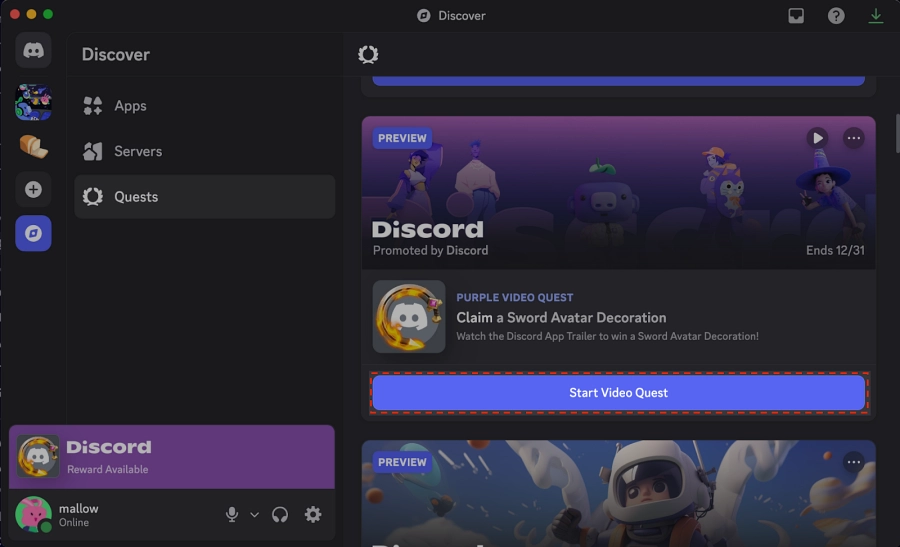
Credits: Discord
These quests are usually personalized based on your interests or can be shown contextually based on where you navigate within the app. You can find them a t the top of the user activity console, at the bottom of the mobile app, in social activity panels if a friend is participating, or in the Quests Home within the Discover section. And what are the rewards for completing these quests?
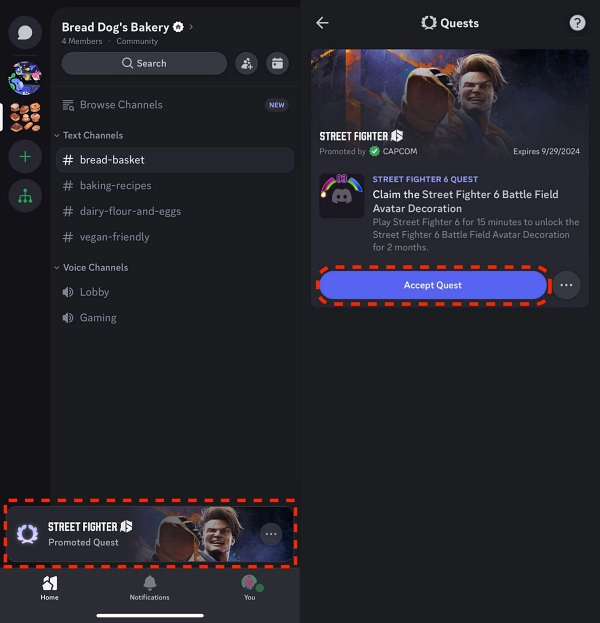
Credits: Discord
Well, r ewards can include in-game items, avatar decorations, or Discord Orbs. However, completing them might be a tough nut to crack in some cases. Moreover, it will also take your valuable time away. So what else can be done? Well, there does exist a script that will automatically complete these quests on your behalf in just a couple of clicks. So without any further ado, let’s show you how this can be carried out.
Easily Complete Recent Discord Quest Using This Hack

Carrying out these tweaks might be a risky task and could result in account termination [though this hasn’t happened till now, but who knows, a danger might be looming around the corners]. So proceed ahead with caution and at your own risk. Droidwin and its members wouldn’t be held responsible in case of a thermonuclear war, your alarm doesn’t wake you up, or if anything happens to your account by performing the steps below.
This script does not work in the browser for quests that require you to play a game! Use the desktop app to complete those. [ All credits for this script go to GitHub Developer aamiaa].
Accept a quest under Discover -> Quests. Press Ctrl + Shift + I to open DevTools. After that, head over to the Console tab. Then, paste the code given below and hit Enter: [Click on Details to expand it] delete window . $ ; let wpRequire = webpackChunkdiscord_app . push ( [ [ Symbol ( ) ] , { } , r => r ] ) ; webpackChunkdiscord_app . pop ( ) ; let ApplicationStreamingStore = Object . values ( wpRequire . c ) . find ( x => x ?. exports ?. Z ?. proto ?. getStreamerActiveStreamMetadata ) . exports . Z ; let RunningGameStore = Object . values ( wpRequire . c ) . find ( x => x ?. exports ?. ZP ?. getRunningGames ) . exports . ZP ; let QuestsStore = Object . values ( wpRequire . c ) . find ( x => x ?. exports ?. Z ?. proto ?. getQuest ) . exports . Z ; let ChannelStore = Object . values ( wpRequire . c ) . find ( x => x ?. exports ?. Z ?. proto ?. getAllThreadsForParent ) . exports . Z ; let GuildChannelStore = Object . values ( wpRequire . c ) . find ( x => x ?. exports ?. ZP ?. getSFWDefaultChannel ) . exports . ZP ; let FluxDispatcher = Object . values ( wpRequire . c ) . find ( x => x ?. exports ?. Z ?. proto ?. flushWaitQueue ) . exports . Z ; let api = Object . values ( wpRequire . c ) . find ( x => x ?. exports ?. tn ?. get ) . exports . tn ; let quest = [ … QuestsStore . quests . values ( ) ] . find ( x => x . id !== “1412491570820812933” && x . userStatus ?. enrolledAt && ! x . userStatus ?. completedAt && new Date ( x . config . expiresAt ) . getTime ( ) > Date . now ( ) ) let isApp = typeof DiscordNative !== “undefined” if ( ! quest ) { console . log ( “You don’t have any uncompleted quests!” ) } else { const pid = Math . floor ( Math . random ( ) * 30000 ) + 1000 const applicationId = quest . config . application . id const applicationName = quest . config . application . name const questName = quest . config . messages . questName const taskConfig = quest . config . taskConfig ?? quest . config . taskConfigV2 const taskName = [ “WATCH_VIDEO” , “PLAY_ON_DESKTOP” , “STREAM_ON_DESKTOP” , “PLAY_ACTIVITY” , “WATCH_VIDEO_ON_MOBILE” ] . find ( x => taskConfig . tasks [ x ] != null ) const secondsNeeded = taskConfig . tasks [ taskName ] . target let secondsDone = quest . userStatus ?. progress ?. [ taskName ] ?. value ?? 0 if ( taskName === “WATCH_VIDEO” || taskName === “WATCH_VIDEO_ON_MOBILE” ) { const maxFuture = 10 , speed = 7 , interval = 1 const enrolledAt = new Date ( quest . userStatus . enrolledAt ) . getTime ( ) let completed = false let fn = async ( ) => { while ( true ) { const maxAllowed = Math . floor ( ( Date . now ( ) - enrolledAt ) / 1000 ) + maxFuture const diff = maxAllowed - secondsDone const timestamp = secondsDone + speed if ( diff >= speed ) { const res = await api . post ( { url :
/quests/ ${ quest . id } /video-progress, body : { timestamp : Math . min ( secondsNeeded , timestamp + Math . random ( ) ) } } ) completed = res . body . completed_at != null secondsDone = Math . min ( secondsNeeded , timestamp ) } if ( timestamp >= secondsNeeded ) { break } await new Promise ( resolve => setTimeout ( resolve , interval * 1000 ) ) } if ( ! completed ) { await api . post ( { url :/quests/ ${ quest . id } /video-progress, body : { timestamp : secondsNeeded } } ) } console . log ( “Quest completed!” ) } fn ( ) console . log (Spoofing video for ${ questName } .) } else if ( taskName === “PLAY_ON_DESKTOP” ) { if ( ! isApp ) { console . log ( “This no longer works in browser for non-video quests. Use the discord desktop app to complete the” , questName , “quest!” ) } else { api . get ( { url :/applications/public?application_ids= ${ applicationId }} ) . then ( res => { const appData = res . body [ 0 ] const exeName = appData . executables . find ( x => x . os === “win32” ) . name . replace ( “>” , "" ) const fakeGame = { cmdLine :C:\\Program Files\\ ${ appData . name } \\ ${ exeName }, exeName , exePath :c:/program files/ ${ appData . name . toLowerCase ( ) } / ${ exeName }, hidden : false , isLauncher : false , id : applicationId , name : appData . name , pid : pid , pidPath : [ pid ] , processName : appData . name , start : Date . now ( ) , } const realGames = RunningGameStore . getRunningGames ( ) const fakeGames = [ fakeGame ] const realGetRunningGames = RunningGameStore . getRunningGames const realGetGameForPID = RunningGameStore . getGameForPID RunningGameStore . getRunningGames = ( ) => fakeGames RunningGameStore . getGameForPID = ( pid ) => fakeGames . find ( x => x . pid === pid ) FluxDispatcher . dispatch ( { type : “RUNNING_GAMES_CHANGE” , removed : realGames , added : [ fakeGame ] , games : fakeGames } ) let fn = data => { let progress = quest . config . configVersion === 1 ? data . userStatus . streamProgressSeconds : Math . floor ( data . userStatus . progress . PLAY_ON_DESKTOP . value ) console . log (Quest progress: ${ progress } / ${ secondsNeeded }) if ( progress >= secondsNeeded ) { console . log ( “Quest completed!” ) RunningGameStore . getRunningGames = realGetRunningGames RunningGameStore . getGameForPID = realGetGameForPID FluxDispatcher . dispatch ( { type : “RUNNING_GAMES_CHANGE” , removed : [ fakeGame ] , added : [ ] , games : [ ] } ) FluxDispatcher . unsubscribe ( “QUESTS_SEND_HEARTBEAT_SUCCESS” , fn ) } } FluxDispatcher . subscribe ( “QUESTS_SEND_HEARTBEAT_SUCCESS” , fn ) console . log (Spoofed your game to ${ applicationName } . Wait for ${ Math . ceil ( ( secondsNeeded - secondsDone ) / 60 ) } more minutes.) } ) } } else if ( taskName === “STREAM_ON_DESKTOP” ) { if ( ! isApp ) { console . log ( “This no longer works in browser for non-video quests. Use the discord desktop app to complete the” , questName , “quest!” ) } else { let realFunc = ApplicationStreamingStore . getStreamerActiveStreamMetadata ApplicationStreamingStore . getStreamerActiveStreamMetadata = ( ) => ( { id : applicationId , pid , sourceName : null } ) let fn = data => { let progress = quest . config . configVersion === 1 ? data . userStatus . streamProgressSeconds : Math . floor ( data . userStatus . progress . STREAM_ON_DESKTOP . value ) console . log (Quest progress: ${ progress } / ${ secondsNeeded }) if ( progress >= secondsNeeded ) { console . log ( “Quest completed!” ) ApplicationStreamingStore . getStreamerActiveStreamMetadata = realFunc FluxDispatcher . unsubscribe ( “QUESTS_SEND_HEARTBEAT_SUCCESS” , fn ) } } FluxDispatcher . subscribe ( “QUESTS_SEND_HEARTBEAT_SUCCESS” , fn ) console . log (Spoofed your stream to ${ applicationName } . Stream any window in vc for ${ Math . ceil ( ( secondsNeeded - secondsDone ) / 60 ) } more minutes.) console . log ( “Remember that you need at least 1 other person to be in the vc!” ) } } else if ( taskName === “PLAY_ACTIVITY” ) { const channelId = ChannelStore . getSortedPrivateChannels ( ) [ 0 ] ?. id ?? Object . values ( GuildChannelStore . getAllGuilds ( ) ) . find ( x => x != null && x . VOCAL . length > 0 ) . VOCAL [ 0 ] . channel . id const streamKey =call: ${ channelId } :1let fn = async ( ) => { console . log ( “Completing quest” , questName , “-” , quest . config . messages . questName ) while ( true ) { const res = await api . post ( { url :/quests/ ${ quest . id } /heartbeat, body : { stream_key : streamKey , terminal : false } } ) const progress = res . body . progress . PLAY_ACTIVITY . value console . log (Quest progress: ${ progress } / ${ secondsNeeded }) await new Promise ( resolve => setTimeout ( resolve , 20 * 1000 ) ) if ( progress >= secondsNeeded ) { await api . post ( { url :/quests/ ${ quest . id } /heartbeat, body : { stream_key : streamKey , terminal : true } } ) break } } console . log ( “Quest completed!” ) } fn ( ) } }Follow the printed instructions depending on what type of quest you have If your quest says to “play” the game or watch a video, you can just wait and do nothing If your quest says to “stream” the game, join a voice channel with a friend or alt and stream any window
Wait a bit for it to complete the quest. Once done, you can now claim your rewards.
NOTE: You can track your progress by looking at the Quest progress: prints in the Console tab or by looking at the progress bar in the quests tab.
- How to Build an App/APK from GitHub using Android Studio
- Shizuku Not Working on Android 16: How to Fix
- Google Patches Pixel IMS App | Here’s a New Method to Enable VoLTE
- How to Root Custom ROMs via SukiSU Ultra

(Cancel Reply)
Δ
