Eufy Security not working with Xiaomi HyperOS: How to Fix
In this guide, we will show you the steps to fix the issue of Eufy Security not working with Xiaomi HyperOS. This app from Anker links your network to your security cameras and door sensors and allows real-time video and motion detection alerts. However, as of now, it seems to be having a rough time with the latest OS build from the Chinese OEM.
In this regard, numerous users have voiced their concern that the Eufy Security app is not working along the expected lines on Xiaomi devices running HyperOS. The issue is more prominent with the EU build of HyperOS ROM rather than the official HyperOS release from Xiaomi. With that said, there does exist a couple of nifty workarounds that should help you resolve this bug. So without further ado, let’s check them out.
- Fix Eufy Security not working with Xiaomi HyperOS Pass Play Integrity Test Hide Root from Eufy Security Downgrade Eufy Security
Fix Eufy Security not working with Xiaomi HyperOS

It is recommended that you try out each of the below-mentioned workarounds and then see which one spells out success. So with that in mind, let’s get started.
Pass Play Integrity Test
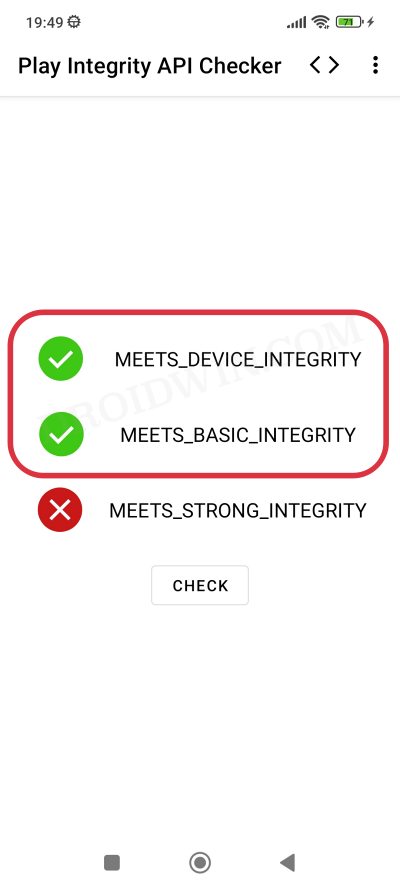
One major reason why the app is not working could be due to the fact that your device is failing the Play Integrity Test. So refer to our guide and make sure to pass this test: How to Pass Play Integrity Test on any Custom ROM [Video] .
Hide Root from Eufy Security
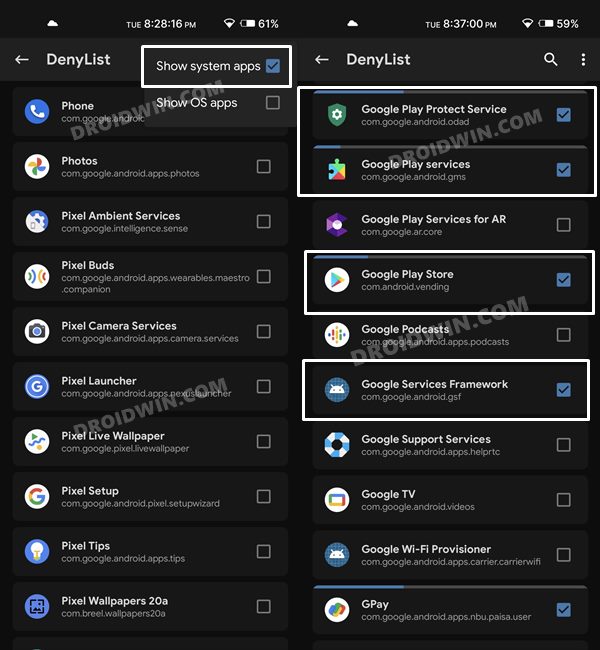
Apart from passing the Play Integrity test, you should also consider hiding root from the Eufy Security app. For that, please refer to our guide on How to Hide Root from Apps via Magisk DenyList [Android 14] .
Downgrade Eufy Security
Some users were able to rectify the issue by simply downgrading the app to an earlier version, most noticeably, version 4.7.0.1747 . So uninstall the currently installed version and install the said version onto your device. Now launch it and check out the results. [While this is the easiest of the three fixes, however, it might give you a temporary respite from the bug and it might re-appear later on. So the first two workarounds are the recommended ones].
- Xiaomi Stuck in Bootloop/Brick while flashing HyperOS [Fixed]
- How to Bypass Xiaomi HyperOS Bootloader Unlock Requirement!
- Gallery App Crashing on Xiaomi EU HyperOS ROM [Fixed]
- How to Install HyperOS on Locked Bootloader on any Xiaomi

(Cancel Reply)
Δ
