Fix Google Maps ‘Arrive by’ feature not showing ‘Leave By’ time
In this guide, we will show you a nifty workaround to rectify the issue wherein the Arrive By feature of Google Maps is not showing the ‘Leave By’ time. When it comes to web mapping platforms, then there’s hardly a doubt that the offering from the Silicon Valley giant is the best in this domain. Apart from the usual navigation, it beholds a slew of other intriguing goodies, such as satellite imagery, aerial photography, street maps, and real-time traffic condition, among others.
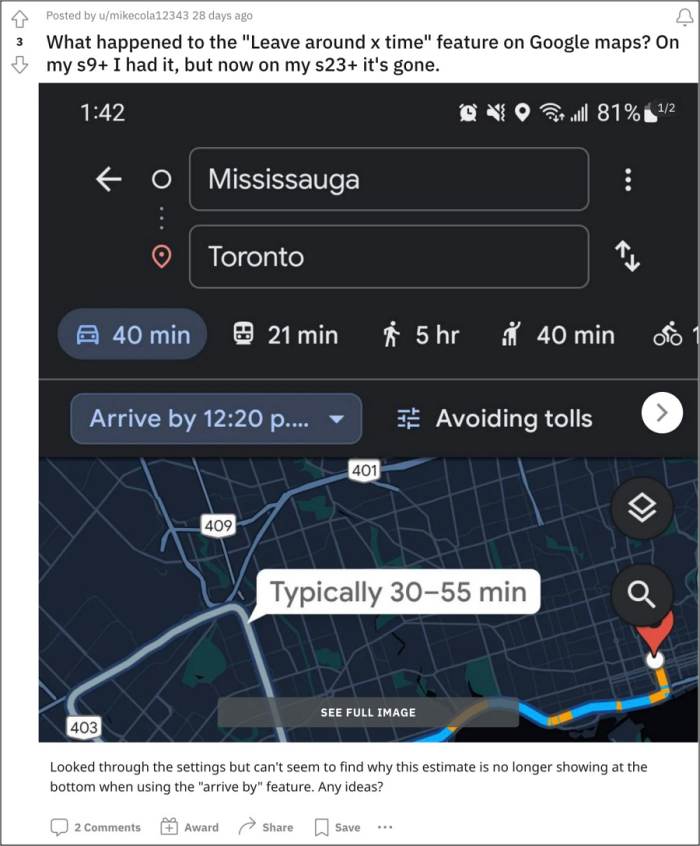
However, one of its features is currently giving quite a tough time to many. Numerous users have voiced their concern that the Arrive By feature of Google Maps is not showing the ‘Leave By’ time. As a result of this, they are unable to get hold of set depart or arrival times and hence cannot ascertain the time at which they need to leave if they wish to reach the destination at a particular time. If you are also getting bugged by this issue, then this guide will help you out. Follow along.
Fix Google Maps ‘Arrive by’ feature not showing ‘Leave By’ time

The culprit behind this issue is the latest update rolled out by Google. So to rectify it, you’ll have to downgrade the app to its earlier stable build. Here’s how it could be done:
- Head over to Settings > Apps > See All Apps > Google Maps.
- Now tap on the overflow icon and select Uninstall Updates > OK.
- Then scroll to the bottom and tap on App Details. You’ll be taken to the Play Store.
- Tap on the overflow icon at the top right and uncheck Enable Auto Updates.
- Fix Google Maps running in Android Auto even after exiting the car
- Why is Google Maps ‘send directions to the phone via SMS’ missing?
- Are You Here missing on Google Maps: How to Fix
- Turn off Do Not Disturb DND when using Google Maps while driving

(Cancel Reply)
Δ
