Fix Mi Account Authorization | Unbrick Xiaomi | EDL Mode
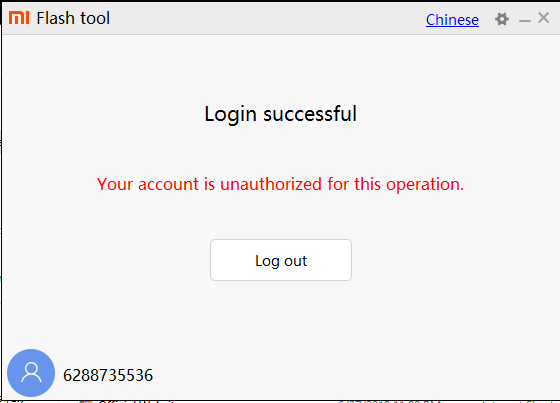
Mi Flash Tool Unauthorized for this Operation OR Your Account is Unauthorized for this operation OR Authorized Service Account required OR Device is stuck on DA mode. If you have ever tried your hands on the custom developments via your Xiaomi device, chances are you might have actually gone through at least one of these four messages. In this guide, we will show you how to fix all these errors. This will ultimately help you to fix the Mi Account Authorization issue and hence unbrick your Xiaomi device via EDL mode. Follow along for the complete instructions.
Xiaomi devices are always known to provide feature-rich devices at affordable prices. Well, one shouldn’t look any further than its ever-popular Redmi Note series. And if you are willing to spend a little bit more, then there is always the Poco series waiting for you. Although both these companies are no longer part of Xiaomi, still everything else, from the underlying OS to all the features, stands the same. And with each new offering, it is scaling up the popularity charts.
Along the similar lines, it has quite an impressive track record when it comes to custom developments. There are a plethora of custom ROMs, tweaks, mods, and TRWP support for its various devices. But as you might be aware by now, these customizations and modifications bring in some associated risks with itself. If your device ends up in a bootloop, you could still access the fastboot mode and flash the stock firmware. But unfortunately, that is not always the case.
In some cases, if you have tweaked the device partition, be it the system partition for flashing ROMs or the boot partition (Project Treble)/Recovery partition (non-Project Treble devices) for flashing TWRP or simply the vendor partition, you could end up with a bricked device, if not done correctly. Well, be it a soft-brick or a hard-brick, it really proves to be quite a challenging task to get your device back to working condition.
How to Flash Xiaomi Fastboot ROM without Mi Flash Tool
Download Xiaomi USB Drivers for Windows
How to Unlock Bootloader on any Xiaomi Device
How to Install Orangefox Recovery project on Xiaomi Devices
Mi Account Authorization Issue
Fix Mi Account Authorization Issue and Unbrick Xiaomi Device STEP 1: INSTALL Qualcomm HS-USB QDLoader 9008 DRIVERS STEP 2: DOWNLOAD ANDROID SDK PLATFORM-TOOLS STEP 3: DOWNLOAD MI FLASH TOOL STEP 4: EXTRACT STOCK FIRMWARE STEP 5: DOWNLOAD PATCHED FIREHOSE FILE STEP 6: REPLACE STOCK FIREHOSE FILE WITH A PATCHED ONE STEP 7: BOOT YOUR XIAOMI DEVICE TO EDL (IF NOT DONE ALREADY) STEP 8: FLASH PATCHED FIREHOSE FIRMWARE VIA MI FLASH TOOL
Method 2: Unbrick Xiaomi Devices without Patched Firehose File Method 3: Bypass SP Flash Tool Authorization
Concluding Remarks
Mi Account Authorization Issue
The recent changes bought in by Xioami have made the matter even worse. In this guide, we will show you how to deal with the Unauthorized for this operation issue. But first, let’s check out more about this error and try to understand it in-depth. Then we will show you how to fix this error which will ultimately fix Mi Account Authorization issue. Once that is done, you could then easily flash the stock firmware and unbrick your Xiaomi device. Follow along.
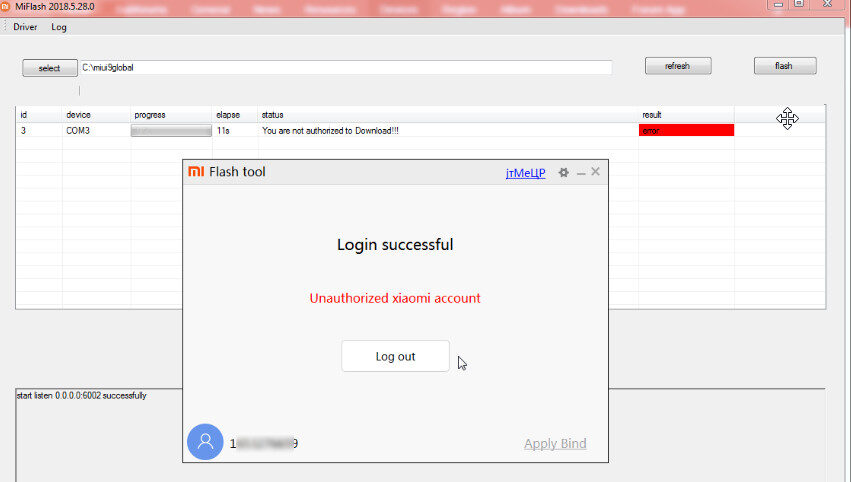
We wouldn’t go into complete detail because most of our readers would rather be interested in the solution than the reasons. In simplest of words, Xiaomi is directly responsible for this issue. With this feature, only the persons directly associated with the authorized service centers could access this tool now. A normal user could at the most download this tool but when they hit the flash button, they will be greeted with an error message. This simply spells out “Unauthorized Xiaomi account” and you cannot proceed ahead.
There are countless many people scamming the concerned device owners by “selling” them credentials of Authorized Xiaomi Account. While we have many reasons to believe that it is indeed a scam, but the unfortunate bunch of users ends up going for that trick. But not anymore. Today, we will show you how to unbrick your Xiaomi Device using the mi Flash Tool but without the need for an authorized Xiaomi account. It goes without saying that the Mi Account Authorization issue will also be fixed. Follow the below steps for that.
Fix Mi Account Authorization Issue and Unbrick Xiaomi Device
So here is what we will be doing. We have got hold of the patched Firehose (prog_emmc_firehose_8953_ddr.mbn) file for your Xiaomi device. In other words, the file has been modified from an authorized Xiaomi account that you could directly flash onto your device.
Once this Firehose file has been flashed, your Xiaomi device will be unbricked and ultimately the Mi Account Authorization issue will also be fixed. Here are all the required instructions in this regard. Droidwin and its members wouldn’t be held responsible in case of a thermonuclear war, your alarm doesn’t wake you up, or if anything happens to your device and data by performing the below steps.
STEP 1: INSTALL Qualcomm HS-USB QDLoader 9008 DRIVERS
For your device to be effectively recognized by your PC in EDL mode, you need to install Qualcomm HS-USB QDLoader 9008. So go ahead and install the said drivers onto your PC.
- Automatic installation setup files for the Qualcomm drivers: 32-bit version: QDLoader_HS-USB_Driver_32bit_Setup.exe | 64-bit version: QDLoader_HS-USB_Driver_64bit_Setup.exe
- If for some reason the automatic installation fails (very rare), you should then try out the manual one: Qualcomm-Driver.zip
STEP 2: DOWNLOAD ANDROID SDK PLATFORM-TOOLS
First off, download and install the Android SDK Platform Tools . This will be needed so that your device gets recognized in the fastboot mode. As of now, your device wouldn’t be able to Fastboot, but later on, during the flashing process, it will be booted to fastboot from EDL mode. And at that point in time, this tool will come in handy.
STEP 3: DOWNLOAD MI FLASH TOOL
Next up, download and install the Mi Flash Tool onto your PC. This will be needed to flash the stock firmware file.
| Name | Xiaomi Mi Flash Tool |
|---|---|
| Version | v20191206 |
| Size | 82.3 MB |
| Download | Download Link |
STEP 4: EXTRACT STOCK FIRMWARE
You now have to extract the stock firmware file inside the platform-tools folder. For the unaware, the platform-tools is the same folder where the installation of Android SDK Platform Tools has taken place.
- Mi Unlock Tool Errors and their Fixes
- How to Fix Error: Cannot load recovery.img
- Fix TWRP Error 7 (While Flashing Custom ROM via TWRP)
- How to Fix FAILED (remote: unknown command) Error
STEP 5: DOWNLOAD PATCHED FIREHOSE FILE
- Download Patched Firehose file for 600+ Android Devices
All the files are compressed inside a single ZIP file. Extract the file and get hold of your device’s firehose file.
STEP 6: REPLACE STOCK FIREHOSE FILE WITH A PATCHED ONE
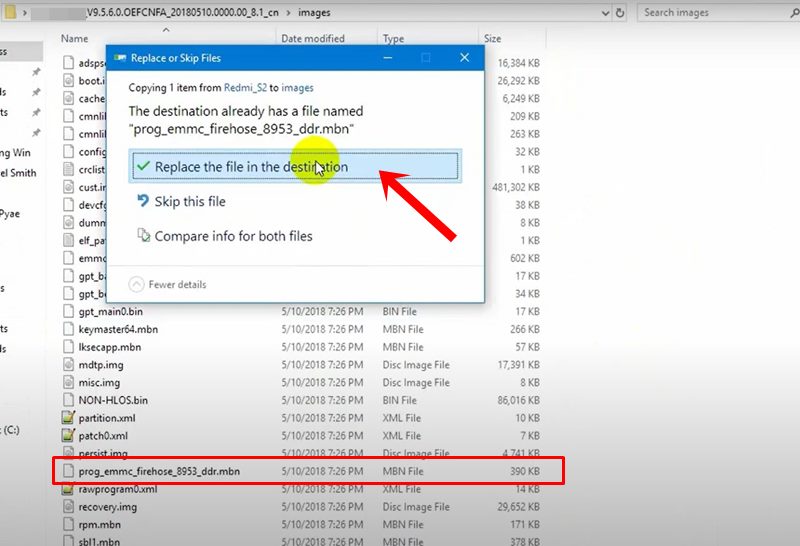
You now have to replace the stock Firehose file with the just downloaded patched Firehose file. The complete name of the file will be something like (prog_emmc_firehose_8953_ddr.mbn). So go to the platform-tools folder where you have extracted the stock firmware and head over to the firmware’s Image folder. Then paste the patched firehose file there. It will then ask for replacing the existing file. Click on Replace the file in the destination. This will then replace the stock prog_emmc_firehose_8953_ddr.mbn with the patched one.
STEP 7: BOOT YOUR XIAOMI DEVICE TO EDL (IF NOT DONE ALREADY)
Now that the firehose file has been replaced, it is time to flash that stock firmware. For that, your device needs to be booted to the EDL Mode. For most of our readers, that will already be the case. If not, then power off your device and then press and hold the Power + Volume Down buttons together and immediately connect your device to PC.
Your device will then boot to the EDL mode and you might notice the blinking of LED light as well. In some cases, you might not be able to turn off the device. So in that case, your only bet is to wait till your device gets completely discharged. You might also get the “ FAILED (status read failed (Too many links)) ” error message while booting to EDL. Simply ignore this message as it wouldn’t conflict with the EDL Mode.
STEP 8: FLASH PATCHED FIREHOSE FIRMWARE VIA MI FLASH TOOL
We have now installed all the necessary software and drivers, and have the firmware with a patched firehose file. It is now time to flash this firmware file via Mi Flash Tool.
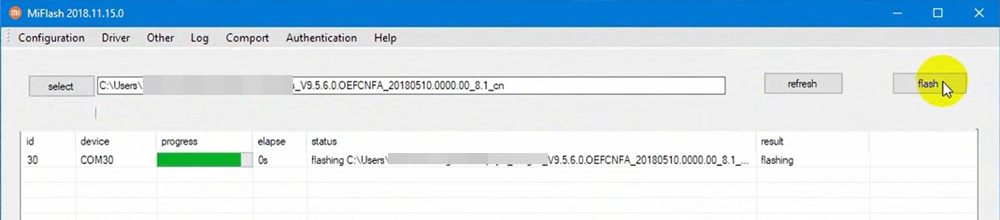
- For that, connect your Xiaomi or Redmi device to PC via USB cable.
- Then launch the Mi Flash Tool and click on Refresh. This will show the COM
or in some cases, your device ID. If you see any of these two, then you are good to go. - Now click on Select. Browse to the extracted firmware folder (which should be inside the platform-tools folder) and select it. Make sure to select the entire folder (and not any single file).
- Then select the Clean All option from the bottom menu bar. This will wipe all the data but that should be the least of your concern as of now. A working device
- Finally, hit the Flash button. You will now no longer get the Mi Flash Tool Unauthorized for this Operation, Authorized Service Account required, or any other Mi Account Authorization issue.
- The entire flashing process will take a few minutes and when that is done, your device will reboot to the Android system. In some cases, it might only boot to fastboot. You will then either have to use the hardware key or fastboot reboot command to boot your device to the system.
- How to Install OTA Updates in Rooted Android Device
- How to Permanently Install TWRP without TWRP ZIP File (only using TWRP.img file)
- Root Android Devices Without TWRP Recovery
- Fix TWRP Error 7 (While Flashing Custom ROM via TWRP)
Method 2: Unbrick Xiaomi Devices without Patched Firehose File
- How to Unbrick Xiaomi Mi A1 via Fastboot Commands
- How to Unbrick Xiaomi Mi A2 via Fastboot Commands
- How to Unbrick Xiaomi Mi A3 via Fastboot Commands
- How to Unbrick Redmi Note 7/7S via Fastboot Commands
- How to Unbrick Redmi Note 7 Pro via Fastboot Commands
- How to Unbrick Redmi Note 8 via Fastboot Commands
- How to Unbrick Redmi Note 8 Pro via Fastboot Commands
- How to Unbrick Redmi Note 9 via Fastboot Commands
- How to Unbrick Redmi Note 9 Pro via Fastboot Commands
Method 3: Bypass SP Flash Tool Authorization
There’s more good news coming to your side! If your Xiaomi device is powered by a MediaTek chipset, then there is a way to bypass the authorization. In other words, you could now bypass the SLA and DAA authorizations of the SP Flash Tool. This way you would be in a position to flash the firmware onto your Xiaomi device, after booting it to Download Mode.
Once the force-flashing of the firmware is complete, your device will be booted to the OS. Here’s the complete instruction for the same: Bypass MediaTek SP Flash Tool SLA DAA Authentication.
Concluding Remarks
That is it. With this, we conclude the guide on how to fix the Mi Account Authorization issue and unbrick your Xiaomi device via EDL Mode. As mentioned before, the patched firehose file that we have uploaded is for Redmi 6 Pro | Redmi S2 | SDM_660_6X_Max3_Note7 | whyred_Note_5.

- nurey 2 months ago Reply i couldn’t find firehose file for mi 11 lite 5g please can you provide
- Harsh 5 months ago Reply Please provide Firehose file for Poco M2 Pro Miatoll.
- wilfried 6 months ago Reply Hi please I have firehose from redmi note 13 pro 5G (garnet). Chinese version
- Kanat 8 months ago Reply Unfortunately, Redmi Note 10 Pro (sweet) is not in the list. Need prog_ufs_firehose_sm7150_ddr elf patched
- Denis 11 months ago Reply Can I get the patched prog_ufs_prog_ufs_firehose_sm7150_ddr.elf xiaomi mi note 10 lite
- xiu1994 1 year ago Reply Do you have the Firehose for the mi10 (umi) thanks
- xiu1994 1 year ago Reply Do you have the Firehose for the mi10 (umi) please !
- Lagan 2 years ago Reply Hi, Do you have the modded firehorse file for POCO F3?
- Victor 2 years ago Reply Hey, I’m trying to fix a broken Redmi 8 (olive). Would you have the patched filehose for it? The mbn file is “prog_emmc_firehose_8937_ddr.mbn”
- Benoit 2 years ago Reply Hey, Do you have the Firehose for the mi 11 lite 5g (renoir)? I can not find it. Thanks
- Hrithik 2 years ago Reply I would really appreciate if you can provide patched firehorse for xiaomi 11 t pro
- R 2 years ago Reply Hi need file for redmi k50i
- Luiz 2 years ago Reply I need the firehose for POCO F5, its on boot loop. Do you have this?
- Jonny 3 years ago Reply I need the Firehose File for the Xiaomi Redmi Note 11 NFC (2201117TY). Can somebody tell me, how to get?
- Anton 3 years ago Reply Hi, I need the patched firehose files for Xiaomi Mi9T Pro/ K20 Pro Thanks
- samuel reis 3 years ago Reply boa tarde tenho um xiaomi 11 çite 5g ne e preciso desses arquivos prog_emmc, vc pode me ajudar?
- ll 3 years ago Reply Speaking of methods, I can help you patch more files
- Sam 3 years ago Reply Hello, I have a bricked Xiaomi 12S Ultra. I am getting the “Your account is unauthorized for this operation”. I am using MiFlash 2022.5.7.0 and Flash tool v7.6.8. Thanks Sam
- Shafqat Ali 3 years ago Reply mi flash tool link is broken
- ahmed 3 years ago Reply i dont find patched firehose for xiaomi 11t pro !!!
- Anderson 3 years ago Reply Para o redmi note 10c,Não encontrei.Se possivel arrume para mim…
- Ray 3 years ago Reply Hi. I need to flash firmware for mi 11 lite 5g be What file is needed to get past authorisation lock. Ray 3 years ago Reply Sorry typo Mi 11 lite 5g ne
- Art 3 years ago Reply could you please provide for redmi 9T(lime).
- Art 3 years ago Reply Hello ! Please, help me with pactch file Redmi note 9 4g (lime)
- Satan 3 years ago Reply please can you patch firehose for Xiaomi 11 Lite 5G NE
- Giorgia 3 years ago Reply If I try to patch it, it returns “cannot receive hello packet”. Does not work
- Darius 3 years ago Reply Sadly, it does not work on pocophone f1. It returns a random error if i patch the firehose. Might be because the firehose in the original file is “prog_ufs_firehose_sdm845_ddr” while in the patched firehose found in this post it’s called something like “prog_ufs_firehose_sdm845_ddr_beryllium_ef1”. Also, here in italy xiaomi doesn’t seem to help, so i have no idea of what to do.
- Ecomed 3 years ago Reply I would like to thank you for your help, Please is there a Patched Firehose File copy for Redmi k30 4G (phoenix -Poco x2) available? prog_emmc_firehose_sdm7150_ddr.mbn Please accept my sincere thanks.
- wiki Mic 3 years ago Reply POCO F3 plase
- KATAN 4 years ago Reply preciso do \prog_ufs_firehose_sm7150_ddr.elf” corrigido para restaurar meu telfeone
- alfeer 4 years ago Reply Please pactch file mi 11 pro.
- Ahmau 4 years ago Reply Redmi K30 5G is not in the list
- Abdalrhman 4 years ago Reply Mi9t firehose
- Viellefon 4 years ago Reply Bonjour, Est-il possible d’y ajouter le Mi10T ? Je ne trouve pas le fichier dans le dossier complet et je n’arrive pas à flasher en mode EDL :/ Merci
- Chris Fox 4 years ago Reply Hello i have followed your instruction but when comes to the firehose file i have none for poco f3 can you please send me the files for poco f3 global?
- JOSE 4 years ago Reply BUENOS DIAS SADIQUE,TENGO EL SIGUIENTE PROBLEMA,TENGO UN XIAOMI NOTE 7 BLOQUEADO CON CUENTA MI.FLAXEO CON VERSION lavender_global_images_V12.5.3.0.QFGMIXM_20211210.0000.00_10.0_global CON MI FLAX Y ME PIDE AUTORIZACION EDL. CAMBIO EL ARCHIVO FIREUSE PARCHEADO Y ME FLAXEA LA RON SIN PEDIRME AUTORIZACION,PERO CUANDO ENCIENDO;ME SIGUE BLOQUEADO CON LA CUENTA MI. QUE ESTOY HACIENDO MAL ME PODRIAS HECHAR UNA MANO.GRACIAS;UN SALUDO
- dennish 4 years ago Reply what about xiaomi 12? I hard bricked my device trying to update the ROM to EU rom. any help would be appreicated. Thanks!
- Rene 4 years ago Reply Sir can you add poco x3 nfc firehose?
- Dave 4 years ago Reply do you have the firehose for xiaomi 11 pro/ultra?
- ZiiVannn 4 years ago Reply unbrick redmi 7 need no auth firehose please any rom
- ZiiVannn 4 years ago Reply Redmi 7 onclite global or china path please.
- iZoid 4 years ago Reply i need that flash took send me download tool please
- JONAS ROCHA 4 years ago Reply REDMI NOTE 9 PRO (JOYEUSE) GLOBAL, TELA PRETA, NAO ENTRA NEM FASTBOOT E NEM BOOTLOADER, SOMENTE ENTRA EDL. OBRIGADO
- Jacque Montague Raymer 4 years ago Reply Redmi Note 7 pro, “prog_emmc_firehose_Sm6150_ddr.elf” is not in the list, please add it.
- Andres 4 years ago Reply Graceful friend, please consider work in REDMI 7A GLOBAL patch. prog_emmc_firehose_8937_ddr Thank you very much anyway
- Jm 4 years ago Reply Hello, any firehose for the poco x3 pro? Thanks!
- AD 4 years ago Reply Dear admins, first of all many thanks for this nice article. Since I am facing issues with a MI 9(cepheus), the files were not super helpful since the prog_ufs_firehose_sdm855_ddr.elf is missing in all the patched ones. Could you please patch this one too, since the Snapdragon 855 is built into many devices? Appreciate it if you would be able to find a bit of time for this device too. Many thanks!
- Sergey 4 years ago Reply Hallo! What about Firehose file for K40PRO (Haydn)?
- Azog 4 years ago Reply Hello sir Could you please upload a firehouse file for xiaomi Mi 9t.
- knurd1337 4 years ago Reply hello i’ve found the firehose for my redmi 9t on another blog: https://www.mohasanteck.com/2021/12/patched-firehose-file.html and it didn’t work, i was using miflash 2021.2.26.0 and it didn’t work, it still asks for auth to flash it, do you know if i did something wrong?
(Cancel Reply)
Δ
