Fix: Pixel 3 Automatically Booting to EDL Mode
In this guide, we will be discussing some potential workarounds that shall help you fix the Pixel 3 device automatically booting to the EDL Mode. The offering from the Silicon Valley giants has been the go-to choice for many users across the globe. When you are getting a clean stock Android experience, among the best camera quality in a smartphone, and three years of guaranteed OS upgrades, there’s not much left to ask.
If we talk about its third iteration, then it was probably the first in the lineup to bring in features like Night Sight, Astrophotography Mode, and wireless charging. However, it wasn’t free from its fair share of issues either. And no, we aren’t just talking about any minor software bug, but this is an issue of significant proportions. The Pixel 3 started automatically booting to the EDL Mode and it remained in that state forever. It wouldn’t boot to the OS and users were unable to use ane device feature.
For the unaware, every Qualcomm device comes with an underlying Emergency Download Mode which is mostly used to force-flash firmware in order to unbrick a device (bring it back to life). But these issues are limited to custom development- when you unlock the bootloader, make changes to the system partition, or flash a customized firmware. However, in this case, Pixel 3 users didn’t carry out any such tweaks but still had to deal with this EDL Mode issue.
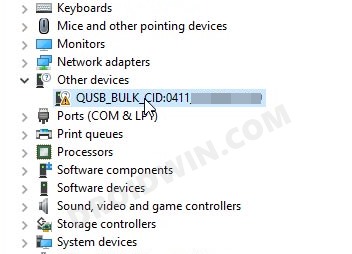
To confirm that it is indeed booted to EDL, you could connect it to the PC via USB cable and then launch Device Manager. Your device will be listed there as “QUSB_BULK_CID” along with a few numbers, which signifies that your phone is booted to the Emergency Download Mode . What’s making the matter worse is the fact that these devices might already be out of warranty, so you might have to shell out a hefty sum of money, or should you? Well, here’s everything you need to know about the Pixel 3 device automatically booting to the EDL Mode.
- How to Fix Pixel 3 Automatically Booting to EDL Mode Google Might Replace Pixel 3 Devices Stuck in EDL Mode Workaround to Fix Pixel 3 EDL Mode Issue
- Concluding Remarks
How to Fix Pixel 3 Automatically Booting to EDL Mode
This issue seems to be affecting quite a lot of users as of late, as is evident from a plethora of threads across Reddit , XDA , and Google’s support forums and issue tracker . So is there any fix in sight? Well, there are two new developments regarding this that deserve your immediate attention: Google Replacing Pixel 3 and a workaround to get out of this issue. Let’s start off with the replacement news.
Google Might Replace Pixel 3 Devices Stuck in EDL Mode
According to various reports lined up across the Reddit forums, it seems the Seach Engine giants might have agreed to replace the Pixel 3 devices that have been bugged with this EDL Mode with a working model. Here’s what users have confirmed in this regard:
Google offering Pixel 3 replacement by u/deddolo in GooglePixel
