git.refresh() error when setting up AutoGPT: How to Fix
In this guide, we will show you the steps to fix the git.refresh() error when setting up AutoGPT. There has been a major inclination of users toward automated chatbots ever since the offering from OpenAI made its presence felt. While there’s no denying the fact that ChatGPT is the best in this domain, however, we are witnessing numerous other open-source tools making quite a name for themselves.
In this regard, AutoGPT seems to have made the best use of the Chat GPT API and has quickly upscaled the popularity charts in no time whatsoever. However, its first-time setup might prove to be quite a challenging task for some, and the errors along the way only make the matter worse. In this regard, we have already talked about the ModuleNotFoundError No Module Named DotEnv error.
And now, there has been another unwanted entry to this list. Numerous users have voiced their concern regarding the git.refresh() error when setting up AutoGPT. If you are also in the same boat, then this guide will help you rectify this issue. Follow along.
Fix git.refresh() error when setting up AutoGPT
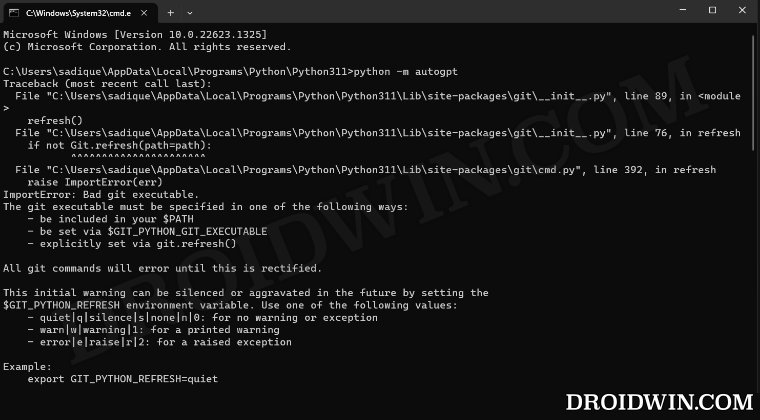
To rectify this issue, all you have to do is just execute the following command:
set GIT_PYTHON_REFRESH=quiet

- How to Install and Use AutoGPT
- Use ChatGPT with YouTube: Summarize and Transcribe Videos
- How to use PDF Files in ChatGPT [3 Methods]
- How to Create your own AI Chatbot with ChatGPT [Video]

(Cancel Reply)
Δ
