How to Activate AOD “only” when Samsung device is charging
In this guide, we will show you the steps to activate AOD only when your Samsung device is charging. Whether it’s the budget domain or the flagship level, most Samsung devices have one feature in common- the Always on Display. However, some users have said that they don’t want to keep this feature enabled all the time but only while a specific task is being carried out.
One such scenario could be when your device is plugged into a charger. So is there a native way of getting this job done or do we have to take the help of a third-party app? Well, there’s no need to opt for any app, you could create a Bixby routine and get this job done natively itself. Here’s how it could be done:
How to Activate AOD “only” when Samsung device is charging
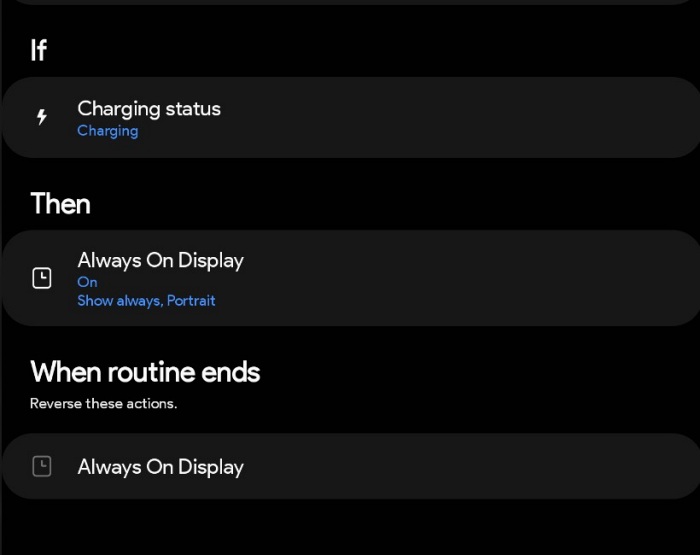
Head over to Modes And Routines, then go to the bottom right tab under Routines, and create a routine exactly as defined below
If


Charging Status [Charging]


Then


Always On Display [On, Show Always, Portrait]


When Routine Ends


Reverse these actions
- Does Galaxy S23/Plus/Ultra support Dual SIM Dual Active [DSDA]
- Enable Call Recording on Galaxy S23/Plus/Ultra [No Root]
- How to Force 120Hz Refresh Rate on Galaxy S23/Plus/Ultra
- Galaxy S23 Ultra is unable to connect to WiFi 6 5GHz

(Cancel Reply)
Δ
