How to Bypass 168 Hours Waiting Time for Xiaomi Bootloader Unlocking
UPDATE 2: There’s a new method for Xiaomi devices that will allow you to easily bypass the 168 Hours Waiting Time and unlock the Bootloader right away. However, this will only work on MediaTek devices as we will be using the MTK Exploit. So click on this link to directly jump over to that method.
UPDATE 1: The tool seems to have been patched and is hence no longer working for many users. So while you are still free to browse this article on “How to bypass the 168 hours waiting time for the Xiaomi Bootloader Unlocking process”, but it might not lead to any valuable results. With that said, once I get hold of a new workaround, will update this guide accordingly.
In this guide, we will show you the steps to bypass the 168 hours waiting time for the Xiaomi Bootloader Unlocking process. Every OEM ships its device with a locked bootloader. The idea on their part is quite simple- they only want the users to try out the stock firmware that they have provided. But, even then, they leave a small window of opportunity open for the tech enthusiasts who could bypass this limitation and try out their preferred tweaks.
Be it flashing custom ROMs, installing custom recoveries, or rooting the device via Magisk, there’s a lot to try out. In this regard, most devices just require you to execute a single line of fastboot command (fastboot oem unlock or fastboot flashing unlock) to unlock the bootloader. But Xiaomi has taken a different approach towards this. It has made it mandatory for every user to use its own Mi Unlock Tool . And this is where things begin to go south.
The tool has placed quite a few unnecessary restrictions that completely hampers the unlock process. Among them, the most irritating is the fact that you have to wait for a week before you could actually carry out the unlocking. Fortunately, there does exist a workaround through which you could bypass the 168 hours waiting time for the Xiaomi Bootloader Unlocking process. And this guide shall make you aware of just that, So without any further ado, let’s get started.
- How to Bypass 168 Hours Waiting Time for Xiaomi Bootloader Unlocking STEP 1: Enable OEM Unlocking and USB Debugging STEP 2: Add Mi Account STEP 3: Boot Xiaomi Device to Fastboot Mode STEP 4: Download Modified Mi Unlock Tool STEP 5: Bypass Xiaomi 168 hours Bootloader Unlock Wait Time
- How to Bypass 168 Hours Waiting Time for Xiaomi Bootloader Unlocking [MTK Exploit]
How to Bypass 168 Hours Waiting Time for Xiaomi Bootloader Unlocking
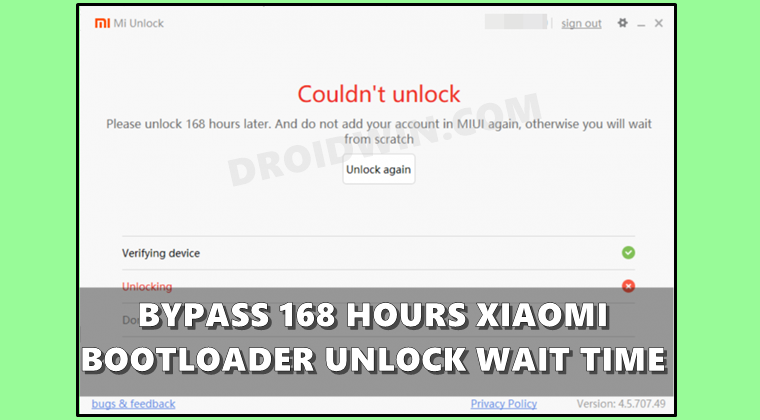
The below instructions are listed under separate sections for ease of understanding. Make sure to follow in the exact same sequence as mentioned. But before you proceed ahead, there’s an important point to keep in mind. The below process will wipe off all the data and could also nullify the device’s warranty. Droidwin and its members wouldn’t be held responsible in case of a thermonuclear war, your alarm doesn’t wake you up, or if anything happens to your device and data by performing the below steps.
STEP 1: Enable OEM Unlocking and USB Debugging
You will have to enable USB Debugging and OEM Unlocking on your device. The former will make your device recognizable by the PC in ADB mode. This will then allow you to boot your device to Fastboot Mode. On the other hand, OEM Unlocking is required to carry out the bootloader unlocking process.
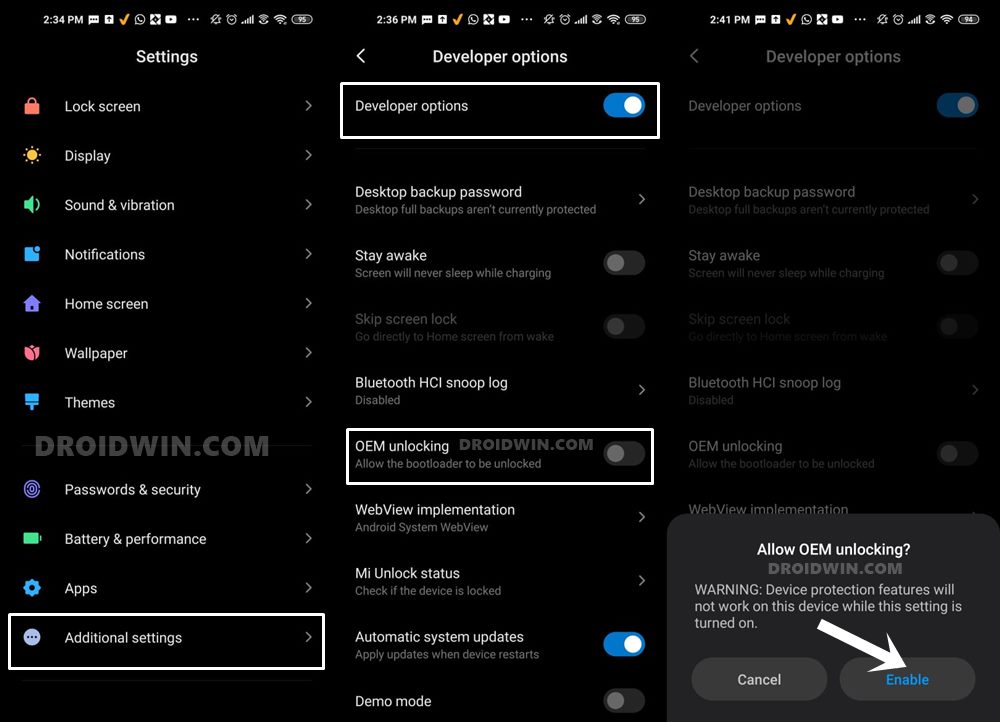
So Go to Setting > About Phone > Tap On MIUI Version 7 times. This shall enable the Developer Options. Now go to Additional Setting > Developer Options > Enable OEM Unlocking and USB Debugging.
STEP 2: Add Mi Account
Next up, you will have to bind your Mi Account with your Xiaomi Device. This same account will then be used in the tool as well. So head over to Settings > Additional Settings > Developer Options > MI Unlock Status and tap on Add account and device.
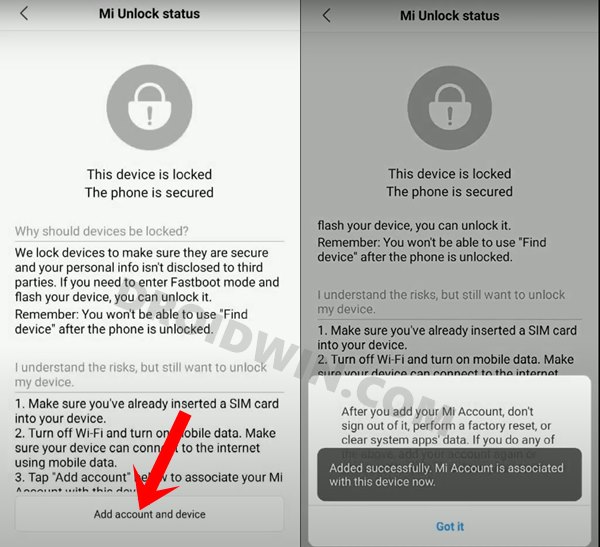
Now log in with your Mi account by following the on-screen instructions. Once the account has been successfully added, you will get the message that “Added successfully. MI account is associated with this device now”.
STEP 3: Boot Xiaomi Device to Fastboot Mode
- Connect your device to the PC via USB cable. Make sure USB Debugging is enabled.
- Then head over to the platform-tools folder, type in CMD in the address bar, and hit Enter. This will launch the Command Prompt.
- Type in the following command in the CMD window to boot your device to Fastboot Mode adb reboot bootloader
STEP 4: Download Modified Mi Unlock Tool
You may now download the Patched Mi Unlock Tool that will allow you to bypass the 168 hours waiting time for the Xiaomi Bootloader Unlocking process from the below link:
- Download: Modified Mi Unlock Tool
STEP 5: Bypass Xiaomi 168 hours Bootloader Unlock Wait Time
- Make sure that your device is connected to the PC via USB cable and is booted to Fastboot Mode.
- Now extract the downloaded tool to any convenient location on your PC.
- Then double click on the miflash_unlock.exe file to launch the tool.
- After that, agree to the Terms and Conditions.
- Now log in with the Mi Account which is linked to your device.
- Finally hit the Unlock button followed by Unlock Anyway. The process will now begin and would take a minute or two.
- Once done, you shall be notified of the same via the Unlocked Successfully message. You may now click on the Reboot Phone button to boot your device to the OS.
How to Bypass 168 Hours Waiting Time for Xiaomi Bootloader Unlocking [MTK Exploit]
The below process will wipe off all the data on your device and might void the warranty as well. Moreover, it will only work on Xiaomi devices having a Mediatek chipset. It has currently been successfully tested on POCO M3 Pro 5G and Redmi Note 10 5G. Droidwin and its members wouldn’t be held responsible in case of a thermonuclear war, your alarm doesn’t wake you up, or if anything happens to your device and data by performing the below steps.
- To begin with, download and extract MediaTekBootloaderUnlock.zip on your PC.
- Now go to the Driver folder, right-click on cdc-acm.inf, and select Install.
- Then go back to the main folder and install USBDK (x64 for 64-bit and x86 for 32-bit OS).
- Once both the drivers are installed, restart your PC. On the other hand, turn off your device.
- Now run the UnlockBootloader.bat file to start the bootloader unlock process.
- Then connect your device to the PC by holding all three buttons together [Power, Volume +/-]
- As soon as you hear a sound, immediately release all the pressed buttons.
- A few commands will now run in the batch file. Once done, it will automatically close.
- And with that your device should boot to the OS having an unlocked bootloader.
- Mi Unlock Tool Errors and their Fixes
- Fix Waiting for Device Error in ADB or Fastboot Commands
- How to Bypass Xiaomi Account Verification via Mi Unlock Tool
- How to Flash Xiaomi Fastboot ROM without Mi Flash Tool

- Amaan Khan 1 year ago Reply Awesome. Worked for me. [redmi note 8 pro] Thanks.
- jd 1 year ago Reply i get a red text and the bat files closes when trying to unlocking. leaving me with a BROM stuck phone. i disconnected the battery to power it back again but it’s not unlocked. i tried everything again and the same thing happens. where can i find a log file to see the error that i get?
- ELOY 1 year ago Reply É o celular não liga mais kkkkkkkkkkk esses tutoriais que burla o original é furada, vamos aprendendo
- raider 2 years ago Reply It work! after the mtk exploit use the official mi unlock tool
- Tim 2 years ago Reply Not working for me on Xiaomi 13 Ultra, I still have to wait another 152 hours. Time will pass, but still annoying a bit that Xiaomi lets us wait for so long. I got my new phone here, but I cannot use for a week, since all data will be lost after unblock of bootloader 🙁
- Cristian 3 years ago Reply didn’t work, when i log in, it takes me to the portal page too… I NEED HELP
- maksim 3 years ago Reply didnt work
- Debridat1 4 years ago Reply hi, not work 🙁
- TAHA 4 years ago Reply hi my device is redmi note 10 pro not working for me too whene i login to miflash unlock does not show unlock … other solution? Vetri 4 months ago Reply The same was on my case I totally logged out of my mi account created a new one and then changed in developer options and now it worked.
- KALEEM ULLAH 4 years ago Reply After login details, it opens the cloud page, and doesnt show any unlock Vetri 4 months ago Reply The same was on my case I totally logged out of my mi account created a new one and then changed in developer options and now it worked.
- Joe B 4 years ago Reply Was hopeful there is something of a hack. Probably only “expert resellers” have the right tools.
- harshit 4 years ago Reply After sign in to the mi account, it is taking to the portal page, but no showing unlock button or phone connected.
- Android_Enthusiast 4 years ago Reply Confirmed That Not Working Because Tool Outdated And Xiaomi Closed The Wait Bypass Backdoor In Latest Version
- Android_Enthusiast 4 years ago Reply Confirmed That Not Working Because Tool Outdated And Xiaomi Closed The With Bypass Backdoor In Latest Version
- bryfly 4 years ago Reply same as other users modified tool is not working. After sign in to the mi account, it is taking to the portal page, but not able to see unlock button or phone connected.
- Matthew 4 years ago Reply redmi 9 same as Pavan no unlock button only portal
- Vivek 4 years ago Reply I followed the exact process but still the same 168 hours waiting is showing Pls help to by pass this
- Mehedy Hasan 4 years ago Reply Not Working
- Sam 4 years ago Reply Hey mate, thanks a lot. Surprisingly, it worked (though it took a couple of tries). Sadique Hassan 4 years ago Reply Hi Sam, glad that it worked out for you. However, it didn’t seem to work out for some of our readers. Could you please let us know if there’s anything extra that you did, apart from the instructions mentioned here? Your reply will be highly appreciated. Ebay 2 years ago Reply Hi not work for me how ur work pleass
- Hamza 4 years ago Reply It ain’t working. The unlock tool is faulty.
- Stuart 4 years ago Reply dose not work
- Pavan 4 years ago Reply That modified tool is not working. After sign in to the mi account, it is taking to the portal page, but no showing unlock button or phone connected. Lucas 4 years ago Reply me too
(Cancel Reply)
Δ
