How to Change CSC on Samsung Galaxy Watch 5/Pro [2 Methods]
In this guide, we will show you the steps to change the CSC on your Samsung Galaxy Watch 5/Pro. While the fifth iteration of the watches brings in a slew of noteworthy features, however, you might still be missing quite a few goodies. Depending on the region to which you belong, you might not be able to use Samsung Pay or make use of the ECG and BP measurements.
This region data is tied to your watch’s Country Specific Code. But guess what, upon changing the CSC on your Galaxy Watch 5/Pro, you will easily be to bypass all the geo-restrictions and get hold of the desired features that were earlier missing from your watch. And in this guide, we will show you how to do just that. So without any further ado, let’s get started.
- How to Change CSC on Samsung Galaxy Watch 5/Pro Confirmed Working CSC Not Working CSC Change CSC on Samsung Galaxy Watch 5/Pro via Dialer Code Change CSC on Samsung Galaxy Watch 5/Pro via NetOdin
How to Change CSC on Samsung Galaxy Watch 5/Pro
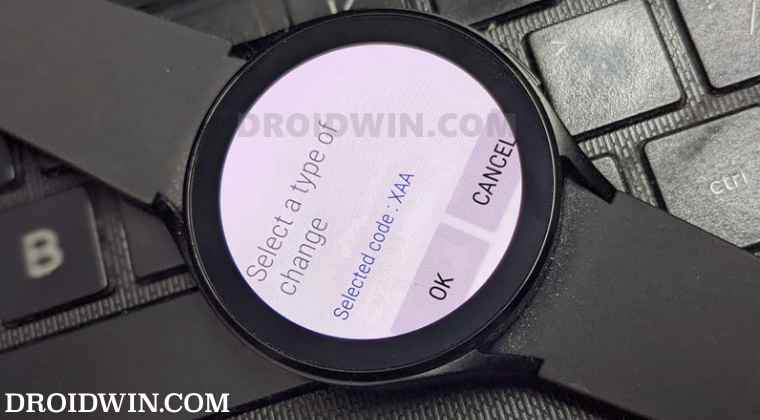
The below tweak doesn’t seem to be working on every CSC. In this regard, I am noting down the CSC on which this method worked as well as the CSC on which it doesn’t. You are welcome to inform me about your watch’s CSC and whether you were successful in changing it or not, I will add the result to this list.
Confirmed Working CSC
BTU [UK]

XAA [USA]

OXM [Multi CSC]

INU [India]

XSG [United Arab Emirates]
Not Working CSC
KOO [Korea] [Only working for 1 user to date]

DBT [Germany]

XXU [Germany?]
Change CSC on Samsung Galaxy Watch 5/Pro via Dialer Code
As for this guide, I changed my CSC from INU [India] to XAA [USA] and was able to enable Samsung Pay, add cards to it, and make payments without any issues. You are free to change the CSC to any region of your choice and then test out the results.
- Open the Dialer on your watch and type in the below command #272719434266344#
- You will now get a warning on your watch, tap OK.
- Now scroll through the list of the CSC, select the desired one, and hit Install.
- You will now get a confirmation, tap OK. That’s it, the CSC has now been changed.
Change CSC on Samsung Galaxy Watch 5/Pro via NetOdin
- To begin with, download the desired firmware for your watch from below [Credits: XDA Senior Member adfree]: SM-R900 AVH6 SM-R910 AVH6 SM-R920 AVG6
- Once downloaded, extract it anywhere on your PC.
- Then download and extract NetOdin on your PC.
- After that, boot your Watch 5 to Download Mode .
- From the Download Mode, double press the Power key. This will boot your watch to AP Mode.
- The watch’s model number will be listed next to AP, signifying a successful connection.
- Now open the WiFi menu on your PC. A new network having the name of your watch will be there.
- Select it and hit Connect. As soon as it is connected, you should see the Connected message on your watch.
- Now open NetOdin and you should see your watch connected at the top left and also in the Log [via the IP Address].
- You may now load the required firmware files in their designated partition [it’s usually the TAR file in the AP partition] and hit Start.
- The flashing process will now begin and once done, your watch will automatically boot to the OS.
- How to Debloat/Remove Bloatware from Galaxy Watch 5/Pro
- Sideload APK/Install Apps via ADB in Galaxy Watch 5/Pro [2 Methods]
- Google Assistant not working in Galaxy Watch 5 Pro: How to Fix
- Install Google Pay/Wallet in Galaxy Watch 5/Pro in an Unsupported Country

- JK 2 years ago Reply Dialer method failed for me too on Galaxy Watch Pro5. Is this working for ANYONE with recent firmware updates?
- Terra 2 years ago Reply I can’t even get to the dialer because the 5 i bought (im in China ) wony even acknowledgr my phone/vice versa.
- Kouakou 2 years ago Reply I am in China for 1 year. I just bought a watch 5 pro but cannot connect the watch to my S23+. My question is if the solution you proposed works with this watch. because my problem is I don’t have access to the watch menu at all. so I don’t have access to the dialer to dial the code #….#. If possible, offer me a reliable solution. THANKS
- Stylianos 2 years ago Reply Even with second option (odin) nothing changed. How can I change csc
- Hussain 2 years ago Reply The 2nd method worked for me we’ll.
- Dossay 2 years ago Reply NetOdin does not connect to the clock, although the clock says connected. IP not showing up in NetOdin
- nika 3 years ago Reply after installing the software from pc it still shows the same regions, how do you actually change the region when installing from the pc?
- marchand 3 years ago Reply hello,do you have the firmware SM-R925 thank you
- Faisal 3 years ago Reply dear all, you need to put your watch’s IMEI number after #272 and not the one shown in this article. Toly 3 years ago Reply None of the codes (#272IMEI#; #272719434266344#) worked for me. I’m trying to use NetOdin but I can’t find R925 firmware to download it. Appreciate any help. Thanks…
- Luciano 3 years ago Reply Not working for Galaxy Watch 5. Current CSC is OXX.
- Andrew 3 years ago Reply Damn, I had no clue that it would even work but surprisingly it did! However, I have found out is the fact that this tweak might not work with every CSC Code. Sadique Hassan 3 years ago Reply Hi Andrew, could you please let us know for which CSC it did work [your original CSC and the new changed CSC code]? Thanks in advance.
- JOAO 3 years ago Reply I did the procedure in XAA to try to switch to ZTO, but nothing happened. Rodrigo 3 years ago Reply Boa tarde, João Conseguiu habilitar se galaxy watch para o Brasil?
- Rafael 3 years ago Reply Don’t work on galaxy watch 5
- Ren 3 years ago Reply Hello Admin This trick is not working for galaxy watch 5 40mm. After dial the numbers above nothing appears from the watch. Could you please recheck.
- Adarsh 3 years ago Reply Hi , I am getting error that connection problem or invalid MMI Code Ricardo 3 years ago Reply Hi, did you even gor it working?
- John 3 years ago Reply Not working at all for me. After dialing the numbers mentioned in the article. Unfortunately nothing happens at all. My watch was bought in mainland china.
- Stylianos Kalintzis 3 years ago Reply EUR csc works for me.
- Timothy 3 years ago Reply Hi I type the command on my dialer but nothing is shows up.
- Stylianos 3 years ago Reply I did the change. How do I know that it working? Stylianos 3 years ago Reply I made it I used EUR and worked just fine.
- Mike 3 years ago Reply #272719434266344# command leads to “Connection problem or invalid MMI code” – how can thi be fixed
- Shehab 3 years ago Reply The code did not work on the watch dialer. Even when I pressed the dial button
(Cancel Reply)
Δ
