How to Check Anti Rollback Index on Pixel Devices
In this guide, we will shed some light on how you can check the Anti Rollback Index on Pixel devices. Up until now, this index checking was only required for Xiaomi as they follow a strict downgrading rule – you can only do so if the ROM’s rollback index is equal to or more than that of the device. However, now Pixel has joined this fray as well, with the sixth series being in the line of fire more often than not.
Three years back, there was a bootloader update that increased the anti-rollback version for these devices when installing the latest Android 13 build. As a result of this, the Pixel 6A/6/6 Pro can no longer downgrade from Android 13 to Android 12 [well, atleast on paper]. Fast forward to May of this year, and the Anti Rollback Index once again had a major role to play.
This time, the Pixel 8 series was the new addition, apart from the usual suspect, the Pixel 6 series. The May 2025 update increments the Anti Rollback version of the bootloader . So after installing the update in one slot, you and to boot to Fastboot Mode, and then install the said update in another slot as well, or else a bricked device might be on the cards.
Since it was the second time this has happened, it is of paramount importance to get yourself acquainted with the steps to check the Anti Rollback Index of your Pixel device. So without any further ado, let’s get started.
- How to Check Anti Rollback Index on Pixel Devices Finding the Index of Anti-Rollback Using Pixel Flasher Fastboot Getvar All Some Other Useful Fastboot Commands for Slots
How to Check Anti Rollback Index on Pixel Devices
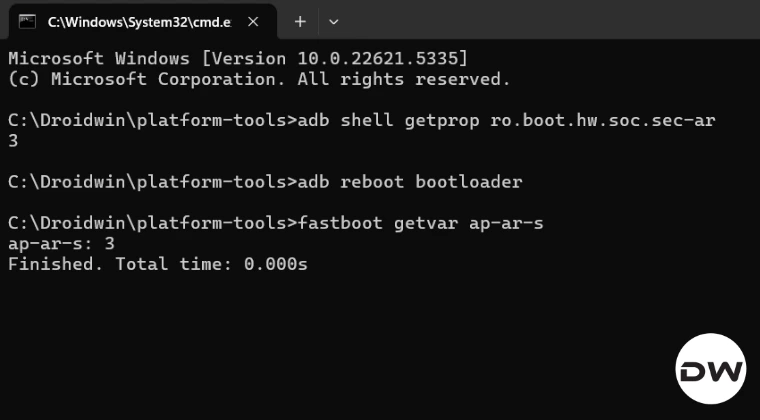
Finding the Index of Anti-Rollback
From ADB

adb shell getprop ro.boot.hw.soc.sec-ar


From Fastboot Mode

fastboot getvar ap-ar-s

So if the value you’re seeing is 2, then it means that the fuse has been updated twice for your device.
Using Pixel Flasher
If you check the AVB Image info on boot.img/vbmeta.img (in Pixel Flasher Dev Tools | AVB – Get Image Info), you will see the Rollback Index in epoc. Let’s say that the Rollback Index is: 1746403200, then it would translate to Monday, 5 May 2025 00:00:00 GMT +00:00 [ here’s how ]. So, assuming that the index on the device is 3 and the date 3 is mapped to is May 10, 2025, then flashing one with Rollback index 1746403200 would fail.
[Epoch time, or Unix time, is a universal, numerical representation of time as the number of seconds that have passed since a specific point called the epoch, which is 00:00:00 Coordinated Universal Time (UTC) on January 1, 1970].
Fastboot Getvar All
Even though we have got our hands on some new and slightly complicated fastboot commands and epoc tweaks above, the basic Fastboot command should still get the job done, as it gives out a clear picture whether a slot is bootable or not. For example, upon executing the below command, you’ll get the output whether a slot is bootable/successful: slot-successful:a, slot-successful:b, slot-unbootable:a, slot-unbootable:b. This can help diagnose if slot ‘b’ or vice versa is in a state that might prevent it from being set as active.
fastboot getvar all

Some Other Useful Fastboot Commands for Slots
fastboot getvar version-bootloader: Displays the version of the bootloader software.

fastboot getvar unlocked: Displays if the bootloader is unlocked (yes) or locked (no).

fastboot getvar secure: Often shows if the device is a secure boot device.

fastboot getvar is-slot-successful:a (and is-slot-successful:b): Checks if slot 'a' (or 'b') is marked as having successfully booted.
fastboot getvar is-slot-unbootable:a (and is-slot-unbootable:b): Checks if slot 'a' (or 'b') is marked as unbootable.
- How to Fix Anti-Rollback on Pixel 6/8 series after May 2025 Update
- Downgrade Pixel 6A/6/Pro from Android 13 to Android 12: Bypass Anti Rollback
- Why I Cancelled and Returned My Pixel 10 Pro XL for 9 Pro XL
- How to Spoof your Device to Pixel 10 Pro and Get Free Gemini Pro

(Cancel Reply)
Δ
