How to Debloat/Remove Bloatware on Galaxy S24 Ultra
In this guide, we will show you a couple of methods to debloat/remove bloatware from your Galaxy S24 Ultra. The newest addition to the Samsung family brings in a power-packed specs sheet, tons of nifty AI features, and an impressive camera setup. On the software front, it houses One UI 6.1 which is based on the latest Android 14 OS.
While the user interface of the underlying OS skin is pretty impressive in itself, however, Samsung has been notoriously infamous for bloating their OS with tons of unnecessary preinstalled apps. Most of these apps are of no use to the users and even if the need arises, one could easily get hold of them from the Play Store.
So we could just head over to the app’s info page and hit Uninstall next to the desired one? Unfortunately, it’s not that easy. This is because these apps are treated as system apps and hence you cannot uninstall them the normal way. With that said, there does exist a couple of nifty workarounds that should help you get this job done with ease. So without further ado, let’s check them out.
- How to Debloat/Remove Bloatware on Galaxy S24 Ultra Via ADB App Control STEP 1: Install Android SDK STEP 2: Enable USB Debugging STEP 3: Establish ADB Shell Connection STEP 4A: Debloat Galaxy S24 Ultra via ADB App Control STEP 4B: Debloat Galaxy S24 Ultra Via ADB Commands Samsung Bloatware Apps Google Bloatware Apps Advertisement Apps Network Provider (Orange) Samsung System Apps Safe to Disable Google System Apps Safe to Disable Advertisements Apps Orange App [Carrier] All Bloatware App List
How to Debloat/Remove Bloatware on Galaxy S24 Ultra
There exist two methods of getting this job done- manual [via ADB Commands] and automatic [via the ADB App Control app]. Go through both of them once and then try out the one that is in sync with your requirements. Droidwin and its members wouldn’t be held responsible in case of a thermonuclear war, your alarm doesn’t wake you up, or if anything happens to your device and data by performing the below steps. Moreover, STEPS 1 to 3 are the prerequisites that are needed for both these methods.
NOTE: If you have any concerns about whether the removal of any of the apps would cause any issues on your device or not, then the best bet is to first disable them and use your device for a minute or two. If everything is working well and good, then you could permanently remove them from your device. However, if your device is not working as expected, then you could easily re-enable that app [explained at the end of this guide].
Moreover, you could also uninstall the bloatware app from your devices instead of disabling it. In case something goes wrong, you could simply reinstall it as well [explained at the end of this guide], however, it may prove to be hit-and-miss in some cases. So the recommended method is to disable/re-enable instead of uninstalling/reinstalling it.
Via ADB App Control
STEP 1: Install Android SDK
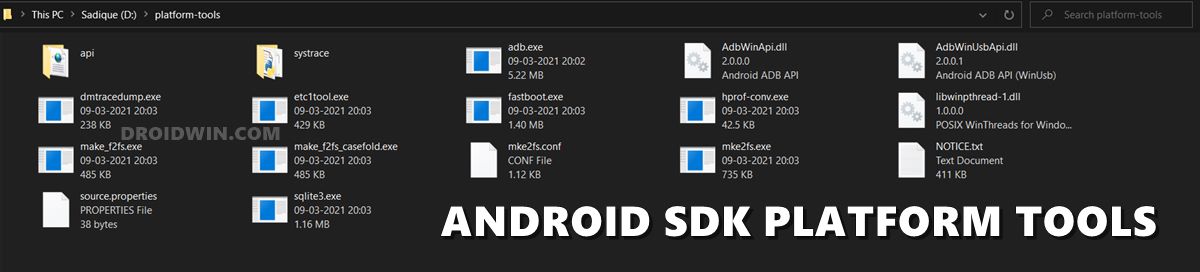
First and foremost, you will have to install the Android SDK Platform Tools on your PC. This is the official ADB and Fastboot binary provided by Google and is the only recommended one. So download it and then extract it to any convenient location on your PC. Doing so will give you the platform-tools folder, which will be used throughout this guide.
STEP 2: Enable USB Debugging
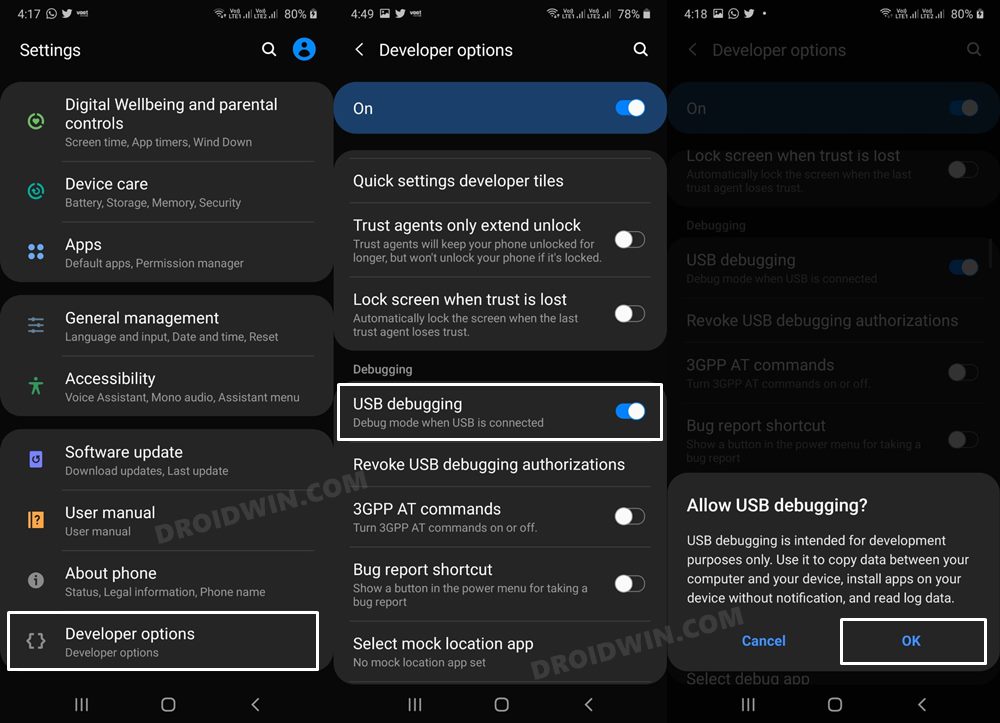
Next up, you will have to enable USB Debugging on your device so that it is recognizable by the PC in ADB mode. So head over to Settings > About Phone > Tap on Build Number 7 times > Go back to Settings > System > Advanced > Developer Options > Enable USB Debugging.
STEP 3: Establish ADB Shell Connection
- To begin with, connect your device to the PC via USB cable. Make sure USB Debugging is enabled.
- Then head over to the platform-tools folder, type in CMD in the address bar, and hit Enter. This will launch the Command Prompt.
- Now in the following command in the CMD window to verify the ADB connection: adb devices
- If you get the device ID, then the connection stands successful. Now type in the below command to open the Shell environment: adb shell
- It will now list out your device codename, which means that the shell connection has been successfully established as well, and you are good to go ahead to debloat or remove bloatware from Samsung Galaxy S24 Ultra.
STEP 4A: Debloat Galaxy S24 Ultra via ADB App Control
- To begin with, download and install the ADB App Control on your PC.
- Then launch it and check the desired number of apps that you want to disable/uninstall.
- Note: The developer has also provided its list of bloatware, to use that, click on Load Preset. Credits: XDA Senior Member malikin
- If you want to delete those app’s data as well, then check Delete Data and Cache.
- Now click on the drop-down menu at the bottom right and select either Uninstall or Disable.
- Finally, click on the Disable/Uninstall button at the bottom right and wait for it to complete.
STEP 4B: Debloat Galaxy S24 Ultra Via ADB Commands
While there is no universal bloatware app list as such an app that might be tagged as ineffective for one user could prove to be of quite significant importance for the other. As a result of this, you shouldn’t copy-paste all the commands listed below, instead use only those that correspond to the apps that you wish to uninstall/disable from your device.
- To find the list of all the apps installed as well as their package names, you may execute the below command: pm list packages
- Now, the generic command to uninstall any bloatware from a device is: pm uninstall -k –user 0 PackageName
- For example, the package name for Game Tools is com.samsung.android.game.gametools, so its removal command will be: pm uninstall -k –user 0 com.samsung.android.game.gametools
- In the same manner, you may now directly copy the bloatware removal command corresponding to their app from the below list and paste it into the CMD window. [Credits: XDA Senior Member Tomatot-].
Samsung Bloatware Apps
- com.samsung.SMT.lang_en_us_l03
- com.samsung.SMT.lang_fr_fr_l01
- com.samsung.android.app.find
- com.samsung.android.app.notes
- com.samsung.android.app.reminder
- com.samsung.android.app.spage
- com.samsung.android.app.tips
- com.samsung.android.app.watchmanager
- com.samsung.android.arzone
- com.samsung.android.bixby.ondevice.enus
- com.samsung.android.bixby.ondevice.frfr
- com.samsung.android.calendar
- com.samsung.android.game.gamehome
- com.samsung.android.nmt.apps.t2t.languagepack.enfr
- com.samsung.android.oneconnect
- com.samsung.android.spay
- com.samsung.android.tvplus
- com.samsung.android.voc
- com.samsung.sree
- com.sec.android.app.clockpackage
- com.sec.android.app.kidshome
- com.sec.android.app.popupcalculator
- com.sec.android.app.sbrowser
- com.sec.android.app.shealth
- com.sec.android.app.voicenote
Google Bloatware Apps
com.google.android.apps.docs
com.google.android.apps.photos
com.google.android.apps.youtube.music
com.google.android.videos
com.amazon.appmanager
com.amazon.mShop.android.shopping
com.booking
com.booking.aidprovider
com.facebook.katana
com.microsoft.office.officehubrow
com.microsoft.office.outlook
Network Provider (Orange)
- com.orange.appshop
- com.orange.mail.fr
- com.orange.orangeetmoi
- com.orange.owtv
- com.orange.phone
- com.orange.securite
Samsung System Apps Safe to Disable
- com.aura.oobe.samsung this is the app that allows your carrier to install apps for you…
- com.samsung.android.app.camera.sticker.facearavatar.preload AR stuff
- com.samsung.android.app.omcagent Samsung Recommended apps
- com.samsung.android.app.parentalcare Parental Controls
- com.samsung.android.appseparation Separated Apps
- com.samsung.android.ardrawing AR stuff
- com.samsung.android.aremoji AR stuff
- com.samsung.android.aremojieditor AR stuff
- com.samsung.android.bixby.agent Bixby Voice
- com.samsung.android.bixby.wakeup Bixby wake-up
- com.samsung.android.bixbyvision.framework Bixby VisionFramework
- com.samsung.android.dkey Samsung Wallet Digital Key
- com.samsung.android.fmm Find My Mobile (Samsung)
- com.samsung.android.game.gametools Game Booster
- com.samsung.android.game.gos Game Optimizing Service
- com.samsung.android.ipsgeofence Samsung Visit In
- com.samsung.android.kidsinstaller Samsung Kids INstaller
- com.samsung.android.mdecservice Call & text on other devices
- com.samsung.android.mdx Link to Windows Service
- com.samsung.android.messaging Samsung Messages
- com.samsung.android.rubin.app Customization Service
- com.samsung.android.samsungpass Samsung Pass
- com.samsung.android.samsungpassautofill Autofill with Samsung Pass
- com.samsung.android.smartswitchassistant Samsung Smart Switch
- com.samsung.android.spayfw Samsung Pay Framework
- com.samsung.storyservice Gallery stories
- com.sec.android.app.billing Samsung Checkout
- com.sec.android.easyMover.Agent Smart Switch Agent
- com.sec.android.easyMover Samsung Smart Switch
- com.sec.android.mimage.avatarstickers AR Emoji Stickers
Google System Apps Safe to Disable
com.android.apps.tag Tags
com.android.bookmarkprovider Bookmarks Provider
com.android.chrome Chrome
com.android.dreams.basic ScreenSaver
com.android.dreams.phototable ScreenSaver
com.android.hotwordenrollment.okgoogle Google Assistant
com.android.hotwordenrollment.xgoogle Google Assistant
com.android.providers.partnerbookmarks Bookmarks
com.google.android.apps.googleassistant Assistant
com.google.android.apps.tachyon Google Meet
com.google.android.gm Gmail
com.google.android.gms.location.history Google Location History
com.google.android.googlequicksearchbox Google App
com.google.android.health.connect.backuprestore Google Health
com.google.android.healthconnect.controller Google Health
com.google.android.onetimeinitializer Google One Time Init
com.google.android.projection.gearhead Android Auto
com.google.android.setupwizard Android Setup
com.google.android.syncadapters.calendar Google Calendar Sync
com.google.android.youtube YouTube
com.google.ar.core Google Play Service for AR
com.sec.android.app.chromecustomizations Chrome Customizations (e.g. home button)
com.sec.android.daemonapp Android Weather Wather
com.sec.android.mimage.avatarstickers AR stuff
com.facebook.services Facebook crap
com.facebook.appmanager Facebook crap
com.microsoft.appmanager Link to Windows
com.microsoft.skydrive Microsoft OneDrive
Orange App [Carrier]
- com.orange.update App Center
All Bloatware App List
com.android.apps.tag

com.android.bips

com.android.bookmarkprovider

com.android.chrome

com.android.egg

com.android.hotwordenrollment.okgoogle

com.android.hotwordenrollment.xgoogle

com.android.internal.display.cutout.emulation.corner

com.android.internal.display.cutout.emulation.double

com.android.internal.display.cutout.emulation.tall

com.android.internal.systemui.navbar.gestural

com.android.internal.systemui.navbar.gestural_extra_wide_back

com.android.internal.systemui.navbar.gestural_narrow_back

com.android.internal.systemui.navbar.gestural_wide_back

com.android.printspooler

com.android.providers.calendar

com.android.role.notes.enabled

com.android.theme.font.notoserifsource

com.facebook.appmanager

com.facebook.katana

com.facebook.services

com.facebook.system

com.google.android.adservices.api

com.google.android.apps.aiwallpapers

com.google.android.apps.docs

com.google.android.apps.googleassistant

com.google.android.apps.photos

com.google.android.apps.tachyon

com.google.android.apps.youtube.music

com.google.android.feedback

com.google.android.gm

com.google.android.gms.supervision

com.google.android.googlequicksearchbox

com.google.android.healthconnect.controller

com.google.android.onetimeinitializer

com.google.android.partnersetup

com.google.android.printservice.recommendation

com.google.android.projection.gearhead

com.google.android.safetycenter.resources

com.google.android.syncadapters.calendar

com.google.android.videos

com.google.android.youtube

com.google.ar.core

com.google.mainline.adservices

com.google.mainline.telemetry

com.knox.vpn.proxyhandler

com.microsoft.appmanager

com.microsoft.skydrive

com.osp.app.signin

com.samsung.android.accessibility.talkback

com.samsung.android.app.appsedge

com.samsung.android.app.find

com.samsung.android.app.notes

com.samsung.android.app.omcagent

com.samsung.android.app.parentalcare

com.samsung.android.app.settings.bixby

com.samsung.android.app.spage

com.samsung.android.app.tips

com.samsung.android.app.updatecenter

com.samsung.android.app.watchmanager

com.samsung.android.app.watchmanagerstub

com.samsung.android.ardrawing

com.samsung.android.aremoji

com.samsung.android.aremojieditor

com.samsung.android.arzone

com.samsung.android.authfw

com.samsung.android.beaconmanager

com.samsung.android.bixby.agent

com.samsung.android.bixby.wakeup

com.samsung.android.bixbyvision.framework

com.samsung.android.calendar

com.samsung.android.carkey

com.samsung.android.coldwalletservice

com.samsung.android.da.daagent

com.samsung.android.dbsc

com.samsung.android.dkey

com.samsung.android.fmm

com.samsung.android.game.gamehome

com.samsung.android.game.gametools

com.samsung.android.game.gos

com.samsung.android.gru

com.samsung.android.ipsgeofence

com.samsung.android.kidsinstaller

com.samsung.android.knox.analytics.uploader

com.samsung.android.knox.app.networkfilter

com.samsung.android.knox.attestation

com.samsung.android.knox.containercore

com.samsung.android.knox.kpecore

com.samsung.android.knox.mpos

com.samsung.android.knox.pushmanager

com.samsung.android.knox.zt.framework

com.samsung.android.mapsagent

com.samsung.android.mcfserver

com.samsung.android.mdx

com.samsung.android.messaging

com.samsung.android.mobileservice

com.samsung.android.oneconnect

com.samsung.android.peripheral.framework

com.samsung.android.samsungpass

com.samsung.android.samsungpassautofill

com.samsung.android.scloud

com.samsung.android.scpm

com.samsung.android.service.peoplestripe

com.samsung.android.service.stplatform

com.samsung.android.service.tagservice

com.samsung.android.settingshelper

com.samsung.android.smartmirroring

com.samsung.android.smartsuggestions

com.samsung.android.spay

com.samsung.android.spayfw

com.samsung.android.tvplus

com.samsung.android.visionintelligence

com.samsung.android.voc

com.samsung.android.wallpaper.magician

com.samsung.cmfa.AuthTouch

com.samsung.ecomm

com.samsung.internal.systemui.navbar.gestural_no_hint

com.samsung.internal.systemui.navbar.sec_gestural

com.samsung.internal.systemui.navbar.sec_gestural_no_hint

com.samsung.petservice

com.samsung.videoscan

com.sec.android.app.billing

com.sec.android.app.desktoplauncher

com.sec.android.app.dexonpc

com.sec.android.app.kidshome

com.sec.android.app.samsungapps

com.sec.android.app.sbrowser

com.sec.android.app.shealth

com.sec.android.app.ve.vebgm

com.sec.android.app.vepreload

com.sec.android.desktopmode.uiservice

com.sec.android.dexsystemui

com.sec.android.easyonehand

com.sec.android.mimage.avatarstickers

com.sec.enterprise.knox.cloudmdm.smdms

com.sec.location.nsflp2

com.sec.penup
- Adaptive Battery Protection Missing in Galaxy S24 Ultra [Fix]
- Choose Different SIMs for Call/Message/Data in Galaxy S24 Ultra?
- Android Auto not working with Galaxy S24 Ultra [Fixed]
- How to Change CSC on Galaxy S24 Ultra

(Cancel Reply)
Δ
