How to Disable/Enable System Apps in Galaxy Watch 4
In this guide, we will show you the steps to disable/enable system apps on your Galaxy Watch 4. The fourth iteration of the watch from the South Korean giants is the first in the lineup that beholds the Android-based OS. And this in itself translates to your ability to carry out a plethora of tweaks that you would normally do on an Android smartphone. Among them, it is the ability to sideload apps from outside the Play Store via ADB Commands or using an IP Address that has been at the top of the priority queue for many users.
Talking about apps, there are quite a few ones that are preinstalled on this watch. However, truth be told, most of them are indeed quite useful, unlike in the smartphone domain where we straightaway uninstall those apps. With that said, there are still a few apps that you might not interact with on a daily basis but they would still be carrying out their background activities on a daily basis. Likewise, a few apps might not be needed at all, but you would still not likely take the extreme approach of permanently removing it from your watch.
So in all these cases, disabling those apps would be the best route forward. Once you do so, those apps wouldn’t run in the background, and neither would they occupy any space in the app drawer. So combine these two and you get longer battery life plus a clean stock user interface. Keeping all these perks in mind, let’s now get started with the steps to disable/enable system apps on your Galaxy Watch 4.
- How to Disable/Enable System Apps in Galaxy Watch 4 STEP 1: Install Android SDK STEP 2: Enable ADB Debugging in Galaxy Wach 4 STEP 3: Connect Galaxy Watch 4 to PC via ADB Command STEP 4: Get a List of All Installed Apps in Galaxy Watch 4 STEP 5: Disable System App from Galaxy Watch 4 via ADB Commands
- How to Enable System Apps in Galaxy Watch 4
How to Disable/Enable System Apps in Galaxy Watch 4
STEP 1: Install Android SDK
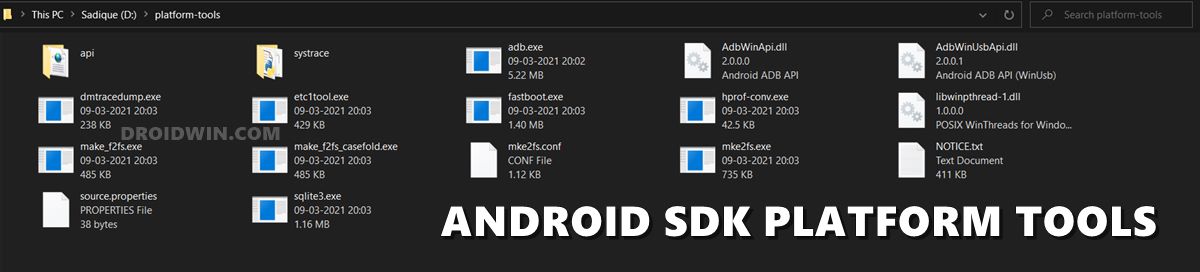
First and foremost, you will have to install the Android SDK Platform Tools on your PC. This is the official ADB and Fastboot binary provided by Google and is the only recommended one. So download it and then extract it to any convenient location on your PC. Doing so will give you the platform-tools folder, which will be used throughout this guide.
STEP 2: Enable ADB Debugging in Galaxy Wach 4
- Head over to the Settings > About Watch > Software and tap Software Version 7 times.
- Then go to Developer Options and enable the toggle next to ADB Debugging.
- After that, scroll down a little bit and enable the toggle next to Debug over WiFi.
- It will now bring up the IP Address, note it down somewhere [do not include the port number, i.e. values after the colon].
- For example, if the entire value is 192.168.1.3:5555, then your IP will be 192.168.1.3.
STEP 3: Connect Galaxy Watch 4 to PC via ADB Command
- Head over to the platform-tools folder, type in CMD in its address bar, and hit Enter. This will launch Command Prompt.
- Now type in the below command in this CMD window [make sure to replace IP accordingly]. adb connect IP
- You will now get a prompt on your watch, tap OK or Always Allow from this computer.
- Finally, execute the below command to verify the ADB Connection between your watch and PC adb devices
- You will now get your IP Address and port number, followed by the ‘device’ keyword. This signifies that the connection has been successfully established.
STEP 4: Get a List of All Installed Apps in Galaxy Watch 4
- To begin with, enable the shell environment using the below command adb shell
- Now execute the below command to get a list of all the installed apps’ package names. pm list packages
- Given below is the output that you would be getting after typing the above command. Just copy the package name of the app that you wish to disable.
- For example, if you want to disable the Bixby app from your watch, then copy its app package name is com.samsung.android.bixby.agent
com.android.cts.priv.ctsshim


com.google.android.ext.services


com.samsung.android.knox.wkes


com.sec.location.nfwlocationprivacy


com.android.providers.telephony


com.sec.android.app.parser


com.android.dynsystem


com.samsung.android.networkstack


com.samsung.android.calendar


com.samsung.android.watch.cameracontroller


com.android.providers.calendar


com.sec.automation


com.android.providers.media


com.google.android.ext.shared


com.samsung.android.watch.watchface.analoguefont


com.samsung.android.watch.watchface.simplecomplication


com.skms.android.agent


com.samsung.android.wear.shealth


com.samsung.android.incallui


com.sec.usbsettings


com.samsung.android.watch.watchface.premiumanalog


com.sec.factory


com.android.companiondevicemanager


com.android.mms.service


com.samsung.android.watch.watchface.myphoto


com.samsung.android.watch.watchface.mystyle


com.android.providers.downloads


com.samsung.android.video.wearable


com.google.android.networkstack.tethering.overlay


com.samsung.android.storage.watchstoragemanager


com.monotype.android.font.foundation


com.samsung.android.gallery.watch


com.samsung.android.watch.compass


com.sk.vas.tshare


com.sec.android.app.factorykeystring


com.samsung.android.watch.runestone.app


com.sec.android.app.samsungapps


com.samsung.android.sdk.handwriting.watch


com.samsung.android.watch.findmyphone


com.samsung.android.watch.findmywatch


com.sec.android.app.wlantest


com.google.android.overlay.modules.permissioncontroller


com.android.vending


com.android.networkstack


com.samsung.android.watch.weather


com.google.android.wearable.batteryservices


com.android.modulemetadata


com.android.certinstaller


com.android.carrierconfig


com.google.android.marvin.talkback


com.samsung.android.app.esimkeystring


com.samsung.SMT


com.samsung.rtl


android


com.samsung.rtlassistant


com.google.android.overlay.modules.cellbroadcastreceiver


com.samsung.android.aircommandmanager


com.google.android.apps.wearable.settings


com.android.mtp


com.android.nfc


com.samsung.android.messaging


com.android.backupconfirm


com.samsung.android.stextclassifier


com.samsung.android.app.telephonyui


com.android.statementservice


com.samsung.android.wear.musictransfer


com.samsung.android.watch.watchface.basicclock


com.samsung.android.bixby.agent


com.sec.android.app.hwmoduletest


com.sec.bcservice


com.sec.modem.settings


com.samsung.hidden.SKT


com.monotype.android.font.samsungone


com.google.android.permissioncontroller


com.android.wearable.resources


com.sec.android.app.servicemodeapp


com.samsung.android.watch.watchface.simpleclassic


com.android.providers.settings


com.samsung.accessibility


com.sec.imsservice


com.samsung.android.service.health


com.google.android.apps.wearable.systemui


com.android.webview


com.samsung.android.watch.watchface.dualwatch


com.android.se


com.android.inputdevices


com.samsung.advancedcallservice


com.samsung.android.app.contacts


com.samsung.android.app.reminder


com.samsung.android.watch.watchface.together


com.samsung.android.watch.flashlight


com.samsung.android.watch.watchface.typography


com.samsung.android.watch.watchface.large


com.samsung.android.watch.watchface.animal


com.google.android.apps.maps


com.samsung.android.qrreader.watch


com.samsung.advp.imssettings


com.samsung.android.watch.alarm


com.android.cellbroadcastreceiver


com.sec.android.RilServiceModeApp


com.samsung.android.mdecservice


com.samsung.android.watch.timer


android.ext.shared


com.samsung.android.smartgesture


com.samsung.android.wear.blockednumber


com.android.server.telecom


com.samsung.euicc


com.android.keychain


com.google.android.packageinstaller


com.google.android.gms


com.google.android.gsf


com.google.android.tts


android.ext.services


com.android.wifi.resources


com.google.android.partnersetup


com.sec.android.diagmonagent


com.android.localtransport


com.samsung.android.batterysavingsettings


com.samsung.android.wearable.knox.attestation


com.samsung.android.watch.stf


com.google.android.wearable.ambient


com.samsung.packageinstalleroverlay


com.samsung.android.shealthmonitor


com.samsung.android.watch.watchface.aremoji


com.android.managedprovisioning


com.samsung.android.watch.watchface.analogmodular


com.android.networkstack.tethering


com.android.soundpicker


com.samsung.android.watch.watchface.emergency


com.samsung.android.watch.watchface.simpleanalogue


com.samsung.android.dialer


com.samsung.android.watch.safety_assistance


com.samsung.android.dqagent


com.google.android.clockworkicons


com.google.android.wearable.overlay.home.merlot


com.samsung.android.wearable.setupwizard


com.sem.factoryapp


com.samsung.android.watch.stopwatch


com.google.android.wearable.healthservices


com.samsung.wear.contacts.sync


com.ims.dm


com.google.android.apps.wearable.retailattractloop


com.sec.android.soagent


com.samsung.android.wearable.sysui


com.sec.phone


com.samsung.android.bixby.wakeup


com.samsung.android.honeyboard


com.samsung.android.scloud


com.samsung.android.location.locproxy


com.sec.app.RilErrorNotifier


com.samsung.euicc.wmservice


com.samsung.android.watch.watchface.bitmoji


com.sec.android.app.bluetoothtest


com.sec.android.sdhms


com.android.networkstack.permissionconfig


com.samsung.android.mediacontroller


com.google.android.wearable.app


com.android.cts.ctsshim


com.samsung.android.watch.screencapture


com.samsung.android.wear.samsungvoiceinput


com.samsung.android.watch.watchface.digitalmodular


com.samsung.android.wcs.extension


com.samsung.android.wearable.samsungaccount


com.samsung.android.providers.contacts


com.android.phone


com.android.shell


com.android.wallpaperbackup


com.android.providers.blockednumber


com.android.providers.userdictionary


com.android.providers.media.module


com.samsung.android.watch.watchface.superfiction


com.google.android.clockwork.oemsetup


com.wssyncmldm


com.samsung.android.watch.worldclock


com.android.hotspot2.osulogin


com.samsung.android.clientconnection


com.android.location.fused


com.sec.android.app.personalization


com.samsung.android.apps.wearable.recent


com.samsung.android.watch.watchface.digitalfont


com.samsung.aasaservice


com.samsung.android.watch.watchface.endangeredanimal


com.samsung.android.cidmanager


com.android.bluetooth


com.samsung.android.watch.watchface.companionhelper


com.samsung.sec.android.application.csc


com.samsung.android.samsungnetworklocation


com.google.android.wearable.frameworkpackagestubs


com.samsung.android.watch.watchface.tickingsound


com.samsung.android.mcfds
STEP 5: Disable System App from Galaxy Watch 4 via ADB Commands
- Use the below command syntax to disable the desired system app from your Galaxy Watch 4 pm disable-user –user 0 app-name
- For example, if you wish to disable Bixby, then the aforementioned command will transform to pm disable-user –user 0 com.samsung.android.bixby.agent
How to Enable System Apps in Galaxy Watch 4
- If at any point in time, you wish to revert the decision and re-enable the system app, then repeat STEP 1 to 4, and then execute the below command pm enable –user 0 app-name
- For example, to reinstall the world clock app, the above command will transform to pm enable –user 0 com.samsung.android.bixby.agent
- Sideload APK/Install Apps via ADB Commands in Galaxy Watch 4
- ADB Debugging not working in Galaxy Watch 4: How to Fix
- Install Google Pay in Galaxy Watch 4 in an Unsupported Country
- Galaxy Watch 4 not working with Huawei: How to Fix

(Cancel Reply)
Δ
