How to Download, Install and Use QFIL Tool | Flash Firmware Guide
In this guide, we will show you the steps to download, install and use the QFIL Tool to flash the MBN and XML firmware file. Qualcomm devices have the biggest share in the smartphone industry and this isn’t going to change anytime soon. Not only for the general users, but the devices with Qualcomm Snapdragon chipset also behold a plethora of opportunities for the tech enthusiasts as well.
However, no matter if you are a general user or a geek, there’s an important tool that you need to get hold of. And that is Qualcomm’s very own QFIL Tool. In this flash firmware guide, we will show you the steps to download, install and use the QFIL Tool to flash MBF and XML firmware. Without any further ado, let’s get started.
- What is QFIL Tool? Unbrick and Fix Bootloop Flash ELF and MBN Firmware Portable Application
- Download Latest Qualcomm Flash Image Loader QFIL Tool
- Download ELF/MBN Firmware
- How to Install QFIL Tool
- How to Use QFIL Tool Fix QFIL Download Fail Firehose Fail FHLoader Fail Process Fail
What is QFIL Tool?
Qualcomm Flash Image Loader, or more popularly known as QFIL, is used to flash the stock firmware onto the Qualcomm Snapdragon devices. Apart from that, there is a plentitude of other functionalities that it beholds. Let’s check them out:
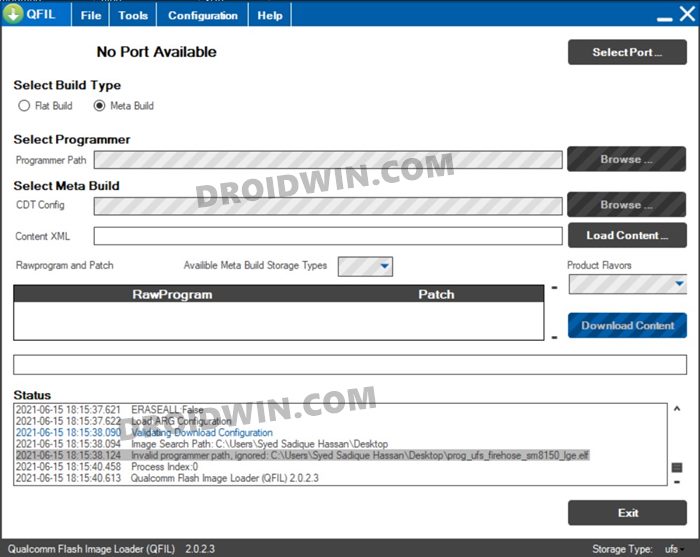
Unbrick and Fix Bootloop
By flashing the stock ROM onto your device, you could unbrick it as well as fix the bootloop issues.
Flash ELF and MBN Firmware
Talking about flashing firmware, it supports both the ELF and MBN firmware formats.
Portable Application
Being a portable app, you don’t need to install it on your PC. You could simply extract the tool and start working right away.
Download Latest Qualcomm Flash Image Loader QFIL Tool
You could now download the latest version of the QFIL Tool from the below link right away. Likewise, we have shared some older builds of this tool, in case, you might need it.
- Qfil_v2.0.3.5: Download
- Qfil_v2.0.3.4: Download
- QFIL_v2.0.2.3: Download
- QFIL_v2.0.1.9: Download
- QFIL_v2.0.1.8: Download
- QFIL_v2.0.1.7: Download
- QFIL_v2.0.1.1: Download
- QFIL_v2.0.0.5: Download
- QFIL_v2.0.0.4: Download
- QFIL_v2.0.0.3: Download
- QFIL_v2.0.0.2: Download
- QFIL_v2.0.0.0: Download
- QFIL_v1.0.0.3: Download
Download ELF/MBN Firmware
Now, download the MBN or ELF firmware corresponding to your device. This file will then be loaded onto the QFIL Tool and flashed onto your device. Make sure that you download the firmware corresponding to your device’s model number and the region as well. As far as the download links are concerned, there’s no official site as such. Google it and you shall get a plethora of sites offering these firmwares.
How to Install QFIL Tool
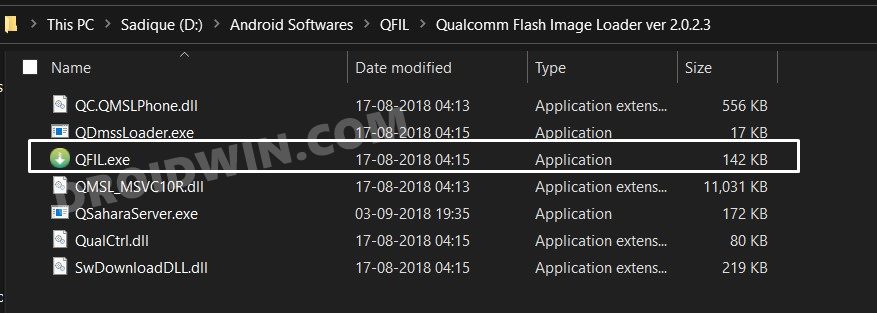
As already mentioned, this is a portable app, hence you don’t need to install it. Just extract it to any convenient location on your PC and double click on the QFIL.EXE file to launch the tool. With that said, let’s now move over to the next step to download, install and use the QFIL Tool to flash MBF and XML firmware.
How to Use QFIL Tool
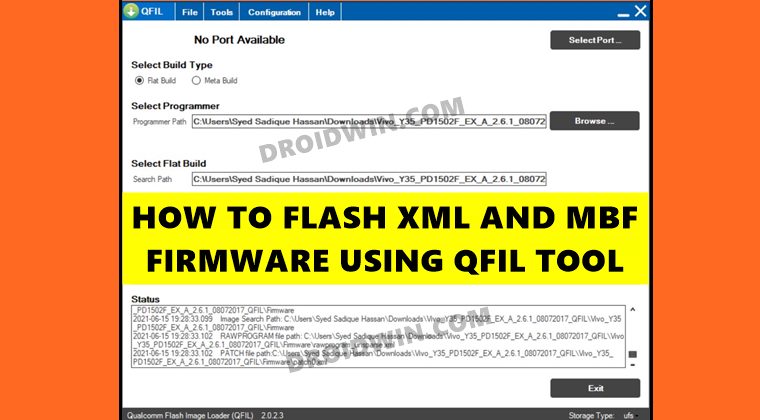
- To begin with, power off your device.
- Then press and hold the Volume Up key and connect your device to the PC via USB cable.
- Now double-click on the QFIL.exe file to open the tool.
- First off, select Flat Build under the Build Type section.
- Then click on the Browse button under the Select Programmer section, next to Programmer Path.
- Navigate to the MBN firmware file present inside the stock firmware and select it. The filename would be something along the lines of prog_emmc_firehose_****.mbn.
- Then click on the Load XML button, navigate to the firmware and select the rawprogram() file present there.
- Finally, hit the Download button and wait for the process to complete, which might take even up to 10-15 minutes.
- Once done, your device shall boot to the OS. You may now unplug the device from your PC and close the tool as well.
Fix QFIL Download Fail Firehose Fail FHLoader Fail Process Fail
If you are getting the QFIL Download Fail Firehose Fail FHLoader Fail Process Fail error, then the fix is fairly simple. You need to download and install the QPST version v2.7.496. The rest of the flashing instructions are the same as mentioned above.
- How to Fix Sahara Fail/QSaharaServer Fail/Process Fail Error in QFIL Tool
- How to Extract KDZ, TOT, or DZ LG Firmware
- Boot any (Bricked/Unbricked) Android Device to EDL Mode
- Qualcomm HS-USB QDLoader 9008 Drivers: Download & Install

(Cancel Reply)
Δ
