How to Enable 6GHz Wi-Fi 6E Hotspot on Android Devices
In this guide, we will show you the steps to enable the 6GHz Wi-Fi 6E Hotspot on your Android device. Many OEMs natively support 2.4 and 5GHz hotspot bands. However, some high smartphones also have the hardware capability to support the 6Hz band, however, it has been disabled by the respective smartphone manufacturer.
Credits: XDA Senior Member CoinsClassic
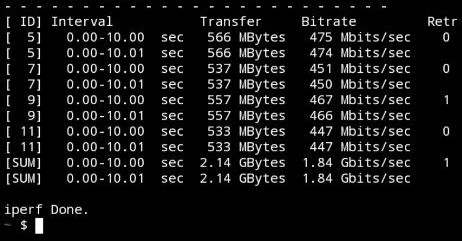
Fortunately, it is just a software-side limitation that you could easily bypass via a few handy tweaks. Upon carrying out this procedure, you could even obtain speed up to over 1.8GBit/s. So without any further ado, let’s show you the steps to enable the 6GHz Wi-Fi 6E Hotspot on your Android device right away.
How to Enable 6GHz Wi-Fi 6E Hotspot on Android

- First off, root your device via Magisk.
- Then download and install the VPN and Hotspot app from GitHub.
- Now launch the app and tap on the WiFi icon at the top right. Credits: XDA Senior Member CoinsClassic
- Then modify the settings as follows: - Security -> WPA3-SAE - AP Band -> 6295 (Channel 69 (nice!)) - Max. Channel Bandwidth -> 160MHz - Disable WiFi 7 - Enable WiFi 6 only
- Once done, enable the toggle next to WiFi Hotspot. Credits: XDA Senior Member CoinsClassic
- That’s it. You should now get a blazing-fast speed!
- How to Fake WiFi as Mobile Data on Android
- Fix Android does not automatically connect to 6GHz WiFi 6E Router
- How to Force Android Device to connect to only 5GHz WiFi
- WiFi not working in Android 13: How to Fix [15 Methods]

(Cancel Reply)
Δ
