How to Enable Live Voicemail in UK on iOS 17
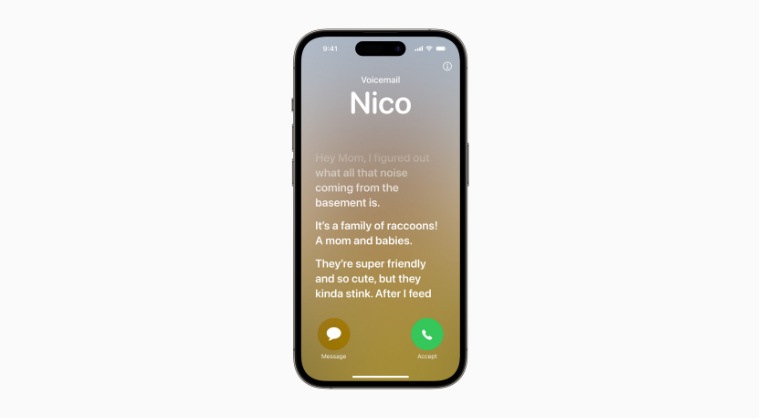
In this guide, we will show you the steps to enable Live Voicemail in UK on your iPhone running iOS 17. The seventeenth iteration of the OS has just been rolled out by the Cupertino giant and with that, there are a slew of noteworthy features to look forward to. One among them which caught everyone’s attention is the Live Voicemail feature. As is evident from its name, Live Voicemail gives users the ability to see real-time transcription when someone leaves a voicemail.
At the same time, it gives you the opportunity to pick up while the caller is leaving a message. However, as is the case with other features that Apple rolls out, this too is only limited to USA and Canada, and as usual, UK seems to be left out of it. [atleast for now]. However, there does exist a nifty workaround using which you could enable Live Voicemail in UK on your iPhone running iOS 17 right away. So without any further ado, let’s show you how this could be carried out.
How to Enable Live Voicemail in UK on iOS 17
In order to get this job done, you’ll have to set your phone region and language to the United States. Y ou can still set your keyboard language to English UK. Likewise, the App Store region wouldn’t be affected as rather than the device, it is tied to your account’s region. So on that note, let’s get started.
- First off, head over to Settings > Siri and Search.
- Then set the Language to English United States.
- Likewise, set the Region to the United States as well.
- Finally, restart your device and check out the result.
- Cannot Pick Up Calls on iPhone iOS 17 [Dev Beta 1 Fix]
- iOS 17 and iPadOS 17 Bugs, Issues, and Their Fixes
- iOS 17/iPadOS 17 Installation Failed: How to Fix
- All the Hidden New Features in iOS 17

- Tony 2 years ago Reply Nope, followed all the steps and still not working for me…
- Paul 2 years ago Reply Hi I have tried everything here but its not working any ideas please
- Paul 2 years ago Reply Hiu I have tried everything here but its not working any ideas
- Paul Lewis 2 years ago Reply Ive tried everything shown here but its still nmot working any ideas
- Paul Lewis 2 years ago Reply paul@thepines.eu hi i have done everything it says here but i cant get it to work any ideas
- John 2 years ago Reply It doesn’t seem to work (at least on O2). the option becomes available in Settings > Live Voicemail and is on by default. After letting the call ring out to Voicemail, an icon appears in the upper left corner to show a message is being left. Clicking on the icon brings up a screen with the caller ID, however there’s no transcript of the message being left (which is the whole point of the feature) Nevermind, perhaps we’ll get the feature before iOS 20 in the UK….
- Steve Bennett 2 years ago Reply Tried this on a UK iPhone 14pro running iOS 17. It does not work. Maybe it only worked on the betas.
- Phill 2 years ago Reply Will this be changed for the future release?
- Matthew Ellis 2 years ago Reply Hi, this worked a treat for my UK mobile and the voicemail settings appeared, but, the voicemail messages don’t seem to get transcribed at all, never mimd live. Any ideas? Matthew Ellis 2 years ago Reply Update. The live element started to work with a few ‘off and on agains’ and after I disabled a 3rd party voicemail app.
(Cancel Reply)
Δ
