How to Extract Partition Files Without Downloading Firmware
In this guide, we will show you a nifty method using which you can easily extract partition files without downloading the entire firmware. There have been numerous instances wherein I only needed a few partition files from the firmware, but still, I had to first download the entire firmware before I could get hold of the required partition files.
Nowadays, these firmware size is getting close to 10GB [for the OnePlus 13 series], so downloading them just for the sake of one or two files not only leads to bandwidth wastage but also leads to time waste as well. One perfect example of the same is when I want to root my device. For that, I need to extract the boot/init_boot files.
However, I have to first download the entire GBs of firmware before I can get hold of these files, which are just a few MBs in size. Well, not anymore! In this guide, we will show you a handy method using which you can easily extract the partition files without even the need to download the firmware. So, without further ado, let’s get started on this intriguing journey.
- Features of Extractor Toolkit OTA Link Extraction Firmware Partition Extraction Additional Features
- How to Extract Partition Files Without Downloading Firmware
Features of Extractor Toolkit

Developed by Nefreno [the same developer who created the Firmware Flasher Tool ], the Extractor Toolkit is perfect for enthusiasts, developers, and users who need quick access to OTA updates or want to extract firmware images for further analysis or modification. It beholds a slew of intriguing goodies up its sleeves. Some of its noteworthy ones include the likes of:
OTA Link Extraction

- Enables retrieval of OTA update links for OnePlus/Realme/OPPO devices.
- Supports managing model groups with the ability to add, edit, and delete them via the interface or directly in the groups.txt file.
- Allows running link extraction for individual models or entire groups.
- Downloads results in text format.
Firmware Partition Extraction
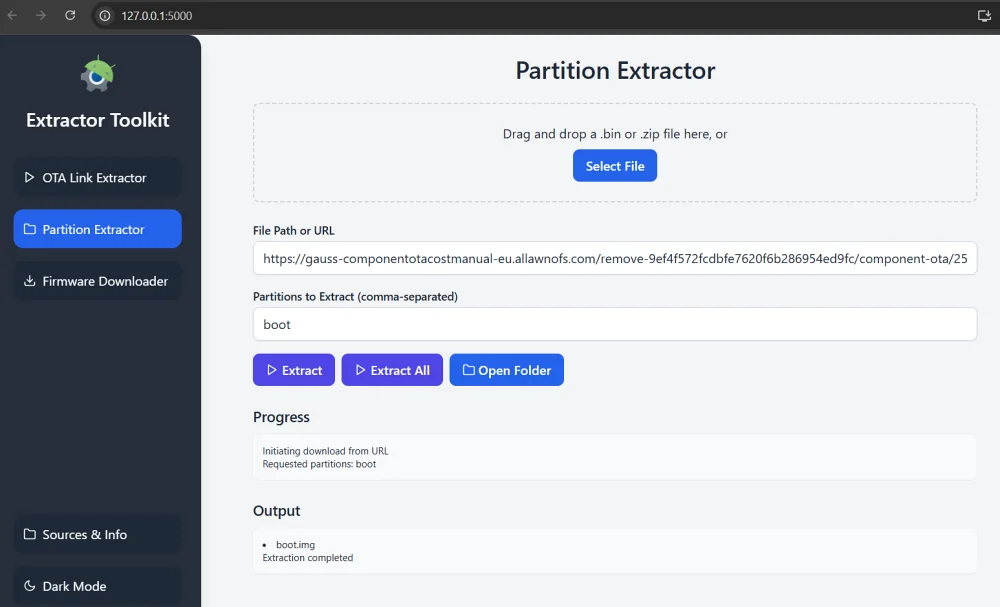
- Extracts partitions (e.g., boot, recovery, init_boot) from payload.bin files or OTA update ZIP archives.
- Supports input via URL, local path, or file drag-and-drop.
- Allows extraction of all partitions or specific ones listed via comma separation.
- Displays progress and warnings if they occur.
Additional Features
- Toggle between light and dark interface themes.
- Allows dragging and reordering of model group.
How to Extract Partition Files Without Downloading Firmware
- Download and extract the Extractor Toolkit on your PC. Then launch it via the Extractor Toolkit.exe file.
- If you want to extract the files from the latest firmware, then select the OTA Link Extractor from the left.
- Then expand your device and click on the green icon next to your region’s firmware.
- Now, click on the desired partition next to Extract Image. [If your partition is not listed, then move to the next step].
- The file will now be extracted to the Extractor_Toolkit > extracted_partitions > firmware_name folder.
- On the other hand, if you want to extract an older firmware or the one that you have locally on your PC, then head to Partition Extractor from the left-hand side.
- Now you may either drag and drop the firmware ZIP/payload.bin file, type in the file path [such as C:\users\sadiq\Downloads], or paste the file’s URL.
- Then type the partition name/s that you want to extract and hit Extract. If you want to extract the entire firmware, then hit Extract all.
- If there are multiple partitions, then segregate them via commas. For example, boot, init_boot, vbmeta will extract all these three files.
- As before, the extracted files will be placed under Extractor_Toolkit > extracted_partitions > firmware_name folder.
- How to Download OnePlus downgrade firmware when removed from servers
- How to Download OnePlus Firmware via Oxygen Updater
- OnePlus might have blocked firmware downloads from external source
- How to Flash Different Region Firmware via Local Install on OnePlus

- j crew 4 months ago Reply how do i do this on linux on cli
(Cancel Reply)
Δ
