How to Find the EID Number for E-SIM Setup
In this guide, we will show you numerous methods to find the EID number which is required for the E-SIM setup. Many new forms of technologies made their way to the smartphone domain in recent years. In this regard, E-SIM is perhaps the most talked-about feature. For the unaware, E-SIM is a SIM that is directly embedded in a mobile device. there is no need for any physical SIM to be inserted into the device. You could easily connect to any supported carrier that offers this service, without the need to make any under-the-hood changes.
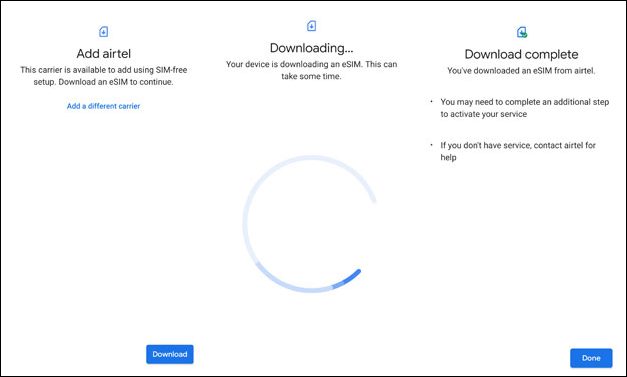
Credits: Airtel
You just need to provide the device’s IMEI and EDI to the carrier when you want to make a switch from the physical SIM to an E-SIM. IMEI is a unique 16-digit number that you get hold of by typing *#06#. on the other hand, the EID is a 32-digit serial number that is linked to a device that uses an E-SIM. But how could you find this number? Well, there exist quite a few methods that shall help you find the EID number which is required for the E-SIM setup. So without further ado, let’s check them out.
- How to Find the EID Number for E-SIM Setup
- EID Number is Not Available under Settings
- How to Get E-SIM without EID?
How to Find the EID Number for E-SIM Setup
- If you own a Pixel device, then you could find the EID Number from Settings > About Phone > SIM Status > EID. Credits: JIO
- For Samsung devices users, they could get the EID Number from Settings > About Phone > Status > EID. Credits: JIO
- If you have an iPhone, then you could find the EID Number from Settings > General > About > EID. Credits: JIO
EID Number is Not Available under Settings
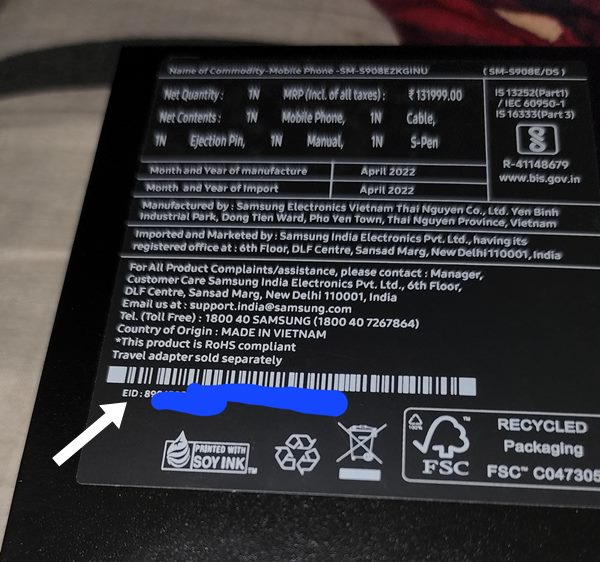
Some users have voiced their concern that the EID section shows the status as Not Available. In such cases, you just need to flip your phone box upside down and the EID number should be written there.
How to Get E-SIM without EID?
If you are unable to get hold of the EID by any of the aforementioned methods, then you could opt for an Airtel E-SIM as it doesn’t require an EID during setup.
- Disable/Turn off Flash Messages in Android [2 Methods]
- SIM Disconnecting on OnePlus 10 Pro How to Fix
- Pixel 6/Pro Mobile Network Connectivity No SIM Issue [Fixed]
- How to Fix iPhone 13 not working with Google Fi eSIM

(Cancel Reply)
Δ
