How to Fix Finder Window Size Permanently on Mac
In this guide, we will show you various methods that should help you fix the Finder window size permanently on your Mac. You could easily customize the size of any app window by dragging it from any of its four corners. And it will respect that size until the Dock/Finder is restarted.
Once that happens, you will then have to once again resize it as per your requirement, which calls for unnecessary time and effort. So is there a way out? Well, there exist a few nifty methods using which you could fix the Finder window size permanently on your Mac. And in this guide, we will show you how to do just that. Follow along.
- How to Fix Finder Window Size Permanently on Mac FIX 1: Using Apple Script FIX 2: Using a Third-Party App
How to Fix Finder Window Size Permanently on Mac

It is recommended that you try out each of the below-mentioned workarounds and then see which one spells out success. So with that in mind, let’s get started.
FIX 1: Using Apple Script
The size of the opened window is saved in ~/Library/Preferences/com.apple.finder.plist. So you could create an Apple script, set the size & position, save it as an app, drag it into Dock, and then use it instead of the default Finder item. You could take the help of the below commands while creating the script:

set X to 0

set Y to 0

set appWidth to 1200

set appHeight to 1000


tell application "Finder"

     activate

     reopen

     set the bounds of the first window to {X, Y, appWidth, appHeight}

end tell
FIX 2: Using a Third-Party App
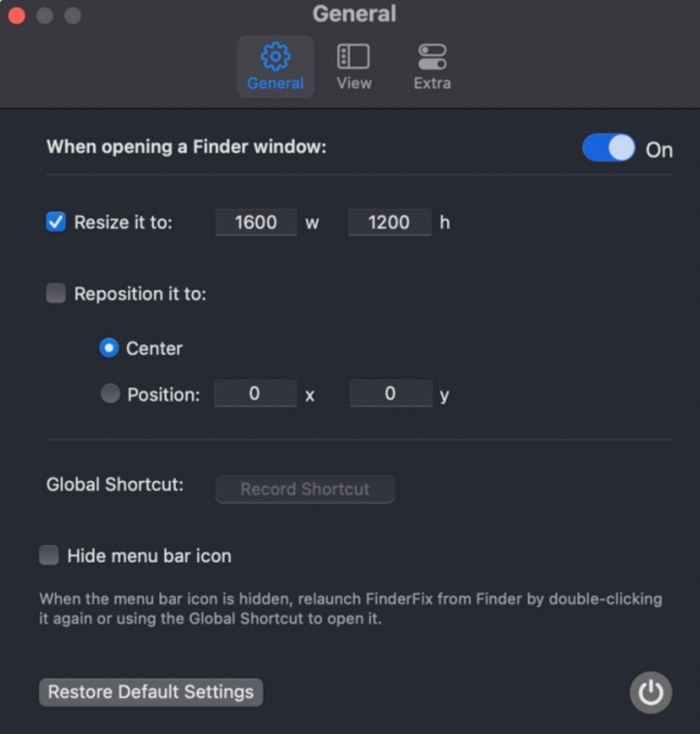
You could make use of a third-party app named FinderFix and easily get this job done as well. While the app is currently in beta, but I haven’t come across any bugs as such. So do give it a try and check if it works out in your favor.
- Google Chrome webcam not working on Mac [Fixed]
- Viber deletes contents of Downloads Folder on Mac!
- How to transfer files between Android and Mac using Nearby Share
- Every macOS comes with a Nakamoto’s Bitcoin whitepaper PDF!

(Cancel Reply)
Δ
