How to Fix TuneIn not working on Google Home
In this guide, we will show you various workarounds to fix the issue of TuneIn not working on Google Home. One of the most popular audio streaming services, TuneIn beholds a plethora of live news, radio, sports, music, and podcast shows from various sources. Then its cross-device support adds up more to its arsenal. However, it seems to be going through a rough patch as of late.
Many Google Home users are complaining that TuneIn is no longer working with this device. TuneIn is working well and good across smartphones and the channels are also up and running, so the issue is not with the service, but rather is specific to this Google device itself. What is even more concerning is the fact that this seems to be a recurring issue.
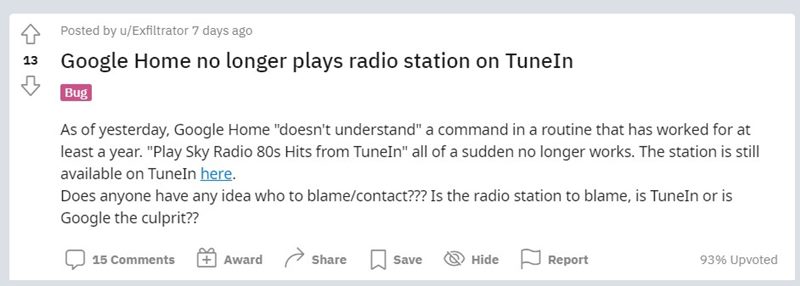
As evident from this Google Support Forum , the issue first came to light in the first half of 2019. And as per various user reports across Reddit and Twitter , it seems to have resurfaced. So when a user is requesting Google to “play X radio on TuneIn”, the device accepts the command but then goes silent.
In other instances, the device spells out that “the stream is not compatible with this device/player.” No doubt this issue is quite concerning and infuriating in equal measures. With that said, I have managed to find out a few workarounds that seem to fix the issue of TuneIn not working on Google Home. So without any further ado, let’s get started.
- How to Fix TuneIn not working on Google Home Fix 1: Using the Cast inside Chrome Feature Fix 2: Using the Radio Keyword Tweak Fix 3: Google’s Suggestion to Fix TuneIn not working on Home
- Conclusion
- UPDATE 1 [May 27, 2022]: Issue resurfaces
How to Fix TuneIn not working on Google Home
Given below are three different types of fixes that have been known to spell out success for some users. Follow along.
Fix 1: Using the Cast inside Chrome Feature
- Start off by opening TuneIn inside the Chrome browser (on your PC or smartphone).
- Then select your desired radio station.
- Once that is done, select the Cast option via the Chrome menu and then select your device.
Fix 2: Using the Radio Keyword Tweak
This seems to be kind of a counterintuitive fix in the sense that it worked out for some but for the others, just the reversal of this fix proved to be their savior. Let’s check out both these methods to fix the issue of TuneIn not working on Google Home.
First off, rather than saying “Hey Google – Play Radio XYZ on (room)”, you should consider leaving out the Radio word from this sentence. SO try saying “Hey Google – Play XYZ on (room)” and see if it does work out or not.
Now, the second set of users were already saying “Hey Google – Play XYZ”. However, that didn’t work out for them. So they then added the Radio word to the above statement and the issue got rectified. In other words, the “Hey Google Play Radio XYZ” worked out for them.
Fix 3: Google’s Suggestion to Fix TuneIn not working on Home
So the Silicon Valley giants seem to have spoken (finally!) on this issue as well. Here’s what they had to say:
De acuerdo, efectivamente tenemos constancia de esta incidencia y estamos trabajando para solucionarla lo antes posible junto con TuneIn. Mientras tanto, lo que puedes hacer es reproducir esta emisora en tu móvil y enviar el contenido al Google Home con el botón que tiene la app. — Made by Google (@madebygoogle) June 10, 2021
