How to Flash OxygenOS 15 Android 15 on OnePlus 9R
In this guide, we will show you the steps to flash the latest OxygenOS 15 based on Android 15 onto your OnePlus 9R device. The fifteenth iteration of the OS build has just been rolled out by the Silicon Valley giant and OnePlus was quick to jump ships over to this bandwagon. All its eligible devices are about to be blessed with a slew of noteworthy and intriguing goodies that would surely give their device a new revamped UI/UX apart from some interesting feature set.
But what about the ones that have missed the bus, in other words, are no longer eligible for this update [since they have reached the EOL]?
Well, there’s always an option to flash a custom ROM like LineageOS, or crDroid, among others. However, this will then mean that they would have to ditch the stock OxygenOS ecosystem and make a switch to AOSP, which might not be in sync with many user’s requirements. If you are also in the same bracket, then you are in for a luck as you can now install the OxygenOS 15 Android 15 onto your OnePlus 9R in just a few steps. And in this guide, we will show you how to do just that. So without further ado, let’s get started.
- How to Install Android 15 OxygenOS 15 on OnePlus 9R STEP 1: Install Android SDK STEP 2: Enable USB Debugging and OEM Unlocking STEP 3: Unlock Bootloader on OnePlus 9R STEP 4: Download Android 15 for OnePlus 9R STEP 5: Boot to Fastboot Mode STEP 6: Install OrangeFox Recovery STEP 7: Install OxygenOS 15 Android 15 on OnePlus 9R
How to Install Android 15 OxygenOS 15 on OnePlus 9R
The below process will wipe off all the data from your device, so take a complete device backup beforehand. Droidwin and its members wouldn’t be held responsible in case of a thermonuclear war, your alarm doesn’t wake you up, or if anything happens to your device and data by performing the below steps.
STEP 1: Install Android SDK
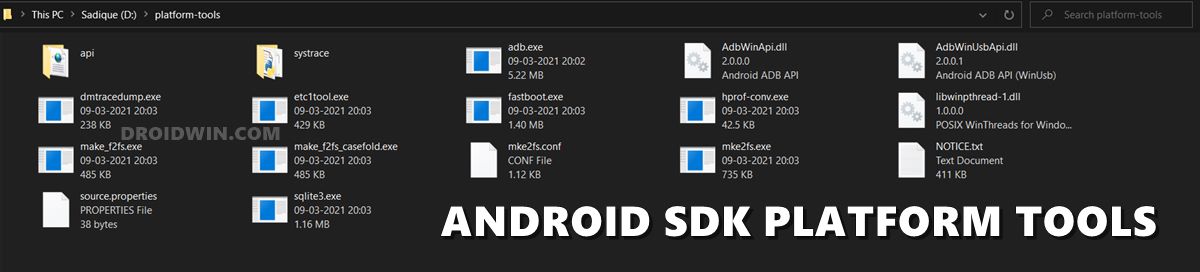
First and foremost, you will have to install the Android SDK Platform Tools on your PC. This is the official ADB and Fastboot binary provided by Google and is the only recommended one. So download it and then extract it to any convenient location on your PC. Doing so will give you the platform-tools folder, which will be used in this guide to install OxygenOS 15 Android 15 on your OnePlus 9R.
STEP 2: Enable USB Debugging and OEM Unlocking
Next up, you will also have to enable USB Debugging and OEM Unlocking on your device. The former will make your device recognizable by the PC in ADB mode. This will then allow you to boot your device to Fastboot Mode. On the other hand, OEM Unlocking is required to carry out the bootloader unlocking.
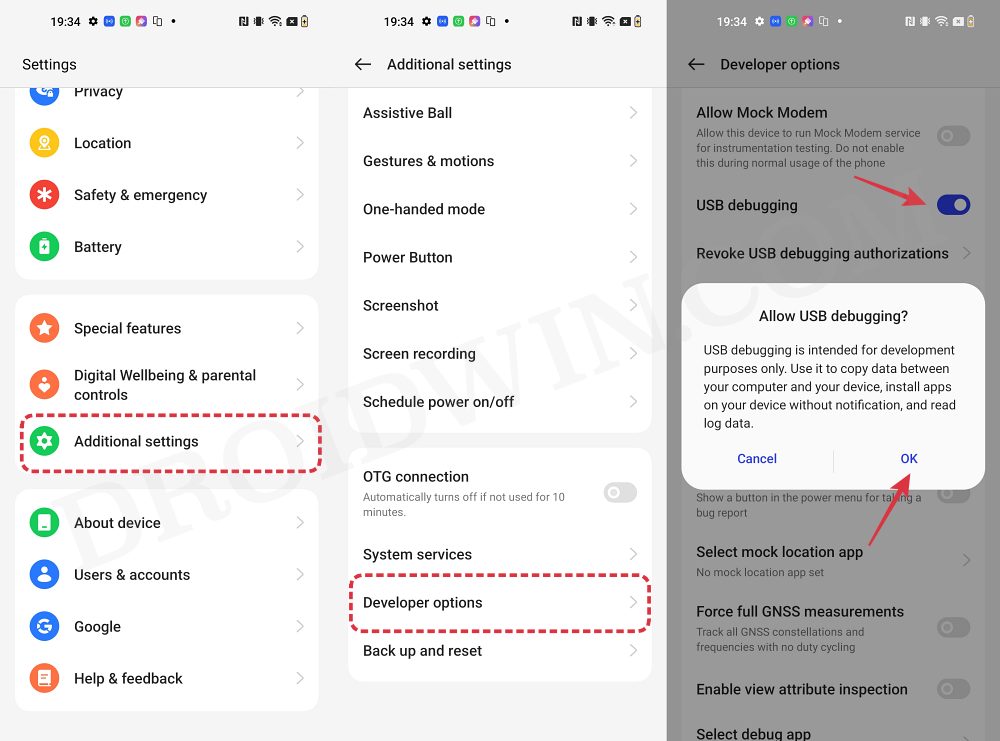
So head over to Settings > About Phone > Tap on Build Number 7 times > Go back to Settings > System > Advanced > Developer Options > Enable USB Debugging and OEM Unlocking.
STEP 3: Unlock Bootloader on OnePlus 9R
Next up, you will also have to unlock the device’s bootloader. Do keep in mind that doing so will wipe off all the data from your device and could nullify its warranty as well. So if that’s all well and good, then please refer to our detailed guide on How to Unlock Bootloader on any OnePlus Device.

STEP 4: Download Android 15 for OnePlus 9R
- You may now grab hold of the required files from the below link: super_empty.img | firmware v603 | flash_all.bat NOTE: We are using the super_empty.img from LineageOS because the developer seems to have removed the original one.
- Rename the file to rom.zip and transfer it to the platform-tools folder.
STEP 5: Boot to Fastboot Mode
- Connect your device to the PC via a USB cable. Make sure USB Debugging is enabled.
- Then head over to the platform-tools folder, type in CMD in the address bar, and hit Enter. This will launch the Command Prompt.
- Type in the following command in the CMD window to boot your device to Fastboot Mode adb reboot bootloader
- To verify the Fastboot connection, type in the below command and you should get back the device ID. fastboot devices
- If you are not getting any serial ID, then please install the Fastboot Drivers on your PC.
STEP 6: Install OrangeFox Recovery
Next up, you’ll have to install the OrangeFox recovery on your device. For that, you may refer to our guide on How to Flash OrangeFox Recovery on the OnePlus 8/Pro/8T/9R .
STEP 7: Install OxygenOS 15 Android 15 on OnePlus 9R
- First off, extract the super_empty.img file via QuickADB.
- Then go to the firmware-update folder.
- Now delete all the IMG files except vbmeta and vbmeta_system.
- Then flash the firmware across both slots.
- Once done, boot your device to the Fastboot Mode.
- Now run the flash_all.bat file. The flashing will now start.
- Once done, your device will reboot to the newly flashed OS.
- How to Download and Install Android 15 OxygenOS 15 on OnePlus
- Downgrade OnePlus from Android 15 to 14: OxygenOS 15 to 14
- Termux Not Working on Android 15 OnePlus/Realme/Oppo [Fixed]
- OxygenOS Customizer not working on OnePlus Android 15 [Fixed]

- Aswin Asok 3 months ago Reply Hi where can I find flash_all.bat because this file is removed from the link you provided for oneplus 9R. If available please update
- Hemanth 8 months ago Reply I am unable to download super_empty.img from the above link Sadique Hassan 8 months ago Reply The dev seems to have removed it. Though you can try the super_empty of the LineageOS. I flashed a OxygenOS 15 port on my OnePlus 9 Pro and used the super-empty file from LineageOS and it worked without any issues https://droidwin.com/how-to-flash-oxygenos-15-android-15-on-oneplus-9-pro/ Also see the attached video at 7:34 mark]. While there’s 99% chance that it should work for you as well, but there’s always a 1% risk that could only be eliminated by trying it out. So if you are willing to test it, then here’s the direct download link for the same: https://mirrorbits.lineageos.org/full/lemonades/20250523/super_empty.im
- Jay 11 months ago Reply Hello Sir, With due respect,I would like to inform you that I’m unable to install OxygenOS 15 on my OnePlus 9R device.I already tried several times to download “super_empty.img” file but there was no presence of super.img file & there were no signs of “vbmeta and vbmeta_system” files in the firmware-update folder.The link where you put the “super_empty.img” file is showing me the pop-up “The item might not exist or is no longer available”.So please make a video content over this issue along with the proper instructions and essential flies.And kindly place it to your website as I can easily find it out. And I hope you would like to help me out as soon as possible and make me grateful to you. Thank You. Sadique Hassan 8 months ago Reply Sorry for the delay in reply mate. The dev seems to have removed the file. Though you can try the super_empty of the LineageOS. I flashed a OxygenOS 15 port on my OnePlus 9 Pro and used the super-empty file from LineageOS and it worked without any issues https://droidwin.com/how-to-flash-oxygenos-15-android-15-on-oneplus-9-pro/ Also see the attached video at 7:34 mark]. While there’s 99% chance that it should work for you as well, but there’s always a 1% risk that could only be eliminated by trying it out. So if you are willing to test it, then here’s the direct download link for the same: https://mirrorbits.lineageos.org/full/lemonades/20250523/super_empty.im
(Cancel Reply)
Δ
