How to Improve Sound Quality on Nothing Phone 2
In this guide, we will show you the steps to improve the sound quality of your Nothing Phone 2. The second iteration of the Nothing smartphone beholds a slew of intriguing features up its sleeves and comes with an impressive specs sheet as well. However, it seems to have fallen short in the audio domain. While the device’s speaker is itself no good, but when you connect a headphone to it, the sound quality of the latter degrades even further.
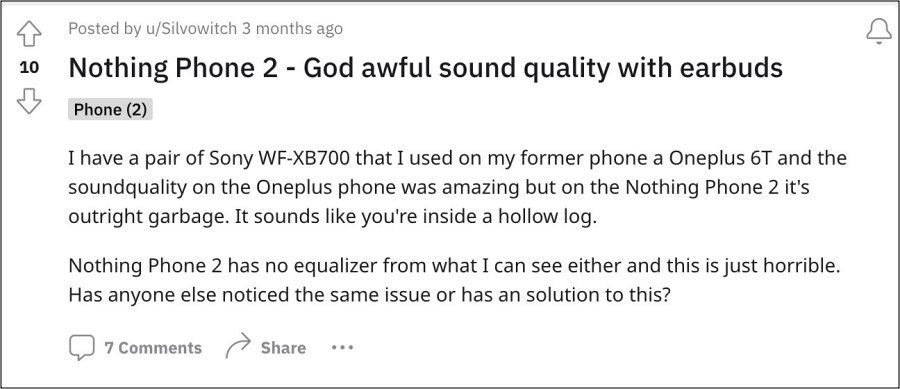
As is evident from this Reddit thread, there have been numerous instances of users using a headphone on their OnePlus 6T, 8T, or Asus ROG Phone 6 with great audio quality but as soon as they switched over to this device, they witnessed a significant degradation of sound quality in the same headphones. If you are also witnessing a similar issue, then this guide will help you out. Follow along for the fix.
How to Improve Sound Quality on Nothing Phone 2
If you wish to improve the sound quality of a headphone/earbud, then connect it to your device before starting with the below steps.
- First off, download and install Wavelet from the Play Store.
- Then launch it and tap on the settings icon at the bottom left.
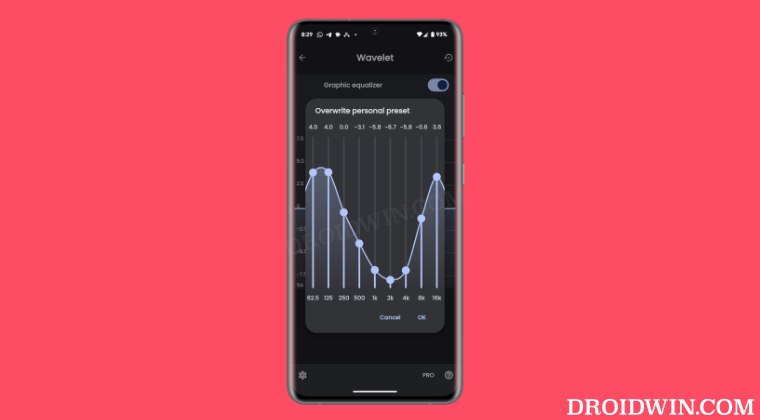
- Now enable Legacy Mode. Then enable Graphics Equaliser.
- Now tap on Graphics Equaliser to further expand it.
- Then tap on the graph and set it up exactly as shown.
- Once done, tap OK to save the changes and then check out the results.
- How to Install Viper4Android on Nothing Phone 2
- How to Flash Custom Kernel on Nothing Phone 2
- Downgrade Nothing Phone 2 from Android 14 to Android 13
- How to Install Custom ROMs on Nothing Phone 2

(Cancel Reply)
Δ
