How to Install LSPosed Modules Without Root [Locked Bootloader!]
In this guide, we will show you the steps to install LSPosed modules without rooting your device on a locked bootloader. Back in the day, we had XPosed Framework, which had tons of modules in its repository, each belonging to a different domain. While some would give you the ability to take a screenshot in restricted apps, others would come with a plethora of customization options.
While this project has now been taken over by the LSPosed team, but everything remains the same as before, with the list of modules growing every other week. While you can also get these mods from GitHub, but LSPosed provides an easy interface to download and install them. Likewise, you can easily implement these modules in the app of your choice in just a single tap.
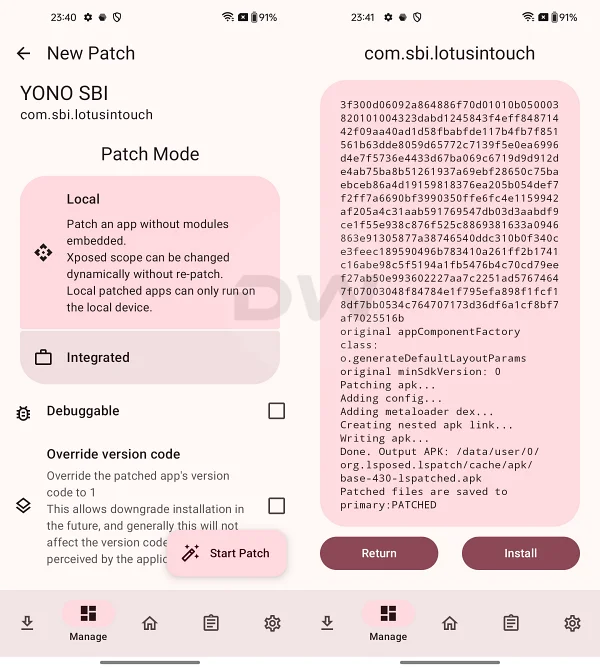
LSPatch in Action
However, there’s just one prerequisite that you need to checkmark beforehand- your device needs to be rooted. As opposed to earlier times, things are not the same in the rooting ecosystem, with Google making life difficult for tech enthusiasts by introducing strict checks such as the Play Integrity .
But what if we told you that you can install ‘some’ of these LSPosed modules even without rooting your device on a locked bootloader? Yes, that is very much possible, and in this guide, we will show how this could be done. So without further ado, let’s check it out.
How to Install LSPosed Modules Without Root on Locked Bootloader

Before starting, please take a complete device backup. Droidwin and its members wouldn’t be held responsible in case of a thermonuclear war, your alarm doesn’t wake you up, or if anything happens to your device, and data by performing the below steps.
To get this job done, we will be using LSPatch. At the time of writing, there are only a handful of modules that work with LSPatch. In our testing, we found AllTrans [which can translate the entire apps] and Disable Flag Secure [allows you to take screenshots in restricted apps] being two such modules. We will be constantly updating this section as and when we find out more such modules that can be installed without root via LSPatch. Stay tuned.
- To begin with, download, install, and set up Shizuku on your device.
- After that, download and install LSPatch on your device. Then launch it and give it Shizuku access.
- Then download the desired module from GitHub [the LSPatch repo currently doesn’t have any modules].
- For the sake of reference, let’s use the Disable Flag Secure module , which allows us to take screenshots in restricted apps.
- So, install the APK and restart your device. Then launch LSPatch and verify that your module is shown there.
- Now, go to the Apps tab, hit the Plus icon > Select an APK or an Installed app. Then choose the app on which you need to enable this module [in our case, it will be a banking app].
- By default, the Patch Mode will be set to Local. In this case, you’ll have to apply the module after patching the app. If you choose the Integrated, then the module will be applied dynamically at runtime, before the app is patched.
- Let’s opt for Local and hit Start Patch [see points 11 and 12 for Integrated]. Once done, minimize it and uninstall that app from the app drawer.
- Now, come back to LSPatch and install this patched app. Once done, verify that it’s shown under the Apps tab.
- Now, long-press on that app and select Module Scope. Then, select the module that needs to be associated with that app and hit the checkmark.
- That’s it. Now launch the app, and the module will be up and running. You can now carry out the intended task [in our case, taking screenshots in restricted apps].
- If you choose Integrated, then tap on Embed Modules > select an Installed app [by app we mean module] > choose the desired module > hit the checkmark.
- Finally, tap on Start Patch. Then uninstall that app and reinstall it from the LSPatch.
What’s the Different Between Local and Integrated Patch Mode in LSPosed
In case of Local, the module will be embedded in the app after you have patched it, so you’ll have to manually embed the module after the app has been patched [using the Module Scope option]. Whereas in the case of Integrated, it will be embedded dynamically at runtime.
So when you have got the patched APK, it will already have the module attached to it. One other difference between the two is that the Local APK will only run on your device, whereas you can send the Integrated to others as well, and they can enjoy the same benefits as yours after installing the app, even without installing LSPatch.
- How to Install LSPosed Framework in APatch
- Android Enhanced: Perfect LSPosed Mod to Customize your Pixel
- Fix Bootloop after Flashing LSPosed Module [Video]
- How to Remove/Disable LSPosed Loaded Notification

(Cancel Reply)
Δ
