How to Pass Play Integrity in New Android 13+ Checks
In this guide, we will show you the steps to pass the Play Integrity Test in the New Android 13+ Checks. A lot has been going on in custom development over the past few years. Initially, we were greeted with the SafetyNet fiasco, which straightaway failed as soon as you rooted your device. As soon as we found a workaround for it, Google went a step ahead and introduced a more stringent mechanism in the form of Play Integrity.
This, in turn, consists of three tests- Device, Basic, and Strong. For the first few months, you just needed to pass the Device and Basic test, which in turn could be carried out by flashing a couple of modules. However, over the course of time, banking and payment apps have become stricter, and some now require you to pass the Strong Test as well.
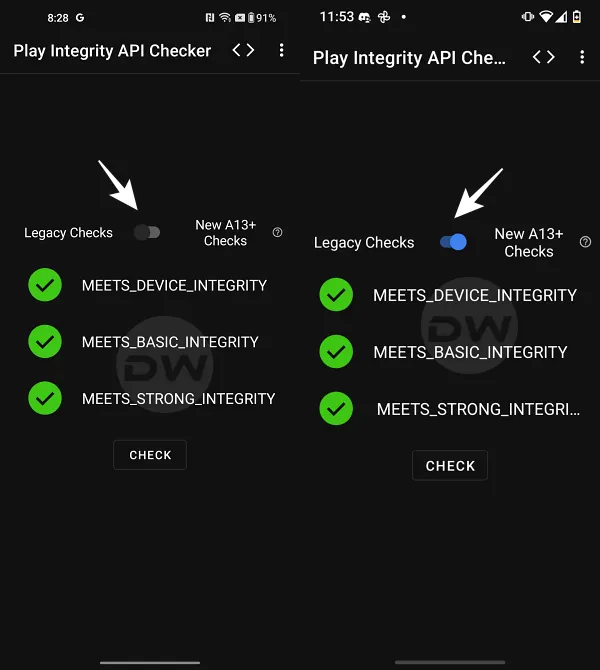
Legacy Test on the Left | New Test on the Right
For the unaware, this requires you to get hold of an unrevoked keybox XML file, which is not only quite a tough job in itself but gets revoked within a few days as well. All in all, things are currently quite messy in the rooting domain. But the Silicon Valley giant doesn’t stop here and wants to make things even more complicated.
It has introduced even stricter rules for devices running Android 13 or higher versions, which now require some additional tweaks, apart from the usual steps that we earlier used to carry out. Even then, the success rate of this tweak is currently on the lower side. Still, let’s give this tweak a try and see if we are on the lucky side of the fence or not. Follow along.
- What are the New Android 13+ Play Integrity Checks
- Pass Play Integrity in New Android 13+ Checks via Magisk
- Pass Play Integrity in New Android 13+ Checks via APatch
- Pass Play Integrity in New Android 13+ Checks via KernelSU
- How to Pass Android 13+ Play Integrity in Custom ROMs
- What is the Role of Tricky Store Add-On
What are the New Android 13+ Play Integrity Checks
Before we proceed to pass this new test, let’s get acquainted with its technicalities and what is changing this time around. So without any further ado, let’s dive into it right away!
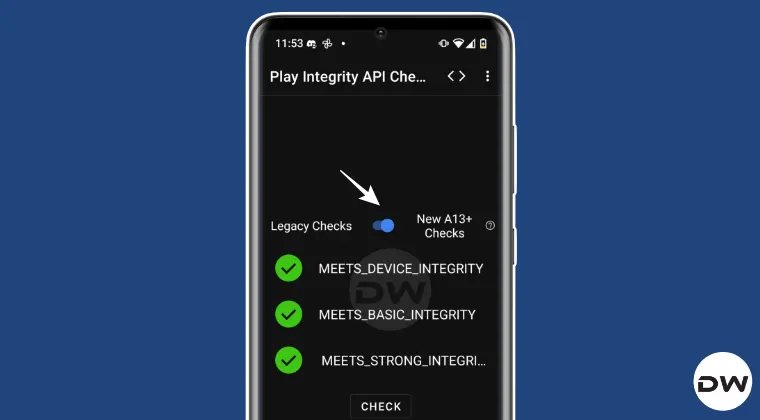
The first question that you might ask is “What changes are being made to the Play Integrity API verdicts on Android 13 or later devices?” Let’s find out, straight from the mouth of Google :
Play Integrity API will now require hardware-backed security signals for all integrity verdicts, namely: Device, Basic, and Strong. In simpler words, the Device Integrity will now also require an unrevoked keybox XML file to pass the Play Integrity Test, similar to how Strong Integrity currently works. To know more about this change, do check out this guide .
Next up, why is there a need to introduce this change in the first place?
After making changes to these integrity verdicts, Google has said that one might notice the following improvements on devices running Android 13 or later: Reduction in device signals that need to be collected and evaluated to generate the default verdict on Google servers by ~90%. Optional signals will continue to require additional signals to be collected. Improvement in verdict latency by up to 80% for worst-case standard requests and up to 80% for all classic requests to obtain the default verdict. Optional signals can increase the latency. Consistent level of reliability and support for all Android form factors with key attestation including mobiles, tablets, foldables, TV, Auto, Wear OS, and ChromeOS. A greater differentiation between each device label in the device recognition verdict: meets-strong-integrity , meets-device-integrity , and meets-basic-integrity . Moreover, there might also be a gradual improvement in performance once the new verdicts are made compulsory for all developers in May 2025
Pass Play Integrity in New Android 13+ Checks via Magisk

- First off, here are all the required files that you need to get hold of: Magisk Canary [For Root] LSPosed Framework [Optional] Shamiko Module Play Integrity [For Spoofing Device] It is no longer being maintained. Use Play Integrity Fork instead. Zygisk Assistant [For Hiding Zygisk] Tricky Store [For modifying the certificate chain generated for Android key attestation] Unrevoked keybox.xml [For passing Strong Integrity] Root Supported File Manager [For accessing the /data directory] Play Integrity API Checker [To check if your device passes Strong Integrity]
- Once you have downloaded all the files, launch Magisk > go to Settings > enable Zygisk.
- Then go to Modules > Install from Storage > flash the following modules: LSPosed Framework [Optional] Shamiko Module Play Integrity Zygisk Assistant Tricky Store
- Now install a root-supported file manager app like Solid File Explorer.
- Then launch it, tap on the hamburger menu, and select Root. You’ll get an SU request, tap Grant.
- Now go to the below directory. There will already be a keybox.xml file present there. data/adb/tricky_store
- Replace it with the unrevoked one that you have downloaded [select New in the prompt that appears].
- Then, download the Tricky Store add-on and flash it via Magisk.
- Once all the modules have been flashed, restart your device.
- Then download and install the KSUWebUI app. Now launch it and hit Grant in the Magisk request.
- Then go to Play Integrity Fix and tap Fetch pif.json. You’ll now get a new fingerprint. [NOTE: In case of Play Integrity Fork, you wouldn’t see this option and you’ll instead have to take the help of Termux to get this job done].
- Then go back, select Tricky Store, tap on the hamburger menu, and choose Select All > Then choose Deselect Unnecessary.
- Now select Set Security Patch > check Advanced > Get Security Patch Date > Save > Save.
- Then download and install the Play Integrity API Checker app.
- Now launch it and tap Check. You’ll now pass Device, Basic, and Strong Integrity tests.
Pass Play Integrity in New Android 13+ Checks via APatch
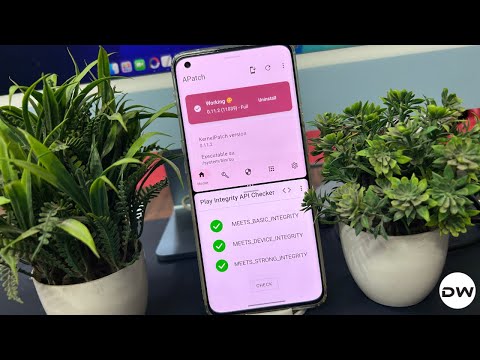
Since APatch doesn’t have built-in Zygisk, you’ll have to flash the Zygisk Next module in combination with ReZygisk. And yes, do not flash Shamiko because it doesn’t work via APatch . Apart from that, the rest of the steps are exactly the same as given above. In short, flash the following modules: LSPosed Framework, Play Integrity, Tricky Store, Tricky Store Add-on, Zygisk Assistant, Zygisk Next, and ReZygisk.
- First off, here are all the required files that you need to get hold of: LSPosed Framework [Optional] Play Integrity Fix . It is no longer being maintained. Use Play Integrity Fork instead. Tricky Store Zygisk Assistant Zygisk Next OR ReZygisk Unrevoked keybox.xml Root Supported File Manager Play Integrity API Checker
- Now launch APatch, go to Modules > flash the following modules: LSPosed Framework [Optional] Shamiko Module Play Integrity Zygisk Assistant Tricky Store
- Now install a root-supported file manager app like Solid File Explorer.
- Then launch it, tap on the hamburger menu, and select Root. You’ll get an SU request, tap Grant.
- Now go to the below directory. There will already be a keybox.xml file present there. data/adb/tricky_store
- Replace it with the unrevoked one that you have downloaded [select New in the prompt that appears].
- Then, download the Tricky Store add-on and flash it via Magisk.
- Once all the modules have been flashed, restart your device.
- Then download and install the KSUWebUI app. Now launch it and hit Grant in the Magisk request.
- Then go to Play Integrity Fix and tap Fetch pif.json. You’ll now get a new fingerprint.
- Then go back, select Tricky Store, tap on the hamburger menu, and choose Select All > Then choose Deselect Unnecessary.
- Now select Set Security Patch > check Advanced > Get Security Patch Date > Save > Save.
- Then download and install the Play Integrity API Checker app.
- Now launch it and tap Check. You’ll now pass Device, Basic, and Strong Integrity tests.
NOTE: Google has blacklisted some of the kernels. So if you are on one of those kernels and then try out the aforementioned steps, it might happen that your device might still not pass this test. In such cases, if possible, try using a different kernel and then see if it works out for you.
Pass Play Integrity in New Android 13+ Checks via KernelSU
- To begin with, flash the following modules via KernelSU: LSPosed Framework [Optional] Play Integrity Fix . It is no longer being maintained. Use Play Integrity Fork instead. Tricky Store Zygisk Assistant Zygisk Next OR ReZygisk
- Then install the following apps: Root Supported File Manager Play Integrity API Checker
- Next, get an Unrevoked keybox.xml file.
- Now install a root-supported file manager app like Solid File Explorer.
- Then launch it, tap on the hamburger menu, and select Root. You’ll get an SU request, tap Grant.
- Now go to the below directory. There will already be a keybox.xml file present there. data/adb/tricky_store
- Replace it with the unrevoked one that you have downloaded [select New in the prompt that appears].
- Then, download the Tricky Store add-on and flash it via Magisk.
- Once all the modules have been flashed, restart your device.
- Then download and install the KSUWebUI app. Now launch it and hit Grant in the Magisk request.
- Then go to Play Integrity Fix and tap Fetch pif.json. You’ll now get a new fingerprint.
- Then go back, select Tricky Store, tap on the hamburger menu, and choose Select All > Then choose Deselect Unnecessary.
- Now select Set Security Patch > check Advanced > Get Security Patch Date > Save > Save.
- Then download and install the Play Integrity API Checker app.
- Now launch it and tap Check. You’ll now pass Device, Basic, and Strong Integrity tests.
How to Pass Android 13+ Play Integrity in Custom ROMs
To pass the new Android 13+ Play Integrity checks on a custom ROM, you need to first root your ROM. There exist three ways of getting this job done. The easiest one is to simply sideload the Magisk ZIP via the ROM’s own recovery [LineageOS, crDroid, etc.] or using the Install option of TWRP. Apart from that, you may extract the ROM’s payload.bin file, get the boot/init_boot, patch it via Magisk, and flash it via Fastboot.

All of these methods are given in this guide, do check them out: How to Root any Custom ROM via Magisk [Video] . Once you have obtained root, you will have to additionally flash the Sensitive Props v6.5.0-60507 module and then carry out the exact same steps as given above [i.e., flashing the LSPosed Framework, Shamiko Module, Play Integrity, Zygisk Assistant, and Tricky Store modules and placing the unrevoked keybox XML file in data/adb/tricky_store], and you’ll pass the Android 13+ Play Integrity checks on your custom ROM.

Sensitivte Props Module
NOTE: If you have flashed GApps, make sure to checkmark all the system Google apps [Play store, Play Services, Services Framework, etc] in the KSUWebUI > Tricky Store.
What is the Role of Tricky Store Add-On
Tricky Store add-on is an unofficial open-source app that allows you to configure the Tricky Store target.txt file. So instead of manually heading to the data/adb/tricky_store directory, opening the target.txt, and then typing the required app package name, you can simply checkmark the said app in KsuWebUI [which comes into action thanks to this add-on]. Apart from that, this module also allows you to fetch the latest unrevoked pif.json file and place it in the required directory [data/adb/pif.json], thereby saving a considerable amount of time and effort.


- Anirudh 1 month ago Reply need latest keybox xml file
- Michal 2 months ago Reply name.jacket919@passinbox.com I also need XML file.
- Genocyber 2 months ago Reply Hi, Would you kindly be able to share a working keybox.xml with me please? Thank you very much in advance!
- Clever 2 months ago Reply The Keybox XML file, specifically designated as file number 28, which contains crucial configuration or data pertaining to the key management system, requires immediate attention. Please send me this specific file without delay. Cty 2 months ago Reply Play integrity fork doesn’t show on KsuWebUi Any help possible?
- Muk 2 months ago Reply Please send me the keybox XML file, specifically the version or instance designated as “28th,” at your earliest convenience.
- anussa 3 months ago Reply Hi, I’m running A14 with a custom ROM, /e/OS, which has MicroG instead of Google play services, on a Oneplus 8T. I did all the steps you wrote for the custom ROMs and I only get basic integrity and not the other ones. Could you help me on this matter? Thanks
- Budi 4 months ago Reply please send unrevoked keybox XML file
- Tang 4 months ago Reply May I have a valid keybox.xml.
- ohknid 4 months ago Reply Please send keybox XML file
- Pams 5 months ago Reply Please send the latest key box to me. Thanks in Advanced much appreciated
- redbrat 5 months ago Reply please send unrevoked keybox XML file
- redbrat 5 months ago Reply Please send keybox XML file Umar 4 months ago Reply Pls send me keybox
- Picaso 6 months ago Reply Hi please latest of playintegry fix
- morteza 6 months ago Reply Please send me the keybox xml file♥️🙏
- Raghav 6 months ago Reply Hello, I would like to have the keybox.xml, I have been waiting since yesterday
- Godson 6 months ago Reply Please, I’m in need of the latest keybox.xml file… In a tight situation atm… I appreciate…
- Anton 6 months ago Reply Hello 🙂 Play Integrity API Checker shows 3 green checkmarks after completing all the necessary steps, but Google Wallet still refuses to work. Could you please advise what might be the issue? Keybox xml 18
- growsky 6 months ago Reply Just to follow up on my last message about removing the other address — I’d appreciate it if you could add this one instead. I’d like to stay subscribed.
- growsky 6 months ago Reply Hello, Thank you for sending the keybox last time. However, I noticed that the email was not sent as a blind carbon copy (BCC), and I would appreciate it if you could remove this email address from the mailing list.
- mario 7 months ago Reply Please send me keybox xml file
- Eric 7 months ago Reply I don’t know if my other comment posted, but may I please have the 18th keybox?
- Sougata 7 months ago Reply Sir give me keybox file
- Joy 7 months ago Reply could you send me the new XML file? Thanks
- Mark 7 months ago Reply PLease send the file to me, thank a lot!
- Martin 7 months ago Reply Hello, does anyone have experience with this procedure on Android 12? I have a Sony Xperia V III+Android 12+magisk 29.0 and the procedure does not work. Do you have any tips?
- 1pairofsocks 7 months ago Reply Hello Sir I did all the steps again and now Clicking Get Security Patch Date worked. However play integrity check still gives 3 red crosses. Also when using Play Integrity Fork its not showing up in KsuWebui. So i presume fetsch Pif Json has to be done within the module itself bu clicking action ? Best regards
- Fabio 7 months ago Reply Send me the Keybox file?
- Sam 7 months ago Reply Please send me the keybox xml file Hamidreza 1 month ago Reply Hi First thanks so much for your hard working to make it easy for others I’m really appreciate that. I’ve done it several times but only get device integrity S24 ultra using (Development ONE UI 8.5 A16 Odin Flashable Beta Firmware S928B/)by Jrkruse Any suggestions
- 1pairofsocks 8 months ago Reply Thank you for the Keybox file. Did all the steps, but Clicking Get Security Patch Date fails. Did manualy create security patch, but also fail all integrity levels. What could be wrong ? Sadique Hassan 8 months ago Reply try using play integrity fork [instead of Play Integrity fix] and then see if it works…
- Wilson 8 months ago Reply meets-strong-integrity Why does it fail the verification?
- Wilson 8 months ago Reply Clicking Get Security Patch Date fails. Why? 1pairofsocks 8 months ago Reply Same here Sadique Hassan 8 months ago Reply try using play integrity fork [instead of Play Integrity fix] and then see if it works… Sadique Hassan 8 months ago Reply You may manually get this job done as well.. Using Solid File Manager, Go to data/adb/tricky_store/ create file named security_patch.txt (if it isn’t there already) and type in: system=prop boot=2025-06-05 vendor=2025-06-05 Now save the changes and verify the result.. 1pairofsocks 8 months ago Reply Not working Sadique Hassan 8 months ago Reply try using play integrity fork [instead of Play Integrity fix] and then see if it works…
- Ja(son) 8 months ago Reply Just one question: the modules used on Magisk could be also available for KernelSU, couldn’t they? Davi 6 months ago Reply Thank you, DroidWin! (August 14, 2025) I just wanted to express my gratitude to DroidWin for the excellent tutorial. By following your guide, I successfully passed the Strong Integrity check in all three measurements on my Galaxy A71. For reference, I’m running crDroid Android 14 with Cartel Kernel 9.5 and KernelSU Next—and everything worked perfectly. Your clear instructions and attention to detail made the process much easier. Keep up the great work! Your content really helps the community. Sadique Hassan 8 months ago Reply With an additonal module of Zygisk Next/ReZygisk as KernelSU doesn’t have built-inZYgisk. And if your kernel is blacklisted, then you will have to spoof it to stock kernel as well: https://droidwin.com/how-to-spoof-custom-kernel-to-stock-using-kernelsu-and-susfs/
- Yash 8 months ago Reply Please send me keybox xml file
- KAUSHIK SINGHA 8 months ago Reply Sir please send me 14th Keybox file
- Jer 8 months ago Reply Hello Sir, I tried it but I can only meet device integrity and not the rest, do you have any suggestions? I don’t know how to fix it. Appreciate your work.
- Aryan 8 months ago Reply Please sir send me XML file
- radit 8 months ago Reply Please send me the latest xml, thank you sir! radityadavi10@gmail.com
- ElMariachi 8 months ago Reply Thank you, you are doing a great thing here fore keeping us FREE from capitalist oppression! I ifnally got it working. While it always went through the whole process with no issue, the API checker’s results always did not improve. But removing ZygiskNext, replacing it by ReZygisk and repeating the process from the ‘modfuler flashing part’ on made it work! ( In The WebUI/TrickyStore marked all apps with ‘google’ in their name or string btw.)
- ElMariachi 9 months ago Reply Hello! I have a custom Android 13 ROM (Matrixx). First I disabled the integrated Google-Spoofing of the ROM. Then I performed all steps without an errror, everything went fine. But the integrity checker still only meets basic 🙁
- None 9 months ago Reply Did all the steps, failed in all checks xD
- Barristan Selmy 9 months ago Reply Please kindly share keybox XML file with me.
- Stepha Kliem 9 months ago Reply Please send me keybox file NELSON 9 months ago Reply I tried it on a techno pova 5 phone and it doesn’t pass any integrity they all come out in red Ronald 8 months ago Reply Afternoon,hope you well.Can you be so kind to send me the keybox file. I appreciate it in advance.Thank you.
- Sumit kumar 9 months ago Reply KEYBOX PLEASE
- Abdulslam 9 months ago Reply Please send me keybox file
- Shakeer 9 months ago Reply Please give me bro keybox. Xml
- Hammoud Abbas 9 months ago Reply Hi, Thank you so much for the very useful guide Can you provide me the valid keybox file please
- Ja(son) 9 months ago Reply Sorry for bothering, but is there some new keybox.xml now? I’ve just got FAIL for all three integrity! Thanks very much!
- Vector 9 months ago Reply Please send keybox xml file.
- wass 10 months ago Reply please send the Keybox.xml Thank you very much
- Jason 10 months ago Reply I thought you would be interested in knowing that with only the Play Integrity Fix, Trickystore and its Addon I was able to both spoof the bootloader status and pass strong integrity on my OnePlus 13. No other modules were needed and Trickystore does work on OnePlus devices if you add a ! after the package names in the Addon to generate a certificate. premma 7 months ago Reply please, I have OnePlus with Android 13, what do you mean by “Trickystore does work on OnePlus devices if you add a ! after the package names” Can you specify it a little more, please? I did everything, yet all checks fail 🙁
(Cancel Reply)
Δ
How to Get Fingerprint PIF.JSON File using Play Integrity Fork
In this guide, we will show you the steps to get the fingerprint PIF.JSON file using Play Integrity Fork. A week back or so, we got the unfortunate news that the Play Integrity Fix module has been discontinued by the developer chiteroman. We can’t thank him enough for the invaluable work he has done for this community. But going forward, what can be our next course of action?
Well, while this module was up and running, another developer [osm0sis] was also running a fork of this module, which goes by the name Play Integrity Fork. While we wouldn’t say that it was under the shadow of Fix, but it wasn’t being used that much when compared to its counterpart.

However, all that is about to change now, and so there are a few queries that might pop up in your minds. In this regard, one of the most common questions that I have been asked for the past week is how to get the fingerprint PIF.JSON file in the Play Integrity Fork module.
As you might already be aware, the Fix module already has this embedded in its module; you just need to launch it via KSUWebUI, hit the Fetch PIF.JSON option, and you’ll get the file. But that’s not possible via the Fork module via the direct route. Why? Let’s find out, and after that, we will list the plausible steps through which you can get this file using this module. Follow along.
- Why is the PIF JSON Fingerprint File Missing in Play Integrity Fork
- How to Get the Fingerprint PIF.JSON File using Play Integrity Fork
- Direct Download PIF JSON Files
Why is the PIF JSON Fingerprint File Missing in Play Integrity Fork
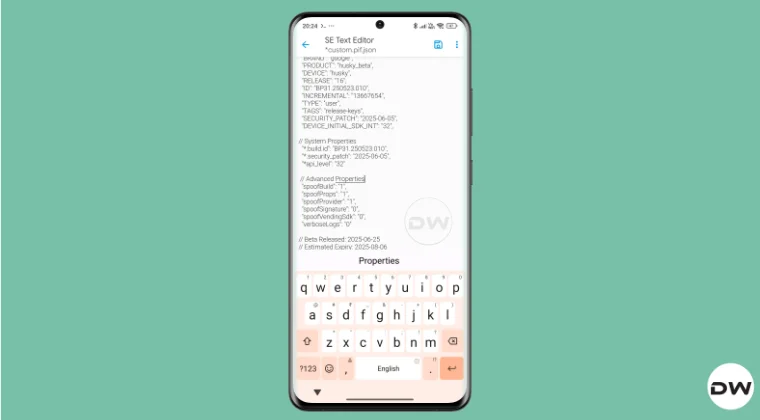
By default, the module comes with a template of a PIF JSON file that you need to fill in manually. You can get this file from /data/adb/modules/playintegrityfix. Once you fill in the values, simply rename it to custom.pif.json, and your task stands complete. But why hasn’t the dev simply added this file, as was the case with the Fix module? Here’s what he has to say regarding this:
There’s intentionally no pif.json in the module because the goal remains to be futureproof, and including something that may be banned and obsolete within days would be contrary to that goal.

However, finding these files might not be everyone’s cup of tea. Not only are a few of these remains, but finding them is also quite an effort taking task. The developer acknowledges this, and hence, he has added a script to extract the latest Pixel Beta fingerprint along with the module. The script is named autopif2, which generates a random device fingerprint from the latest Pixel Beta. So let’s have a look at the steps to make full use of this file.
How to Get the Fingerprint PIF.JSON File using Play Integrity Fork

Before starting, please take a backup of all the data on your device, just to be on the safe side. Droidwin and its members wouldn’t be held responsible in case of a thermonuclear war, your alarm doesn’t wake you up, or if anything happens to your device, and data by performing the below steps.
NOTE: There are quite a few ways of getting this job done, however, I personally found Termux to be the easiest among all of them. But if you want to try out any other method, then run the generation script from a root manager app that supports the module Action button or from a file explorer app that supports script execution.
- To begin with, flash the wget2 module via Magisk / KernelSU / APatch .
- Then, flash the Play Integrity Fork CI module from GitHub Actions .
- Now, download and install the Termux app from F-Droid.
- Then launch it and execute the following three commands: su //you’ll get a SU request, hit Grant cd /data/adb/modules/playintegrityfix //to change the directory to the module’s sh autopif2.sh –preview // this will give you the fingerprint file
- You can also add a few other parameters to the above command, namely: su -c sh /data/adb/modules/playintegrityfix/autopif2.sh -a -m -p -s -a Advanced -m Match -p Preview -s Strong
- Once done, head over to the below location to access the custom.pif.json /data/adb/modules/playintegrityfix
Direct Download PIF JSON Files
If you don’t want to manually carry out the aforementioned steps, then you may directly get the PIF JSON file from our below guide:
Download PIF JSON File from Here
- How to Pass Strong Integrity Using Revoked/Banned Keybox File!
- How to Pass Play Integrity in New Android 13+ Checks
- Guide to Pass Strong Integrity on Unlocked Bootloader & Root!
- How to Spoof/Fake/Hide Bootloader Unlock Status
- How to Pass Play Integrity Test on any Custom ROM [Video]
- Drw 6 months ago Reply Problem solved. Termux wasn’t prompting me to grant su user access. Found where to enable it in the KSU Next GUI under Superuser.
- Drw 6 months ago Reply I’m getting “su program not found.” Rooted with ksu and susfs. Modules installed are BKI, Play integrity fork, shamiko, susfs for ksu, tricky store, wget2, zygisk lsposed, and zygisk next. Nothing tweaked.
- mario 7 months ago Reply sorry, what do you mean with “Then, flash the Play Integrity Fork CI module from GitHub Actions.” ? i have pif v13 flashed in magisk
- Mohamed 7 months ago Reply Hi, can you please help me with a vaild keybox pleaaase 🙏
- Antonis 7 months ago Reply 1) “Then, flash the Play Integrity Fork CI module from GitHub Actions” https://github.com/osm0sis/PlayIntegrityFork/actions what do i download? 2) and then what do i do with custom.pif.json ?
- Antonis 7 months ago Reply “Then, flash the Play Integrity Fork CI module from GitHub Actions” https://github.com/osm0sis/PlayIntegrityFork/actions what do i download?
(Cancel Reply)
Δ
