How to Remove AI from Google Chrome URL Address Bar
In this guide, we will show you the steps to remove the AI from Google Chrome’s URL address bar. The Silicon Valley giant is doing its absolute best to force the AI integration into its numerous services, whether one likes it or not, doesn’t matter.
Initialy, it started as an AI Overview, which then expanded to the incorporation of the AI Mode, placing it meticulously at the same spot where ‘All’ used to be, tricking users’ muscle memory into unintentionally clicking on AI! Well played, Google!

Apart from that, you now also have AI in the search bar, which is placed on the Android device’s home screen. And now, Google has upped its game by adding the AI in Chrome’s URL address bar itself. Not many are fans of this intrusive feature being unnecessarily placed at the most frequently used place in the browser.
While there’s a Chrome setting named “AI innovations”, turning it off wouldn’t have any impact on that feature whatsoever. But fret not. We have found a nifty method using which you can finally bid adieu to this feature. So without further ado, let’s show you how this could be carried out.
How to Remove AI from Google Chrome URL Address Bar
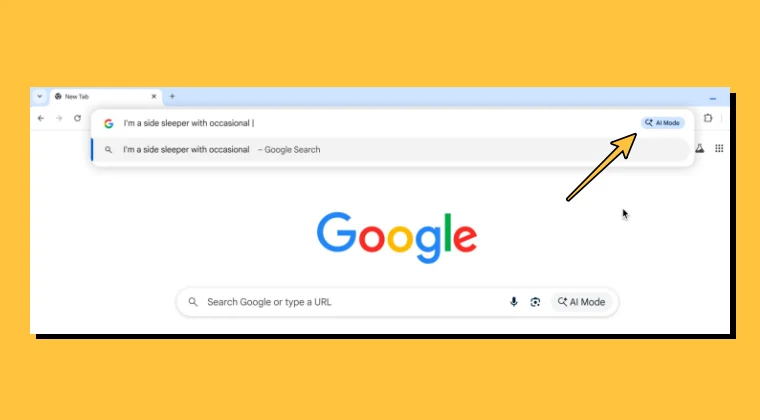
- Launch Chrome and head over to the location below: chrome://flags
- Next up, type in the below flag name in the search box: AI Mode
- You’ll get 3-4 flags of this name, as listed below: AI Mode Omnibox entrypoint AI Entrypoint Disabled on User Input Omnibox Allow AI Mode Matches
- Change their state from Default to Disabled and hit Relaunch.
- Upon relaunch, you’ll no longer see AI in the URL address bar.
We would also like to thank you for carrying out this tweak because the less AI you use in Google Search, the more it will benefit us. As you might have noticed, when you search for a query in Google, it will bring up the result in the AI overview itself. As a result of this, users don’t even visit our site, leading to loss of traffic and ultimately revenue as well.
And as opposed to the common notion, Google doesn’t attribute us in most cases for the results that its AI brings up, even if the entire data is picked from our site, so we are at a huge loss ever since the incorporation of AI in search. The more you stay away from AI, the better it will be for us. So once again, a huge thank you from us <3

- How to Run Magic Cue and other AI Features on Rooted Pixel 10
- How to Remove AI Shortcut from Google Search Bar on Android
- Google AI Edge Gallery: Use AI Offline on your Device!
- How to Add ChatGPT/Gemini in Android Keyboard

(Cancel Reply)
Δ
