Along the same lines, the seventh offers some of the best value for money. Well, there’s even a Kids exclusive variant- the Fire HD 8. All in all, it has managed to check-marked most of the prerequisites that one could have asked for from a device of this domain. However, there’s just one issue: all these tablets come preloaded with a plethora of built-in apps.
- How to Remove Bloatware from Amazon Fire 7/8/10 Tablets Install Android SDK Enable USB Debugging/ADB on Amazon Fire 7/8/10 Tablets Verify Amazon Fire Tablet ADB Connection Remove Bloatware from Amazon Fire Tablet via ADB Commands
The below instructions are listed under separate sections for ease of understanding. Make sure to follow in the exact same sequence as mentioned. Droidwin and its members wouldn’t be held responsible in case of a thermonuclear war, your alarm doesn’t wake you up, or if anything happens to your tablet and its data by performing the below steps.
Install Android SDK
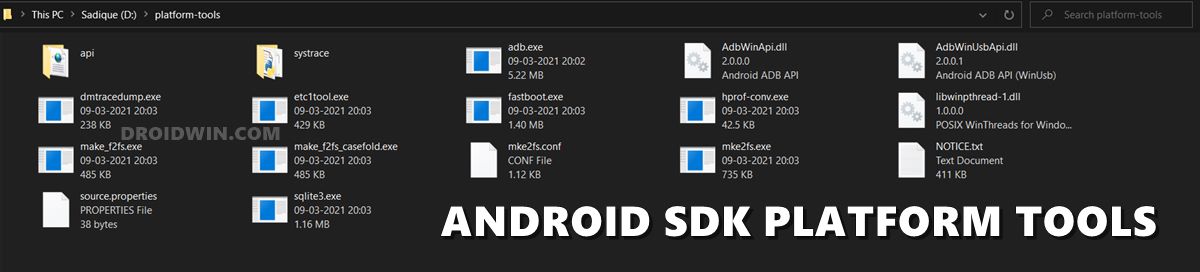
First and foremost, you will have to install the Android SDK Platform Tools on your PC. This is the official ADB and Fastboot binary provided by Google and is the only recommended one. So download it and then extract it to any convenient location on your PC. Doing so will give you the platform-tools folder, which will be used throughout this guide.
To begin with, head over to the Settings menu on your tablet.
Then go to Device options and tap on Serial Number 7 times.
You will now get a message that “You are now a Developer” (or something along the similar lines).
Now exit this Device Options and re-enter it. You shall now see the Developer Options at the end of the page.
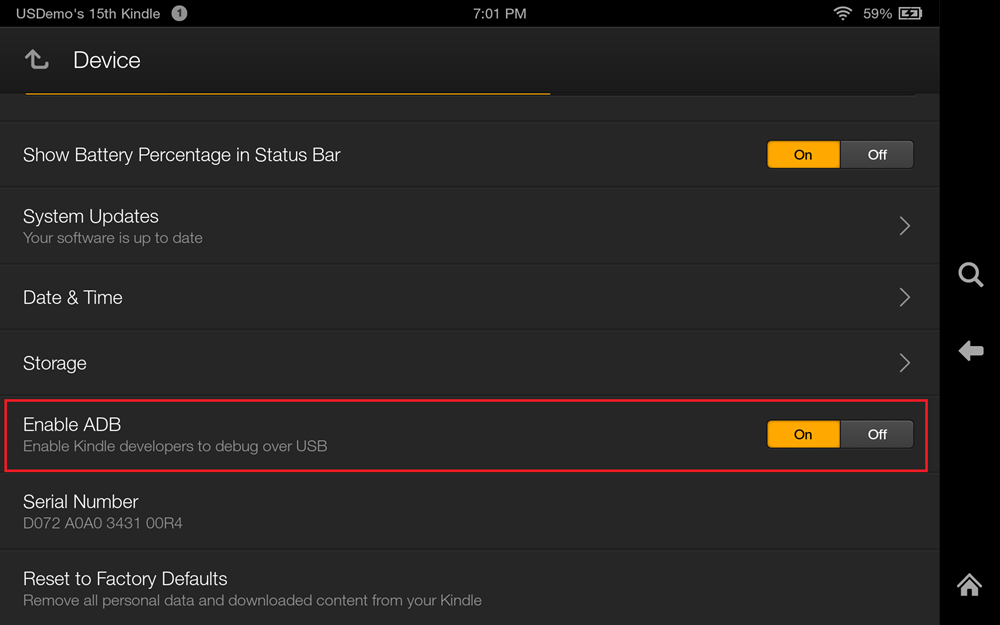
Go to Developer Options and enable the ‘USB Debugging’ toggle (or the ‘Enable ADB’ toggle in some tablets).
First off, connect your tablet to the PC via the USB cable.
Then head over to the platform-tools folder, type in CMD in the address bar, and hit Enter.
This shall launch the Command Prompt window.
Execute the below command to verify a successful ADB Connection: adb devices
If you get an alphanumeric code followed by the ‘device’ keyword, then the connection stands successful.
Now type in the below commands in the CMD window, one at a time. if you get an error with any of these commands, simply skip it and move over to the next one. [Credits: Reddit User dingers13 ].
adb shell pm uninstall --user 0 com.amazon.parentalcontrols


adb shell pm uninstall --user 0 com.android.calendar


adb shell pm uninstall --user 0 com.amazon.photos


adb shell pm uninstall --user 0 com.amazon.kindle


adb shell pm uninstall --user 0 com.android.email


adb shell pm uninstall --user 0 com.android.music


adb shell pm uninstall --user 0 com.goodreads.kindle


adb shell pm uninstall --user 0 com.amazon.kindle.personal_video


adb shell pm uninstall --user 0 com.amazon.geo.client.maps


adb shell pm uninstall --user 0 com.amazon.cloud9.systembrowserprovider


adb shell pm uninstall --user 0 com.amazon.cloud9


adb shell pm uninstall --user 0 com.amazon.csapp


adb shell pm uninstall --user 0 com.amazon.weather


adb shell pm uninstall --user 0 com.amazon.ags.app


adb shell pm uninstall --user 0 com.amazon.h2settingsfortablet


adb shell pm uninstall --user 0 com.android.contacts


adb shell pm uninstall --user 0 amazon.alexa.tablet


adb shell pm uninstall --user 0 com.amazon.kindle.kso


adb shell pm uninstall --user 0 com.audible.application.kindle


adb shell pm uninstall --user 0 com.amazon.mp3


adb shell pm uninstall --user 0 com.amazon.tahoe


adb shell pm uninstall --user 0 com.amazon.photos.importer


adb shell pm uninstall --user 0 com.amazon.zico


adb shell pm uninstall --user 0 com.amazon.dee.app
- Remove/Uninstall Bloatware Apps from Android via ADB
- Fix An error has occurred DP-4040: Fire TV Live Stream
- How to Cast Hotstar on TV without Chromecast
- How to Remove Ads on Nvidia Shield and other Android TVs

- James 3 years ago Reply Every line command fails. This is a complete waste of time!
- B 4 years ago Reply This article is garbage. Not only does this not work, you do not even begin to list all of the bloatware on the tablet. There are a whole lot more app installed that should not be on the tablet.
- Arthur Edwards 4 years ago Reply Some of the commands did work, most didn’t. Those that did work, the apps were still there even on reboot. Fire 10HD
- Peter 4 years ago Reply Hi Sadique, Thank you for the instructions, I managed to follow through your guide step by step. Most of the intented bloatwares in my Fire 8 have appeared “success”. However, when I restart my Fire 8, the annoying apps still remains on the main screen. I tried to uninstall them again on CMD screen, the system responded “failure” as it seems “already uninstalled”! I don’t know what to do next. Please advise. Thanks peter
(Cancel Reply)
Δ
