How to Turn Off Show Stickers in iPhone Keyboard on iOS 17
In this guide, we will show you the steps to turn off Show Stickers on the iPhone keyboard on iOS 17. The Cupertino giant has recently rolled out its latest OS build and with that, there were a plethora of talking points, all thanks to the introduction of a slew of intriguing features. While most of them were welcomed with open hands, a few others were hard to digest for the end users.
For instance, the new default message tone didn’t fall in sync with many user’s requirement. And that’s not it. When you select the emoji keyboard, you now get the Frequently Used Sticker section to its left. This hasn’t gone down too well with many, as not only does it lead to unnecessary occupying of more screen space but it also makes it inconvenient to access the emoji, not to mention the fact that many users don’t even prefer to use stickers in the first place.
If you also fall in the same bracket, then this guide will show you the steps to turn off Show Stickers on your iPhone keyboard on iOS 17. Follow along.
How to Turn Off Show Stickers in iPhone Keyboard on iOS 17
- Profile Picture missing in App Store after iOS 17 update
- How to Change iOS 17 Default Message Tone
- Next Backup Size Larger Bug in iOS 17? You’re not alone!
- How to Fix CarPlay not working on iOS 17

- rdl 2 years ago Reply Aha!! On the Keyboards screen, don’t SELECT Keyboards where one of your choices is “Emoji”. SCROLL DOWN to the bottom of the Keyboards screen, past the Auto-Annoying things. EMOJI is the last section, and the only item is “Stickers”, which can be turned off. Thanks for your help in getting me to the right section of Settings, and for giving me hope that the Stickers could be turned off (I’m not 13!), but if you had said to SCROLL DOWN to the Emoji SECTION, and not the “Emoji keyboard”, I would have found it sooner. But still, Thank You!!
- rdl 2 years ago Reply I am at Settings -> General -> Keyboard. I see a list of my keyboards, one of which is “Emoji”. I do not see anything mentioning “Stickers”; there is no way to select “Emoji” to have anything further appear. It looks like the only option is to delete “Emoji” completely.
(Cancel Reply)
Δ
Next Backup Size Larger Bug in iOS 17? You’re not alone!
Many users have voiced their concern that the next backup size is going to be significantly larger than their previous one in iOS 17. At the time of writing, Apple is testing out the second Public Beta and the fifth Developer Preview. Since both of them are currently in the testing phase, it’s near about along the obvious lines that the OS is bound to get bugged with a few bugs and issues [which has indeed been the case ].
Next Backup Size Larger Bug in iOS 17
However, the latest one seems to have left quite a few users stumped. Many of them have reported that the Next Backup feature on their iPhone is showing up to 20-30GB larger than their previous one. Upon further digging up the files that it might back up, well, they are even seeing the likes of Google Drive, One Drive, Dropbox, and offline YouTube videos [serioulsy, we are not joking!].
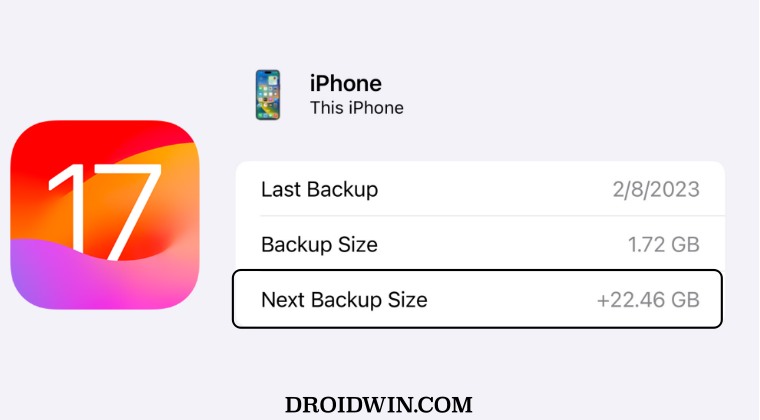
They could verify the same by heading over to S ettings > iCloud > Manage storage > backups > tap my iPhone, and checking out all the data that’s going to be in the next backup. As of now, there doesn’t seem to be any workaround that seems to be addressing this issue. While we are waiting for the third public beta to arrive [which could be here in a day or two], it’s recommended that you file a bug report using the Feedback app installed on your device at the earliest.
As far as the official stance on this matter is concerned, the developers are yet to acknowledge this issue, let alone give out any ETA for the rollout of a fix. As and when any of these two things happen, we will update this guide accordingly. In the meantime, the aforementioned workarounds are your best bet.
- iOS 17 Unable to Check for Update [Workaround]
- Fix iPhone Screen Time not working/Incorrect Data on iOS 17
- Fix Apps not showing Notification Badge on iOS 17
- How to Fix CarPlay not working on iOS 17
- AdGuard not working on Safari on iOS 17: How to Fix
(Cancel Reply)
Δ
