How to Uninstall Core Audio Driver MSTeamsAudioDevice.driver on Mac
In this guide, we will show you the steps to uninstall the Core Audio Driver (MSTeamsAudioDevice.driver) from your Mac. Ever since work from home became the new normal, users have flocked over to numerous video conferencing apps. One among them is the offering from the Redmon giant. Many users have been inclined towards Teams due to its handy integration with other Microsoft services.
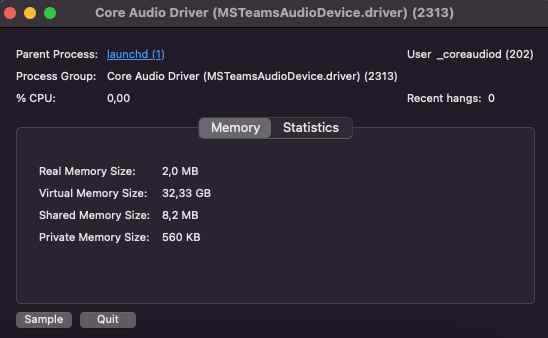
However, as of late, numerous Mac users have voiced their concern that even after uninstalling Microsoft Teams, its core audio driver file MSTeamsAudioDevice.driver is still present on their system. Not only that, it continues to run in the background and ends up hogging valuable system resources as well.

What is even more intriguing is the fact that even though Microsoft has [finally] updated Teams to be an Apple Silicon native app, the processor still appears as Intel. So if you are also getting bugged with these issues, then this guide shall help you out. Follow along for the fix.
How to Uninstall Core Audio Driver MSTeamsAudioDevice.driver on Mac

- Launch Finder and press Shift+Command+. to view hidden files
- Then delete the file from the following directory /Library/Audio/Plug-Ins/HAL/MSTeamsAudioDevice.driver
- After that, delete the file from the following location as well: /Library/Audio/Plug-Ins/HAL/MSTeamsAudioDevice.driver/Contents/MacOS/MSTeamsAudioDevice
- Now open Activity Monitor, select Core Audio Driver, and hit Quit for one final time.
- How to Create a New Text File in a Folder on Mac
- Netbiosd High CPU Usage on Mac: How to Fix
- nsmb.conf file missing from Preferences or Etc folder on Mac [Fixed]
- SMB Samba Share not working in macOS Monterey: How to Fix

- Pam 3 years ago Reply Hello! thank you I have tried searching for the directory without success although my activity monitor shows the audio driver.. what can I do? thank you in advance.
- Josh 3 years ago Reply So looking in my library and my activity monitor, I don’t see it there. And I had already run the uninstall from my M1 MacStudio. However recently on a media recording embedded in the Canvas LMS while viewing on Chrome, it cam up as a Mic option. Any ideas or suggestions?
- John Tzortzis 3 years ago Reply How do you reinstall the driver?
(Cancel Reply)
Δ
