How to Uninstall OnePlus Red Cable Club App
In this guide, we will show you the steps to uninstall the Red Cable Club app from your OnePlus device. The eleventh iteration of the OS was the last build that truly had the USP of the original OxygenOS, because after that things took a turn for the worse, all thanks to Oppo. However, even though the OEM stepped within the ColorOS ecosystem, fortunately, there wasn’t an addition of new bloatware.
So while you would still be getting a messed up UI, the number of pre-installed apps is still the same as before. Among them, one such app is the Red Cable Club which is a community-driven app that gives you the platform to claim credits after completing a few tasks. You could then use these credits to claim exclusive free benefits like extra cloud storage, extended warranty, discounts on OnePlus products, and many more.
However, not everyone wishes to be a part of this community. Well, some even tag this app as an unwanted addition to the OS and they want to bid adieu to it for good. If you also echo the same thought, then this guide will show you the steps to uninstall the Red Cable Club app from your OnePlus device. Follow along.
- How to Uninstall OnePlus Red Cable Club App STEP 1: Install Android SDK STEP 2: Enable USB Debugging STEP 3: Establish ADB Shell Connection STEP 4: Uninstall OnePlus Red Cable Club App
How to Uninstall OnePlus Red Cable Club App

The below instructions are listed under separate sections for ease of understanding. Make sure to follow the same sequence as mentioned.
STEP 1: Install Android SDK
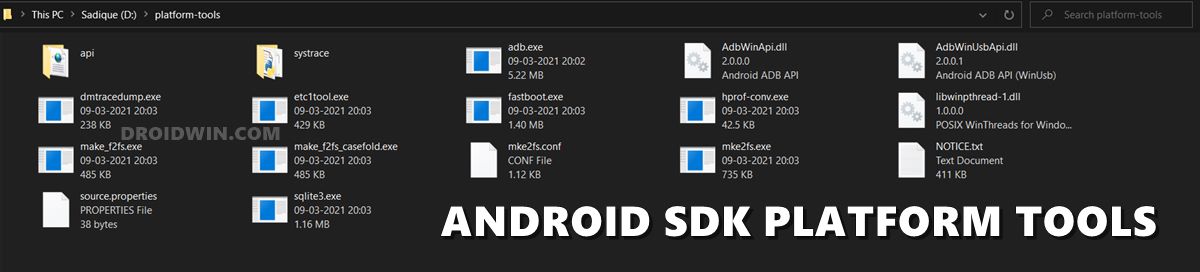
First and foremost, you will have to install the Android SDK Platform Tools on your PC. This is the official ADB and Fastboot binary provided by Google and is the only recommended one. So download it and then extract it to any convenient location on your PC. Doing so will give you the platform-tools folder, which will be used throughout this guide.
STEP 2: Enable USB Debugging
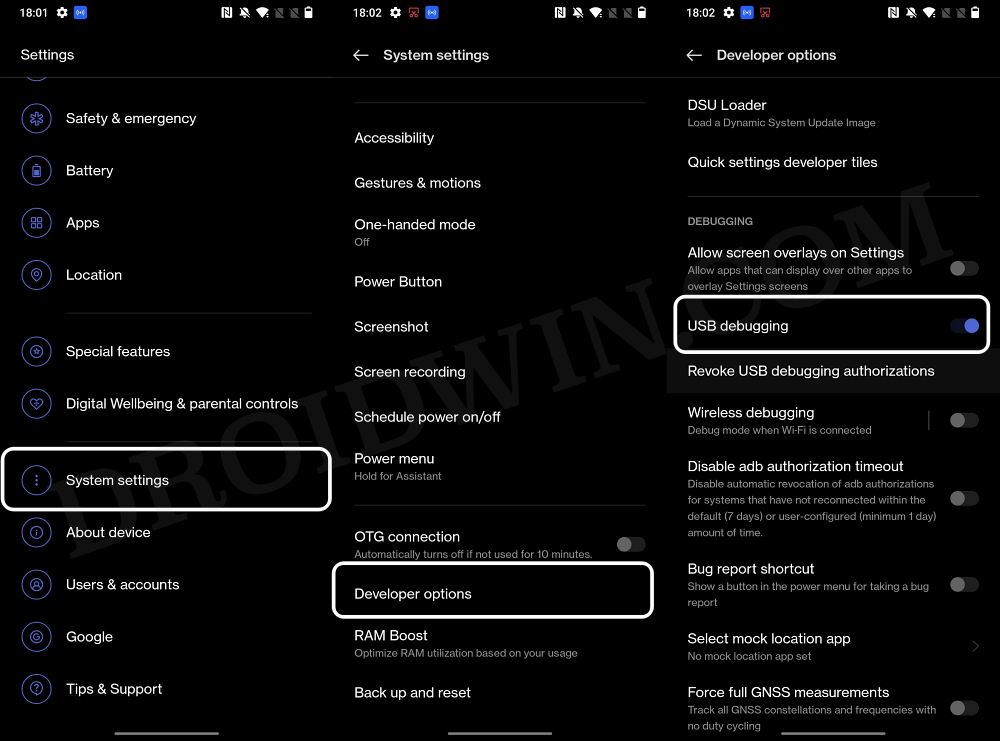
Next up, you will have to enable USB Debugging on your device so that it is recognizable by the PC in ADB mode. So head over to Settings > About Phone > Tap on Build Number 7 times > Go back to Settings > System Settings > Developer Options > Enable USB Debugging.
STEP 3: Establish ADB Shell Connection
- To begin with, connect your device to the PC via USB cable. Make sure USB Debugging is enabled.
- Then head over to the platform-tools folder, type in CMD in the address bar, and hit Enter. This will launch the Command Prompt.
- Now in the following command in the CMD window to verify the ADB connection. If you get the device ID, then the connection stands successful. adb devices
- Now type in the below command to open the Shell environment: adb shell
- It will now list out your device codename, which means that the shell connection has been successfully established.
STEP 4: Uninstall OnePlus Red Cable Club App
- Just execute the below command and your task stands complete: pm uninstall –user 0 com.oneplus.membership
- Remove Bloatware/Debloat OnePlus 10 Pro [No Root]
- Debloat/Remove Bloatware OnePlus 9 Pro via ADB [Android 13]
- How to Uninstall Facebook/Meta Services from OnePlus Open
- How to Get Hasselblad Watermark on OnePlus 10 Pro Camera

- OnePlus 12 2 years ago Reply Nice, thank you for this. But, I also needed to type this: pm uninstall –user 0 com.oneplus.account
(Cancel Reply)
Δ
