How to Use Revolut app on Rooted Device/Custom ROM
In this guide, we will show you the steps to use the Revolut app on a rooted device or a device running a custom ROM. This mobile financing app is among the most popular players in its domain. However, it has also placed some stringent privacy measures, especially if we talk about root and custom firmware checks.
Rooted Devices: “Sorry, Revolut does not support rooted devices. We take the security of your data very seriously. If you wish to install and use the app on your device, you need to perform a factory reset.” Devices Running Custom ROMs: “Sorry, revolut is not supported on devices with custom firmware”.
As a result of this, it is giving some tough times to the tech enthusiasts, and they are unable to use it on their devices. Given above are the error messages that they are greeted with upon launching the app on their devices. If you are also in the same boat, then this guide will help you out. Follow along for the fixes.
- How to Use Revolut App on Rooted Device/Custom ROM STEP 1: Hide Root from Revolut Via APatch Using Magisk STEP 2: Hide Custom ROM
How to Use Revolut App on Rooted Device/Custom ROM

Before starting, please take a complete device backup. Droidwin and its members wouldn’t be held responsible in case of a thermonuclear war, your alarm doesn’t wake you up, or if anything happens to your device, and data by performing the below steps.

STEP 1: Hide Root from Revolut
Via APatch
- To begin with, root your device using APatch .
- Now flash ZygiskNext and PlayIntegrityFork CI .
- Next, pass the Strong Integrity check [recommended].
- Then, create a blacklist via HMA and add Revolut to it.
- Now go to the below location and open the target.txt file: data/adb/tricky_store
- Then add its app package name [given below] and save it com.revolut.revolut!
- Also, make sure that the below values are there in the file com.google.android.gms com.google.android.gsf com.android.vending android
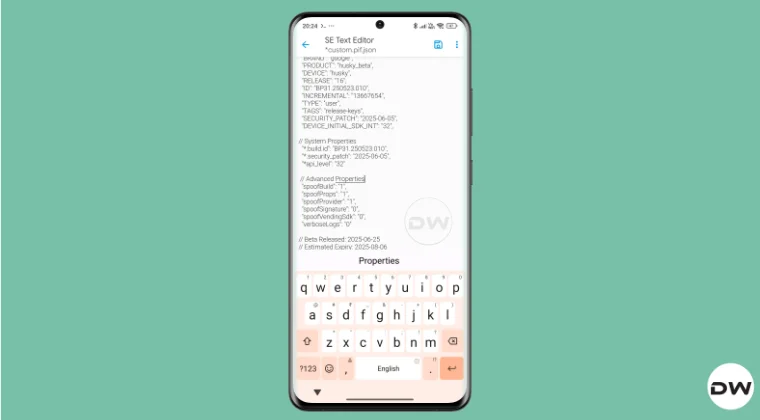
- Now create a custom.pif.json file [recommended].
Using Magisk
It is highly recommended that you use Magisk Alpha instead of Magisk Stable/Beta/Canary. I downloaded it from Magisk Alpha Telegram Group but you can get it from any source of your choice.
- First off, pass the Strong Integrity check [recommended].
- Next up, create a blacklist via HMA and add Revolut to it.
- Now launch Magisk > head to Settings > Configure Denylist.
- After that, check the following apps in the Magisk Denylist: Google Play Service, Google Play Store, Google Services Framework, Revolut.
- Now go to the below location and open the target.txt file: data/adb/tricky_store/target.txt
- Then add its app package name [given below] and save it com.revolut.revolut! Reference Image
- Also, make sure that the below values are there in the file com.google.android.gms com.google.android.gsf com.android.vending android
- Now create a custom.pif.json file [recommended].
- Then delete the data of Google Play Service, Google Play Store, Google Service Framework, and Revolut.
- Finally, restart your device and check out the result.
STEP 2: Hide Custom ROM
This tweak is for the LineageOS ROM. Moreover, before installing any OTA update, you’ll have to remove that tweak [the command] and only then install the update. Once installed, you may then re-add that command.
- Launch File Manager and head to the below location: /data/adb/modules/playintegrityfix/post-fs-data.sh
- Then open the post-fs-data.sh file and type in the below value: resetprop -d ro.lineage.build.version
- Finally, save the changes and your task stands complete.
- How to Pass Strong Integrity Using Revoked/Banned Keybox File!
- How to Pass Play Integrity in New Android 13+ Checks
- Guide to Pass Strong Integrity on Unlocked Bootloader & Root!
- How to Spoof/Fake/Hide Bootloader Unlock Status
- How to Pass Play Integrity Test on any Custom ROM [Video]

- MicroG 7 months ago Reply Any chances you could look at how to get it all working including MicroG? I’ve it installed using MinMicroG Magisk module as it simplifies all steps and discovered that PIF doesn’t work well with it – meaning it hides MicroG apk and effectively causes disables all GMS functionality which MicroG makes possible without using Google Services. Here is the link to MinMicroG releases: https://github.com/FriendlyNeighborhoodShane/MinMicroG_releases/releases
- Antonis 7 months ago Reply still revolut doesnt work
(Cancel Reply)
Δ
How to Get Fingerprint PIF.JSON File using Play Integrity Fork
In this guide, we will show you the steps to get the fingerprint PIF.JSON file using Play Integrity Fork. A week back or so, we got the unfortunate news that the Play Integrity Fix module has been discontinued by the developer chiteroman. We can’t thank him enough for the invaluable work he has done for this community. But going forward, what can be our next course of action?
Well, while this module was up and running, another developer [osm0sis] was also running a fork of this module, which goes by the name Play Integrity Fork. While we wouldn’t say that it was under the shadow of Fix, but it wasn’t being used that much when compared to its counterpart.

However, all that is about to change now, and so there are a few queries that might pop up in your minds. In this regard, one of the most common questions that I have been asked for the past week is how to get the fingerprint PIF.JSON file in the Play Integrity Fork module.
As you might already be aware, the Fix module already has this embedded in its module; you just need to launch it via KSUWebUI, hit the Fetch PIF.JSON option, and you’ll get the file. But that’s not possible via the Fork module via the direct route. Why? Let’s find out, and after that, we will list the plausible steps through which you can get this file using this module. Follow along.
- Why is the PIF JSON Fingerprint File Missing in Play Integrity Fork
- How to Get the Fingerprint PIF.JSON File using Play Integrity Fork
- Direct Download PIF JSON Files
Why is the PIF JSON Fingerprint File Missing in Play Integrity Fork
By default, the module comes with a template of a PIF JSON file that you need to fill in manually. You can get this file from /data/adb/modules/playintegrityfix. Once you fill in the values, simply rename it to custom.pif.json, and your task stands complete. But why hasn’t the dev simply added this file, as was the case with the Fix module? Here’s what he has to say regarding this:
There’s intentionally no pif.json in the module because the goal remains to be futureproof, and including something that may be banned and obsolete within days would be contrary to that goal.

However, finding these files might not be everyone’s cup of tea. Not only are a few of these remains, but finding them is also quite an effort taking task. The developer acknowledges this, and hence, he has added a script to extract the latest Pixel Beta fingerprint along with the module. The script is named autopif2, which generates a random device fingerprint from the latest Pixel Beta. So let’s have a look at the steps to make full use of this file.
How to Get the Fingerprint PIF.JSON File using Play Integrity Fork

Before starting, please take a backup of all the data on your device, just to be on the safe side. Droidwin and its members wouldn’t be held responsible in case of a thermonuclear war, your alarm doesn’t wake you up, or if anything happens to your device, and data by performing the below steps.
NOTE: There are quite a few ways of getting this job done, however, I personally found Termux to be the easiest among all of them. But if you want to try out any other method, then run the generation script from a root manager app that supports the module Action button or from a file explorer app that supports script execution.
- To begin with, flash the wget2 module via Magisk / KernelSU / APatch .
- Then, flash the Play Integrity Fork CI module from GitHub Actions .
- Now, download and install the Termux app from F-Droid.
- Then launch it and execute the following three commands: su //you’ll get a SU request, hit Grant cd /data/adb/modules/playintegrityfix //to change the directory to the module’s sh autopif2.sh –preview // this will give you the fingerprint file
- You can also add a few other parameters to the above command, namely: su -c sh /data/adb/modules/playintegrityfix/autopif2.sh -a -m -p -s -a Advanced -m Match -p Preview -s Strong
- Once done, head over to the below location to access the custom.pif.json /data/adb/modules/playintegrityfix
Direct Download PIF JSON Files
If you don’t want to manually carry out the aforementioned steps, then you may directly get the PIF JSON file from our below guide:
Download PIF JSON File from Here
- How to Pass Strong Integrity Using Revoked/Banned Keybox File!
- How to Pass Play Integrity in New Android 13+ Checks
- Guide to Pass Strong Integrity on Unlocked Bootloader & Root!
- How to Spoof/Fake/Hide Bootloader Unlock Status
- How to Pass Play Integrity Test on any Custom ROM [Video]
- Drw 6 months ago Reply Problem solved. Termux wasn’t prompting me to grant su user access. Found where to enable it in the KSU Next GUI under Superuser.
- Drw 6 months ago Reply I’m getting “su program not found.” Rooted with ksu and susfs. Modules installed are BKI, Play integrity fork, shamiko, susfs for ksu, tricky store, wget2, zygisk lsposed, and zygisk next. Nothing tweaked.
- mario 7 months ago Reply sorry, what do you mean with “Then, flash the Play Integrity Fork CI module from GitHub Actions.” ? i have pif v13 flashed in magisk
- Mohamed 7 months ago Reply Hi, can you please help me with a vaild keybox pleaaase 🙏
- Antonis 7 months ago Reply 1) “Then, flash the Play Integrity Fork CI module from GitHub Actions” https://github.com/osm0sis/PlayIntegrityFork/actions what do i download? 2) and then what do i do with custom.pif.json ?
- Antonis 7 months ago Reply “Then, flash the Play Integrity Fork CI module from GitHub Actions” https://github.com/osm0sis/PlayIntegrityFork/actions what do i download?
(Cancel Reply)
Δ
