iOS 17: contact poster using nickname instead of first & last name!
The seventeenth iteration of the OS build has bought a slew of intriguing goodies to the fore. Some of the noteworthy ones include the likes of Standby Mode, Live VoiceMail, Contact Posters, Offline Apple Maps, Personal Voice, and Interactive eWidgets, among others. If we shift our attention towards Contact Poster, then it allows you to completely overhaul the UI of incoming calls, with the incorporation of Memoji, different types of typography, and font colors.
However, there is a minor bug with this functionality. When you first set up a contact poster for a user, then the OS gives you the opportunity to add a nickname. However, when the final result is saved, the contact poster in iOS 17 still shows the first & last name, instead of the nickname! This issue had been doing the rounds ever since it came into existence and is yet to be rectified even with the latest beta [which at the time of going to writing is Beta 5].
iOS 17 Contact Posters is still using Nickname!
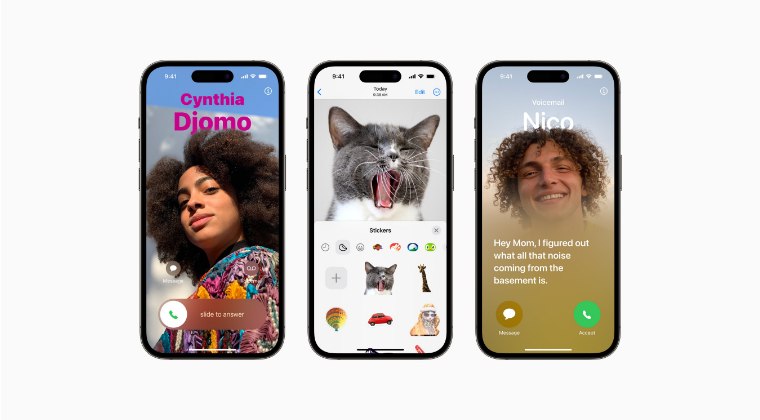
So in its current form, if you save your contact poster on iOS 17, then it will not show the nickname. The only time it shows the nickname is in the “preview” of what it will look like. But as soon as you save it, it will be saved with the first and last name itself. There does not seem to be any option to make the OS show the nickname of the final saved contact poster, which has resulted in a great deal of inconvenience to the end users, and rightly so.

Initially, it was assumed that turning off the Preferred Nicknames feature might rectify this issue. but that isn’t the case. So we would highly recommend you file a bug report wth Apple so that they are made aware of the same and take action at the earliest before the stable rollout begins. As and when there is any further development in this regard, we will update this post accordingly. So stay tuned! [All Images Credits: Apple].
- Next Backup Size Larger Bug in iOS 17? You’re not alone!
- Fix Apps not showing Notification Badge on iOS 17
- iOS 17 Unable to Check for Update [Workaround]
- How to Fix CarPlay not working on iOS 17

(Cancel Reply)
Δ
Next Backup Size Larger Bug in iOS 17? You’re not alone!
Many users have voiced their concern that the next backup size is going to be significantly larger than their previous one in iOS 17. At the time of writing, Apple is testing out the second Public Beta and the fifth Developer Preview. Since both of them are currently in the testing phase, it’s near about along the obvious lines that the OS is bound to get bugged with a few bugs and issues [which has indeed been the case ].
Next Backup Size Larger Bug in iOS 17
However, the latest one seems to have left quite a few users stumped. Many of them have reported that the Next Backup feature on their iPhone is showing up to 20-30GB larger than their previous one. Upon further digging up the files that it might back up, well, they are even seeing the likes of Google Drive, One Drive, Dropbox, and offline YouTube videos [serioulsy, we are not joking!].
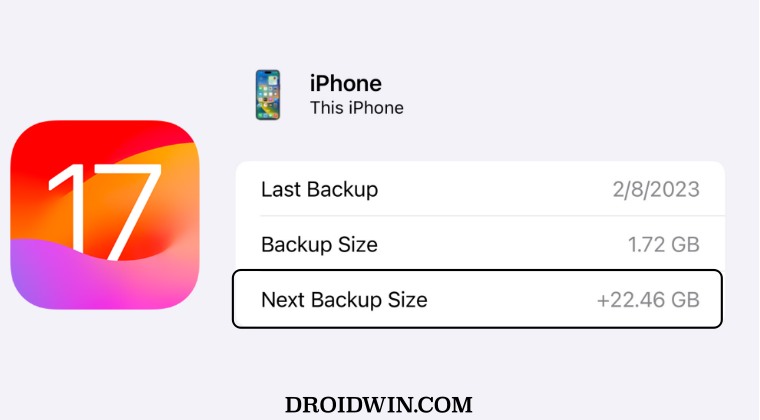
They could verify the same by heading over to S ettings > iCloud > Manage storage > backups > tap my iPhone, and checking out all the data that’s going to be in the next backup. As of now, there doesn’t seem to be any workaround that seems to be addressing this issue. While we are waiting for the third public beta to arrive [which could be here in a day or two], it’s recommended that you file a bug report using the Feedback app installed on your device at the earliest.
As far as the official stance on this matter is concerned, the developers are yet to acknowledge this issue, let alone give out any ETA for the rollout of a fix. As and when any of these two things happen, we will update this guide accordingly. In the meantime, the aforementioned workarounds are your best bet.
- iOS 17 Unable to Check for Update [Workaround]
- Fix iPhone Screen Time not working/Incorrect Data on iOS 17
- Fix Apps not showing Notification Badge on iOS 17
- How to Fix CarPlay not working on iOS 17
- AdGuard not working on Safari on iOS 17: How to Fix
(Cancel Reply)
Δ
