LDAC Codec not working on Galaxy S23 Ultra: How to Fix
In this guide, we will show you the steps to fix the issue of the LDAC Codec not working on Galaxy S23 Ultra. Out of all the available codes, namely SBC, AACM aptX, and LDAC, it is the latter one that is usually the go-to choice for the masses. This proprietary codec has been developed by Sony and allows streaming high-resolution audio over Bluetooth up to 990 kbps at 24 bit/96 kHz. However, some Samsung flagship users aren’t able to make full use of it.
They have voiced their concern that the LDAC Codec is not working along the expected lines on their Galaxy S23 Ultra even though their headphones support the same. In this regard, we have seen reports from Sony WF-1000XM4, WH-1000XM4, Galaxy Buds 2 Pro, and even the Realme Buds Pro. If you are also getting bugged by this issue, then this guide will help you out. Follow along.
Fix LDAC Codec not working on Galaxy S23 Ultra
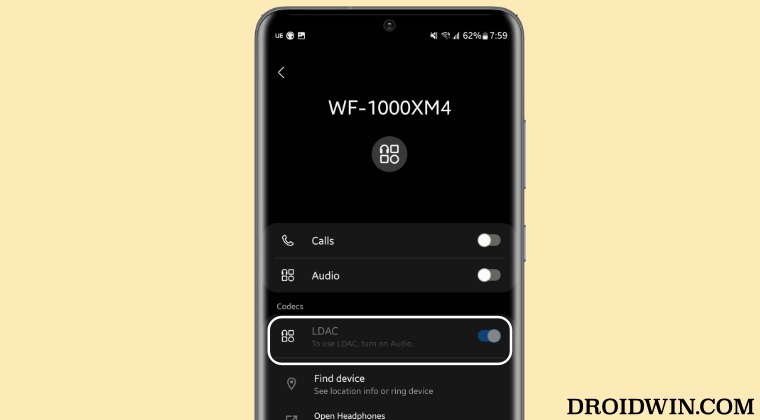
In order to rectify this issue, you will have to enable LDAC from three different locations [two compulsory and one optional]. These are the Developer Options, Bluetooth Menu, and the headphone app [if available] So without further ado, let’s get started with the task.
- First off, head over to Settings > About Phone > Software Information.
- Then tap on Build Number 7 times. This will enable Developer Options.
- So go to Settings > General > Developer options > Bluetooth Audio Codec and select LDAC from the list.
- Once done, go to Settings > Connections > Bluetooth > “Headphone name”. Then enable the toggle next to LDAC from there.
- Likewise, if your headphone has an associated app, then make sure to enable LDAC from there as well [if present].
- S23 Ultra Touch not working with third-party apps: How to Fix
- Galaxy S23 Ultra is unable to connect to WiFi 6 5GHz
- Enable Call Recording on Galaxy S23/Plus/Ultra [No Root]
- How to Force 120Hz Refresh Rate on Galaxy S23/Plus/Ultra

- EM 2 months ago Reply thanx mate it works!
- Trebor 2 years ago Reply Ldac not selectable for me either although shows grey out in list.
- Nanang 2 years ago Reply Thank you mate ! It works for me (Soundcore Liberty 4 & Samsung Galaxy S22). Tonga 2 years ago Reply What do you Wrote: It works for you – with Samsung Galaxy S22? i can choose only SBC!
- Billy columbel 3 years ago Reply Thank you that work!!!!
- Andrew 3 years ago Reply Neither of those solutions work for Samsung.
- Lee 3 years ago Reply Trigger Audio Codec options are all unselectable for me. I see the full list like your screenshot but I cannot change my selection, it is stuck on SBC. Szántó Pál 3 years ago Reply Sajnos nekem is ez a problémám S23 ultra telefonon nem lehet változtatni szürkébe van az összes codec. Andrew 3 years ago Reply same! David 3 years ago Reply Same can see and not greyed out but cannot select LADC
(Cancel Reply)
Δ
