Measure ECG and BP on Galaxy Watch 5 [Unsupported Countries]
In this guide, we will show you the steps to measure ECG and BP on your Galaxy Watch 5. The newest addition to the smartwatch family from the South Korean giant beholds a plethora of health and exercise-related goodies. Among them, it’s ECG, BP, Heart Rate, and spO2 that are among the most important ones. While the latter two are universally available, unfortunately, the same cannot be said for the former two.
While every Galaxy Watch 5 comes with BP and ECG functionalities, however, they are not universally enabled across all countries. But since both these watches house the wearOS, which is based on the open-source Android OS, developers were quick to find a tweak that should help you bypass this restriction. And in this guide, we will show how to make full use of the same. So without further ado, let’s get started.
- Measure ECG and BP on Galaxy Watch 5 [Unsupported Countries] STEP 1: Install Samsung Health Monitor Mod App on Phone STEP 2: Install Samsung Health Monitor Mod App on Watch Install Android SDK Download Samsung Health Monitor Mod App for Watch Enable ADB Debugging in Galaxy Watch 5 Connect Galaxy Watch 5 to PC via ADB Command Install Samsung Health Monitor Mod App on Galaxy Watch 5 STEP 3: Setup Samsung Health Monitor Mod App on Galaxy Watch 5 STEP 4: Setup Samsung Health Monitor Mod App on Phone STEP 5: Measure ECG via Galaxy Watch 5 STEP 6: Measure BP via Galaxy Watch 5
Measure ECG and BP on Galaxy Watch 5 [Unsupported Countries]
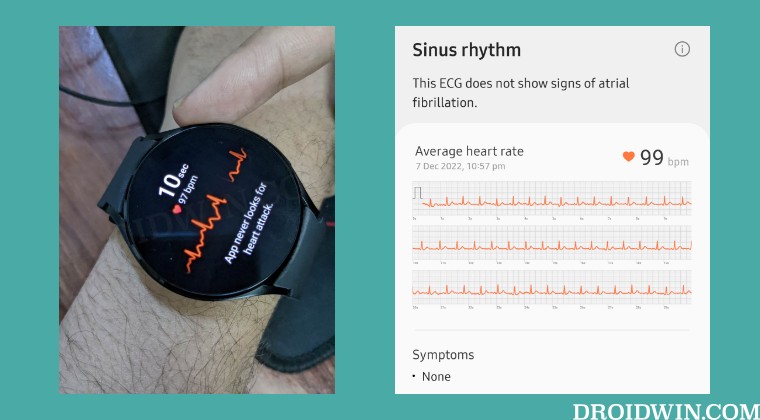
The below instructions are listed under separate sections for ease of understanding. Make sure to follow the same sequence as mentioned. Irrespective of the result of the ECG and BP via this watch, you shouldn’t draw any conclusions beforehand. Rather, first consult with your doctor and then opt for the best route forward, if required.
STEP 1: Install SamsungHealth Monitor ModAppon Phone
- First off, install the Samsung Health Monitor and Watch5 Plugin app from the Play Store onto your device.
- Then download and install the Samsung Health Monitor Mod app on your device [Credits: dante63 ].
STEP 2: Install SamsungHealth Monitor ModAppon Watch
You will now have to install the Samsung Health Monitor Mod A pp on your watch. So proceed with the below steps to carry out this task.
Install Android SDK
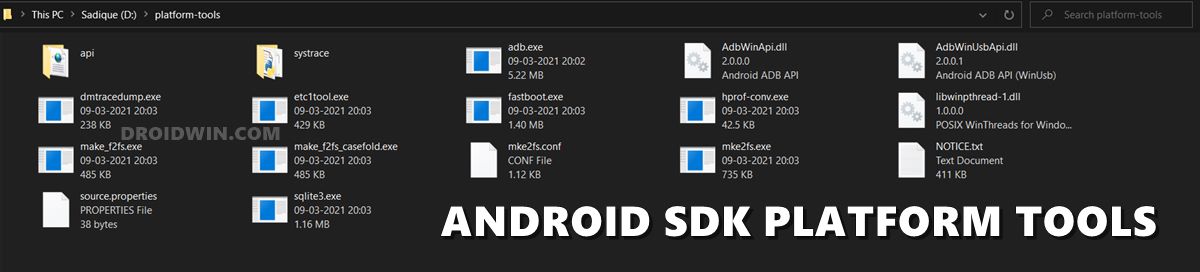
First and foremost, you will have to install the Android SDK Platform Tools on your PC. This is the official ADB and Fastboot binary provided by Google and is the only recommended one. So download it and then extract it to any convenient location on your PC. Doing so will give you the platform-tools folder, which will be used throughout this guide.
Download SamsungHealth Monitor ModApp for Watch
Next up, grab hold of the Samsung Health Monitor Mod A pp APK from below and transfer it to the platform-tools folder on your PC.
Download Link [Credits: dante63]
Enable ADB Debugging in Galaxy Watch 5
- Head over to Settings > About Watch > Software and tap Software Version 7 times.
- Then go to Developer Options and enable the toggle next to ADB Debugging.
- After that, scroll down a little bit and enable the toggle next to Debug over WiFi.
- It will now bring up the IP Address, note it down somewhere [do not include the port number, i.e. values after the colon].
- For example, if the entire value is 192.168.1.3:5555, then your IP will be 192.168.1.3.
Connect Galaxy Watch 5 to PC via ADB Command
- Head over to the platform-tools folder, type in CMD in its address bar, and hit Enter. This will launch Command Prompt.
- Now type in the below command in this CMD window [make sure to replace IP accordingly]. adb connect IP
- You will now get a prompt on your watch, tap OK or Always Allow from this computer.
- Finally, execute the below command to verify the ADB Connection between your watch and PC adb devices
- You will now get your IP Address and port number, followed by the ‘device’ keyword. This signifies that the connection has been successfully established.
Install SamsungHealth Monitor ModAppon Galaxy Watch 5
- To begin with, transfer the Samsung Health Monitor Mod A pp to the platform-tools folder on your PC.
- For the sake of convenience, rename it to Watch.SHM.MOD.apk.
- Now execute the below command in the CMD window [make sure to replace IP accordingly] adb -s IP install Watch.SHM.MOD.apk
- That’s it. The app is now installed on your watch.
STEP 3: Setup SamsungHealth Monitor ModAppon Galaxy Watch 5
- Launch the Samsung Health Monitor Mod A pp your Watch 5 and tap on Allow.
- You will now get the BP and ECG option, let’s select ECG and go to your phone.
STEP 4: Setup SamsungHealth Monitor ModAppon Phone
- Launch the Samsung Health Monitor Mod A pp your Watch 5.
- Then go to the ECG tab and tap on Get Started.
- Now proceed with the on-screen instructions to go through the warning messages.
- Finally, select your wrist position and hit Next Done.
STEP 5: Measure ECG via Galaxy Watch 5
- Wear your watch on the same wrist that you had selected above.
- Then open the Samsung Health Monitor Mod A pp and tap OK in the warning.
- Now slightly long-press the power button and the ECG will start. It will take around 30 seconds to complete.
- Once done, it will bring up the result both on your watch and a detailed report in the Samsung Health App on your device.
STEP 6: Measure BP via Galaxy Watch 5
If you want to measure your Bop via your Galaxy Watch 5, then here’s what you need to do
- Launch the Samsung Health Monitor Mod A pp on your watch and select BP.
- Then launch the Samsung Health Monitor Mod A pp on your device and go to the Blood Pressure tab.
- After that, bring a cuff-based blood pressure monitor and then celebrate your watch via it [this is just required for the first time].
- Once done, you will then be able to take your BP on your watch without any issues.
- Change Screen Density/DPI/Display Size in Galaxy Watch 5
- How to Change Font Size in Galaxy Watch 5
- How to Change CSC on Samsung Galaxy Watch 5/Pro
- Sideload APK/Install Apps via ADB in Galaxy Watch 5/Pro [2 Methods]

- 91 Club Lottery 5 months ago Reply Great read! It’s frustrating that ECG and BP features are not available in unsupported countries. I hope Samsung expands these functionalities to a wider audience soon. Despite that, the Galaxy Watch 5 still seems like a fantastic health tracker!
- y89 apk 9 months ago Reply It’s frustrating to see such useful features being unavailable in unsupported countries. I hope Samsung will expand access soon. Otherwise, it feels like we’re missing out on some great health monitoring tools!
- Mp3Quack 10 months ago Reply Great post! It’s frustrating that ECG and BP features are not available in unsupported countries on the Galaxy Watch 5. I hope Samsung expands support soon, as these features would be incredibly useful for health monitoring. Thanks for sharing the details!
- Poppy CHAPTER 3 APK 11 months ago Reply Great post! It’s frustrating that the ECG and BP features are limited to certain countries. I hope Samsung expands availability soon—I’d love to use those health monitoring tools on my Galaxy Watch 5!
- YT5s Official 11 months ago Reply Great post! It’s frustrating that these features are unsupported in some countries, especially when they’re so beneficial for monitoring health. Hope Samsung expands access soon!
- Mohamed 2 years ago Reply Hello, Does this work for Watch 6 Classic?
- Saleh 3 years ago Reply Hi, Thanks for your article but it is not work with Watch 5, in this step not connect: adb connect IP and in apk from dante63 say that work with Watch 4 not 5 Thanks
(Cancel Reply)
Δ
