Netflix/Prime/Hulu Distorted and Pixelated color issue on Xbox [Fix]
In this guide, we will show you a handy method to fix the distorted and pixelated color issue in Netflix/Prime/Hulu app on Xbox. The video game console from the Redmond giant is among the most popular players in their domain. Apart from the plethora of games that you could try your hands on, it also boasts a slew of video streaming services. However, most of them are going through a rough patch on this console.
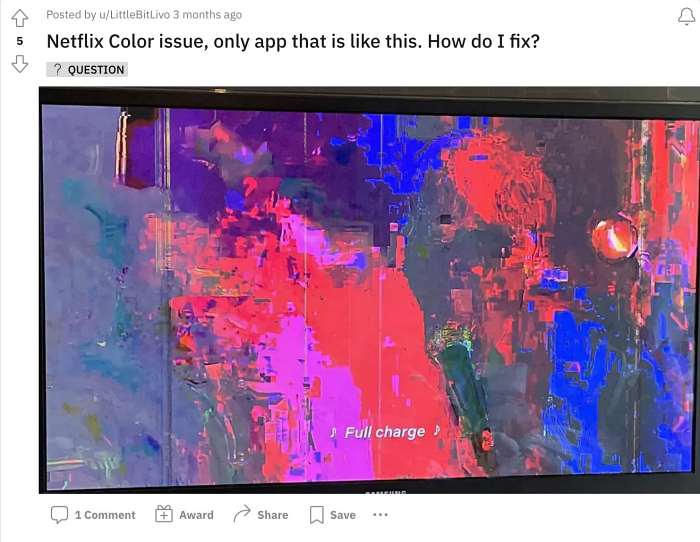
Numerous users have voiced their concern that they are witnessing distorted and pixelated color issues in Netflix/Prime/Hulu apps on Xbox. Apart from that, the brightness and contrast are also quite high, way beyond the acceptable limit. To rectify this issue, users have even opted for the nuclear approach of factory resetting their console, but to no avail. With that said, there does exist a nifty workaround that should help you resolve this bug. So without further ado, let’s check it out.
Fix Netflix/Prime/Hulu Distorted and Pixelated color issue on Xbox
In order to rectify this problem, you will have to turn off the Dolby Vision on your Xbox console using the instructions given below:
- To begin with, press the Xbox button to open the guide.
- Then go to Settings > General > TV & display options.
- Now go to Video modes > Allow Dolby Vision > Off.
- How to Fix Netflix Error Code D7361-1253
- Netflix not working on LG Smart TV: How to Fix
- Fix Video DRM issue on Rooted Android [Netflix, Prime, Hulu]
- Netflix Not Working in Windows 11 [App/PWA/Site]: How to Fix

(Cancel Reply)
Δ
