nsmb.conf file missing from Preferences or Etc folder on Mac [Fixed]
In this guide, we will show you how to fix the issue of nsmb.conf file missing from Preferences or Etc folder on Mac. There could be quite a few instances wherein you want to get hold of the nsmb.conf file. For example, if you wish to change the SMB protocol by disabling the default SMB 1.0 and instead opting for SMB 2.0 and 3.0, then you will have to add a line of command to that file.
Likewise, if you want to disable the NetBIOS [since it is notoriously infamous for hogging excessive system resources ], then also you need to make changes to this file. In this regard, there are two different locations from where you could get hold of this file, namely ~/Library/Preferences/nsmb.conf [for a single user] and /etc/nsmb.conf [for all users].
Unfortunately, in my case [and many others], this file was missing from both the directories. So what’s happening here? Well, the file isn’t exactly missing, but it doesn’t exist on your system in the first place. You will have to manually create this file first in order to make changes to it. And in this guide, we will show you how to do just that. Follow along.
Fix nsmb.conf file missing from Preferences or Etc folder on Mac
- To begin with, launch Terminal from Launchpad > Others.
- Then execute the below command if you want the nsmb.conf file in the Preferences folder sudo touch ~/Library/Preferences/nsmb.conf
- On the other hand, if you want the nsmb.conf file in the etc folder, then use the below command sudo touch /etc/nsmb.conf
- That’s it. The. nsmb.conf file gas ben created on your Mac. Let’s now access it.
- So launch Finder and press Command + Shift + . shortcut keys to view hidden folders.
- Then go to the Library > Preferences folder and you should see the nsmb.conf file.
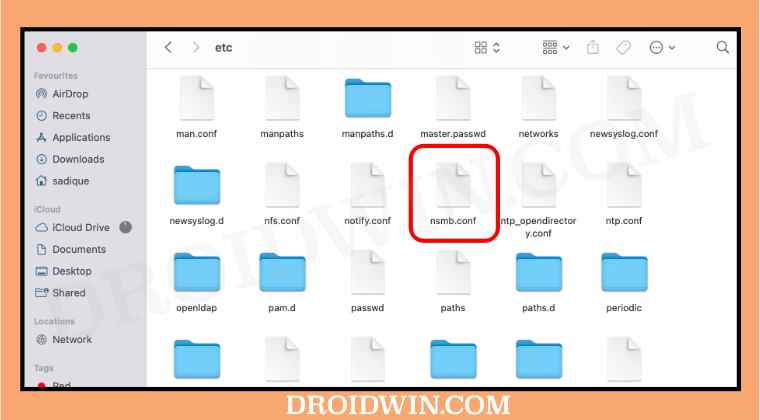
- On the other hand, if you want to access it in the etc folder, then press ⌘ + ⇧ + G, type in /etc, and hit Enter.
- This will take you to the etc folder and you may now access the nsmb.conf file from there.
- Fix: Quick Look Preview with spacebar not working in macOS Monterey
- SMB Samba Share not working in macOS Monterey: How to Fix
- Netbiosd High CPU Usage on Mac: How to Fix
- Missing Icon Preview for EPS files in macOS Monterey: How to Fix
- Cannot Upload Files via Chrome in macOS: How to Fix

(Cancel Reply)
Δ
