Oculus Quest 2 lagging when using Link Cable [Fixed]
In this guide, we will show you the steps to fix the Oculus Quest 2 lagging issue when using the Link Cable. When it comes to virtual reality headsets, then there’s hardly an iota of a doubt that the offering from Facebook is right there at the top. While on the software side its second iteration is similar to its predecessor, but this is where its similarity ends. The second generation comes with updated internal specifications, a display with a higher refresh rate and per-eye resolution, and updated controllers.
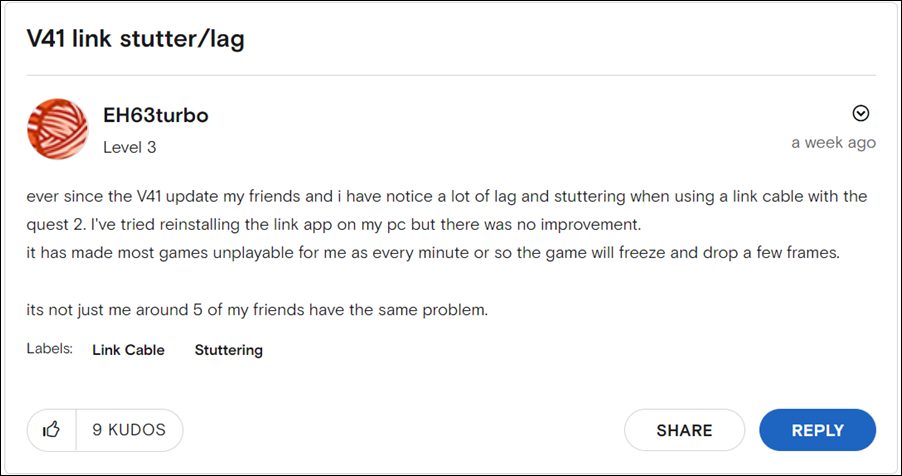
However, in spite of all the goodies attached, it isn’t free from its fair share of issues. As of now, various users have voiced their concern that their Oculus Quest 2 is constantly crashing, lagging, and freezing when using the Link Cable. This issue is most prominent on AMD GPUs and is resulting in frequent frame drops. If you are also currently getting bugged with it, then this guide shall help you out. Follow along for the fix.
Fix Oculus Quest 2 lagging when using Link Cable
Initially, the issues was attributed to the Oculus Quest 2 v41 update. However it turns out the recently released AMD GPU graphic drivers update version 22.5.2 was the culprit. So to rectify it, you will have to downgrade AMD GPU graphic drivers to version 22.5.1. Here’s how it could be done-
- To begin with, head over to the AMD Drivers page .
- Then download the driver corresponding to your PC architecture and hit Submit.
- After that, expand the OS section and hit Download next to version 22.5.1.
- Once downloaded, launch the setup and proceed with the on-screen instructions to complete the installation.
That’s it. Once you downgrade the driver, it should fix the Oculus Quest 2 lagging issue when using the Link Cable. As far as the official stance on this matter is concerned, the developers are aware of this issue, but they haven’t given out any ETA for the rollout of a fix. As and when that happens, we will update this guide accordingly. In the meantime, the aforementioned workaround is your best bet.
- Oculus Quest 2 Black Screen Issue: How to Fix
- How to Install Firmware via ADB Sideload in Oculus Quest 2
- Oculus Quest App Sharing Not Working: How to Fix
- Oculus Quest 2 stuck at 72Hz Refresh Rate: How to Fix

(Cancel Reply)
Δ
