Outlook Rules are not available for this account [Fix]
In this guide, we will show you a nifty workaround to fix the Outlook “Rules are not available for this account” error. Recently I updated my Mac from Ventura to Sonoma and then updated Outlook, instead of taking the other way around [updating the email client and then the OS]. It’s fair to say that all hell broke loose and this app from the Redmond giant gave me quite a torrid and infuriating time during setting it up on macOS 14.
When everything was done and dusted, the final piece of the missing jigsaw was setting up Rules. However, that brought about a slew of its own issues. Not only did it refuse to get imported, however, when I tried recreating it, but I was also straightaway greeted with the “Rules are not available for this account” error in Outlook. if you are also facing this error message, then this guide will help you rectify it. Follow along for the fix.
Fix Outlook Rules are not available for this account

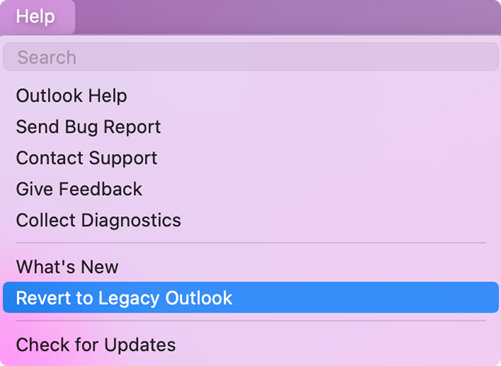
In order to rectify this issue, you’ll have to switch back to the old Outlook account. Once you upgrade the macOS and then launch Outlook, then the latter will automatically switch over to the new layout, thereby resulting in issues with Outlook. So simply head over to “Help”> “Revert to Legacy Outlook” and restart the app.
- How to Disable ‘Outlook closed while you had items open’ prompt
- Outlook for Mac sync issues with Yahoo and AOL accounts
- Excel Tables Format lost when pasting it in Outlook Web App [Fix]
- Cannot Sync Outlook Calendar Events with Google Calendar [Fix]

(Cancel Reply)
Δ
