Pink/Green Overlay in Videos on Telegram Desktop App [Fixed]
In this guide, we will show you the steps to fix the pink/green overlay issue in the videos being played in the Telegram desktop app. When it comes to instant messaging services, then Telegram has edged the popular offering from Meta in quite a few domains. One among them is the truckload of new and intriguing features that it has to offer. And this just keeps on taking an upward trajectory with each new update. To top it all off, you get a secure and end-to-end encrypted environment for chat, video, and voice calls.
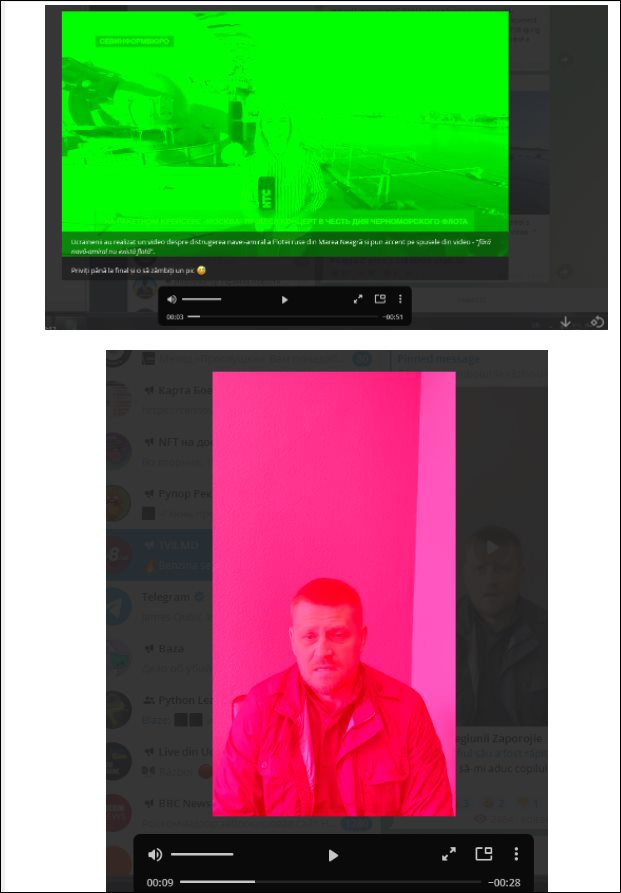
Likewise, it has made its presence felt across both the smartphone and personal computers. However, as of now, there seems to be an issue with the latter platform. Various users have voiced their concern that they are getting a pink or green screen overlay while watching videos in the Telegram desktop app. This issue seems to have come into existence right after the version 3.7.0 update. If you are also in the same boat, then this guide shall make you aware of a nifty workaround to resolve this bug. Follow along.
Fix Pink/Green Overlay in Videos on Telegram Desktop App
In order to resolve this bug, you will have to disable the Hardware Accelerated Video Decoding feature in the app. Here’s how it could be done-
- Launch the Telegram and go to the Settings > Advanced section.
- After that, disable the toggle next to Hardware Accelerated Video Decoding.
- Finally, restart the app for the changes to take place.
That’s it. This should fix the pink/green overlay issue in the videos being played in the Telegram desktop app. As far as the official stance on this matter is concerned, the developers are aware of this issue , but they haven’t given out any ETA for the rollout of a fix. As and when that happens, we will update this guide accordingly. In the meantime, the aforementioned workaround is your best bet.
- Enable 120Hz Refresh Rate in Telegram on Google Pixel 6/Pro
- Add 3D Fluent Design Windows 11 Animated Emojis to Telegram
- WhatsApp Message Notifications Not Showing on Android [Fix]
- Let Google Assistant Read and Reply to Messages from WhatsApp, Telegram, and more

(Cancel Reply)
Δ
