Pixel 10/Pro/XL Random Screen Freeze [Fix?]
I have always been a die-hard Pixel fan. Although it never reaches the heights in benchmarking that its competitors manage to do, however, numbers don’t always give out the correct picture. Yes, Tensor still has some way to go when we compare it with Snapdragon, but it has still done a decent job. If someone asks for a smartphone suggestion, I straightaway recommend a Pixel. However, I guess now I might have to give a second thought to this blind trust in this OEM.
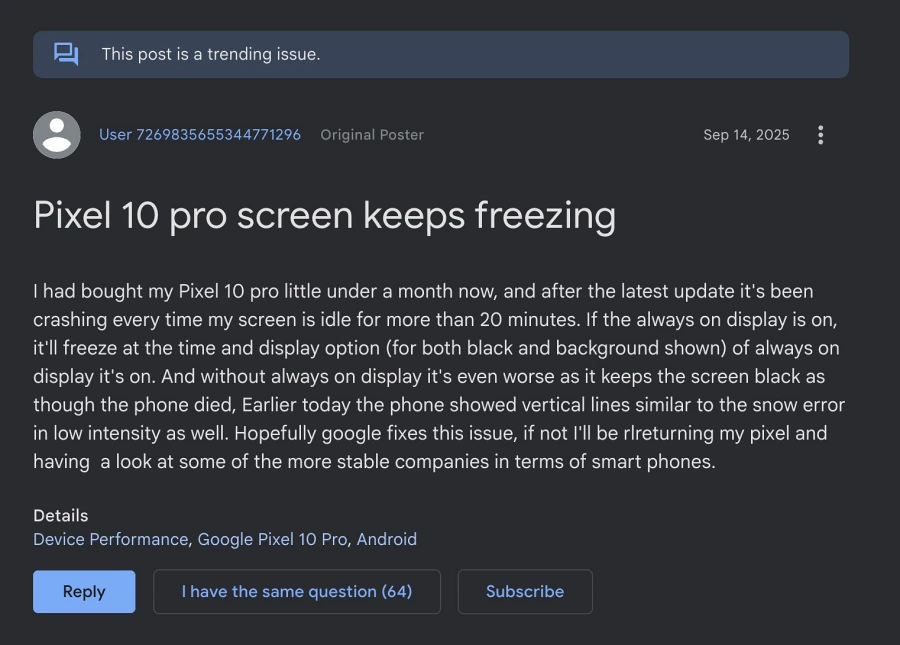
Right after the device was launched, it was plagued with a lot of issues, most of which revolved around the display. While we are yet to go over the “screen snow” issue, a new and equally infuriating one has already impacted the tenth series. Numerous users have voiced their concern that their Pixel 10/Pro/XL is undergoing random screen freezes 5-10 times a day.

Getting bugged with these issues on a device that usually breaks the cost barrier is just not acceptable. What is even more interesting is that you can still interact with stuff behind the frozen screen, as users have reported that they can still feel the vibration when interacting with the display. At the time of writing, this post has already become a trending issue over at Google Support Forum, with over 60 users claiming to be bugged with the same problem. So all this begs an important question- is there a fix? Let’s find out.
Fix Pixel 10/Pro/XL Random Screen Freeze

The Google Support Team has shared two workarounds-
- Try using the device in Safe Mode for 24 hours.
- Do a force reboot when you face this problem.
One cannot use the device in Safe Mode as it will disable all third-party apps [bring up the Power menu > long press on Restart > hit OK in the Safe Mode prompt]. Without that, I don’t think one would be able to carry out most of their daily tasks. And it’s not that we have to be in Safe Mode for an hour or two, it’s for the entire day! Let’s suppose someone actually manages to do so, and he doesn’t face any issues in that mode. What then? Will Google tag a third-party app as the culprit, and the case will be closed?
Secondly, some users were able to temporarily get relief from this issue by doing a force reboot . However, the relief was only temporary, lasting for 4-5 hours. They then had to once again do a force reboot. All in all, this went for 5-6 times throughout the day, which is neither the most feasible nor the most viable approach towards this issue.
Initially, some users pointed fingers at the Pixel Snap wireless charging; however, reports then emerged that even users who aren’t using this charging technology are facing this problem. So, wireless charging is not to be blamed.
All in all, it’s just a hit-and-trial, and Google is just passing the buck from one tweak to another without any proper workaround or fix in sight. It has been over two weeks; however, it is yet to gather the kind of attention that it should, because after all, it is quite a worrisome issue that makes the device unusable.
Let’s just keep our fingers crossed and hope that the Silicon Valley giant addresses this issue at the earliest, the chances of which currently look slim. Anyways, let’s stay on the optimistic side of the fence, and when a workaround gets available, we will update our guide accordingly. So keep a tab on this post and check it out at regular intervals.
- Why I Cancelled and Returned My Pixel 10 Pro XL for 9 Pro XL
- Magic Cue Not Working on Pixel 10: How to Fix
- Cannot Add Cards to Google Wallet on Pixel 10: How to Fix
- How to Run Magic Cue and other AI Features on Rooted Pixel 10

(Cancel Reply)
Δ
