Plex Server Grey Screen on Mac: How to Fix
In this guide, we will show you the steps to fix the grey screen issue in the Plex Server on your Mac. This media streaming service giant has made an impressive name for itself in this domain. Acting as a client-server media player platform, it also allows you to organize your video, audio, and photos and then directly stream them to the player. Talking about its availability, it has made its presence felt across all the platforms, including Smart TVs, PCs, mobile phones, smartwatches, and streaming/casting services, among others.
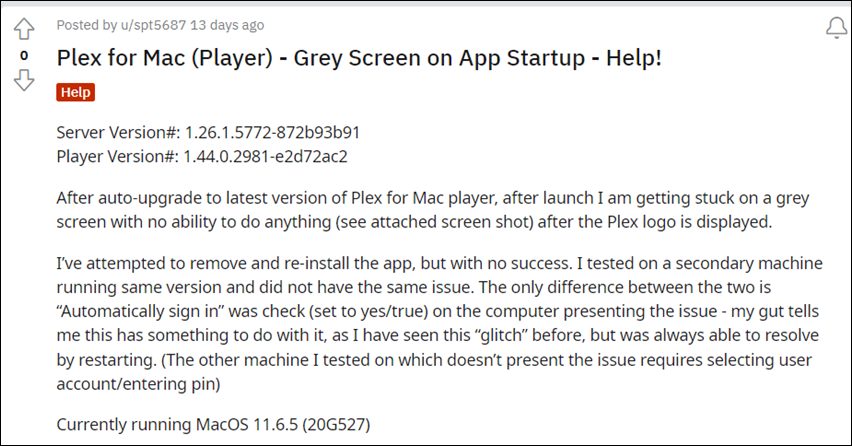
However, as of now, it is going through a rough patch on the PCs from the Cupertino giants. Various Mac users have voiced their concern that the Plex Server is displaying a grey/black screen right at the startup. As a result, they are unable to stream any content whatsoever. The issue first came to light after the rollout of the update v1.44.0 and is only affecting Mac, Windows users are not affected by this bug. So on that note, let’s check out the steps to fix the grey screen issue in the Plex Server on your Mac. Follow along.
How to Fix Plex Server Grey Screen on Mac

- Bring up the Finder’s Go menu, select Go to the Folder, and type in the below location: ~/Library/Application Support/Plex Media Server/
- There will be a folder named Updates. Go there and you should see the previous installation builds of Plex.
- Copy any one of the older versions’ setup files [preferably 1.43.4.2971] and transfer it anywhere outside of the Plex Media Server folder.
- However, if there’s no Updates folder or previous setup files inside the Updates folder, then you could manually download the older Plex Media Server setup file for your Mac from a third-party site.
- Now select Application from the sidebar of the Finder window to open the Applications folder.
- Then drag the Plex Media Server to the trash can and the app stands uninstalled.
- Now download and install the Plex Media Server 1.43.4.2971 on your Mac.
- Once done, restart your PC and the underlying issue would be resolved.
So these were the steps to fix the grey screen issue in the Plex Server on your Mac. As far as the official stance on this matter is concerned, the developers are yet to acknowledge this issue, let alone give out any ETA for the rollout of a fix. As and when any of these two things happen, we will update this guide accordingly. In the meantime, the aforementioned workaround is your best bet.
- Plex App Audio/Video Issues on One UI 4 and Samsung TV [Fixed]
- Plex Media Server not working/crashing on Windows and Mac: How to Fix
- How to Access Plex Server Storage Directory on Nvidia Shield TV
- Plex Server Stuck at Scanning Libraries: How to Fix

(Cancel Reply)
Δ
