Reddit App Pauses Music in Third-Party Music Players [Fixed]
In this guide, we will show you various methods to fix the issue of the Reddit app pausing music in third-party music players. This social news aggregation, web content, and discussion website is the most popular name in this domain. The amalgamation between a Q&A site like Quora and various social media services, its subreddit manages to checkmark all the prerequisites- ranging from knowledgeable insights to sarcastic memes.

Likewise, it has various third-party clients as well that offers a plentitude of additional goodies than what the stock environment has to offer. But in spite of all the goodies, it isn’t free from its fair share of issues either. As of now, various users have voiced their concern that the Reddit app is pausing the music being played by other third-party music players like Apple Music, Tidal, Spotify, SoundCloud, and even YouTube.

Users have also tried using third-party clients of Reddit, but those apps are exhibiting similar behavior as well. Moreover, the issue is mostly affecting the iOS and iPad users, with the Android ecosystem largely being unaffected. If you are also getting bugged with this issue, then this guide will make you aware of a few nifty workarounds to resolve it. Follow along.
- Fix Reddit App Pauses Music in Third-Party Music Players FIX 1: Disable Autoplay Videos/GIFs FIX 2: Turn on Quiet Audio Mode FIX 3: Toggle Video Sound on Reddit
Fix Reddit App Pauses Music in Third-Party Music Players
It is recommended that you try out each of the below-mentioned workarounds and then see which one spells out success for you. So with that in mind, let’s get started.
FIX 1: Disable Autoplay Videos/GIFs
Your first course of action should be to disable Reddit’s Autoplay Videos/GIFs feature and then check out the results. Here’s how it could be done:
- Launch the Reddit app and tap your avatar situated at the top right.
- Then select Settings and go to the General section.
- After that, select Autoplay Videos/GIFs and choose Never.
- Check if it fixes the issue of the Reddit app pausing music in third-party music players.
FIX 2: Turn on Quiet Audio Mode
Your next course of action should be to enable the Quiet Audio Mode and then see if it spells out success for you or not. Proceed ahead with the below steps to give it a try:
- To begin with, launch the Reddit app on your device.
- Then go to the Settings menu situated at the bottom right.
- Now enable the toggle next to Quiet Audio Mode.
- Check if it fixes the issue of the Reddit app pausing music in third-party music players.
FIX 3: Toggle Video Sound on Reddit
Browse through any random video on your Reddit feed and then tap on the sound icon. As soon as you hear the audio from the video, again tap on the sound icon. This will mute the audio in the video and will automatically start the audio from the music player.
So these were three different methods to fix the issue of the Reddit app pausing music in third-party music players. As far as the official stance on this matter is concerned, the developers are yet to acknowledge this issue, let alone give out any ETA for the rollout of a fix. As and when any of these two things happen, we will update this guide accordingly. In the meantime, the aforementioned workarounds are your best bet.
- Instagram Filters This effect is not available in your location[Fix]
- Apple Music: The requested URL was not found on this server [Fix]
- YouTube Music Not Loading Songs on Sprint/T-Mobile [Fixed]
- Fix Apple Music Back Button Disappearing Issue on Mac

(Cancel Reply)
Δ
YouTube Music Not Loading Songs on Sprint/T-Mobile [Fixed]
In this guide, we will show you the steps to fix the issue of YouTube Music not loading songs on Android devices having Sprint/T-Mobile as the carrier. Google Play Music has for long been the go-to choice for Android users and was usually their default music player. However, similar to countless other Google products, it was also sent to Google’s Graveyard. To fill this position, the SiliconValley giants introduced the YouTube Music app which, to be fair, hasn’t yet reached the same level as its predecessor in some aspects.
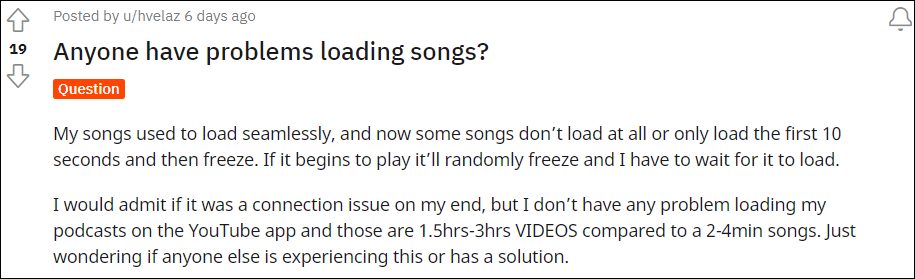
Moreover, it also gets bugged with an issue or two at regular intervals. As of now, various users have voiced their concern that YouTube Music isn’t able to load songs, rather it gets stuck at the buffering period. For others, the song load for the initial 10 seconds, and then it gets frozen. Going through all the reports, the issue seems to be only present while users were on their carrier data, there wasn’t an issue as such on WiFi. So one thing was pretty clear- the carrier network was conflicting with this app.
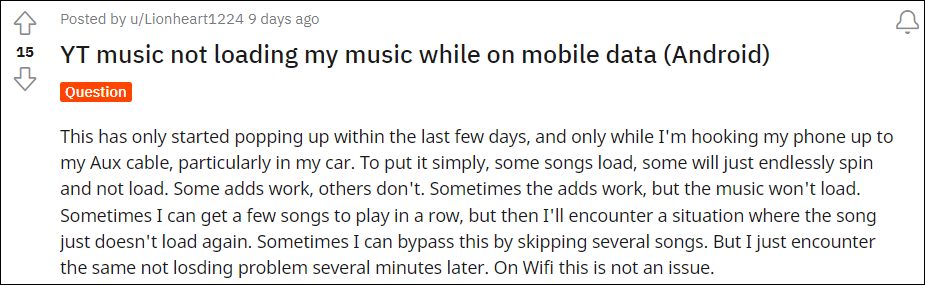
Digging deep into this issue, and is mostly happening with Sprint/T-Mobile users, and only on Android devices. Going even further, I found out that the issue is only present in the Chicago area. Joining all these dots, I found out that the issue stems from the way the APN profile has been configured. So making a few tweaks to the APN should be able to fix the issue of YouTube Music Not Loading Songs on Sprint/T-Mobile. And in this guide, we will show you how to do just that. Follow along.
YouTube Music Not Loading Songs on Sprint/T-Mobile
In order to rectify this issue, you will have to change the default APN Protocol to IPv4, from the current IPv6 or IPv4/IPv6. Here’s how it could be done:
- To begin with, head over to Settings > WiFi & Network.
- Then go to SIM & Network and select your Active SIM.
- After that, go to Access Point Names and select the default APN.
- Now scroll to the APN Protocol section and select IPv4. That’s it.
This should fix the issue of YouTube Music not loading songs on Sprint/T-Mobile. It’s still not clear as to why the app is having trouble establishing a successful connection with IPv6. Moroever, as far as the official stance on this matter is concerned, the developers are yet to acknowledge this issue, let alone give out any ETA for the rollout of a fix. As and when any of these two things happen, we will update this guide accordingly. In the meantime, the aforementioned workaround of choosing IPv4 as the APN Protocol is your best bet.
- How to Fix Cannot Turn Off Restricted Mode in YouTube
- YouTube Music App Not Working/Crashing/Freezing [Fixed]
- Fix YouTube Music Shuffle not shuffling all songs/entire playlist
- YouTube video links/URL redirecting to Your browser is up to date [Fixed]
(Cancel Reply)
Δ
