Remove Bloatware/Debloat OnePlus 10 Pro [No Root]
In this guide, we will show you the steps to debloat/remove bloatware from your OnePlus 10 Pro via ADB Commands. The downfall of one of the most popular smartphone manufacturers is there for everyone to see. It’s not that this happened overnight, but the downfall was gradual and over the course of time.
More importantly, even the OEM themselves knew what they were up to, but preserving the economies of scale and pushing aside the user’s requirement is sadly becoming a new trend, which OnePlus has mastered with full expertise.
To concrete this statement, one shouldn’t look any further than their questionable decisions to incorporate the elements of Oppo’s ColorOS into its own house OxygenOS. Not only has OnePlus lost its originality, but the underlying OS skin has completely ruined the software experience as well.
The entire OS is now bloated with tons of unnecessary apps, most of which are treated as system apps and you wouldn’t b able to remove them from your device the native way. But free not. You could still remove all these craps from your device with the help of ADB Commands. And in this guide, we will show you how to do just that. Given here are the detailed steps to debloat/remove bloatware from your OnePlus 10 Pro via ADB Commands.
- How to Remove Bloatware/Debloat OnePlus 10 Pro STEP 1: Install Android SDK STEP 2: Enable USB Debugging STEP 3: Establish ADB Shell Connection STEP 4: Debloat/Remove Bloatware from OnePlus 10 Pro
- OnePlus 10 Pro: List of Bloatware Apps
- How to Reinstall Bloatware Apps on OnePlus 10 Pro
How to Remove Bloatware/Debloat OnePlus 10 Pro
The below instructions are listed under separate sections for ease of understanding. Make sure to follow the same sequence as mentioned. Droidwin and its members wouldn’t be held responsible in case of a thermonuclear war, your alarm doesn’t wake you up, or if anything happens to your device and data by performing the below steps.
STEP 1: Install Android SDK
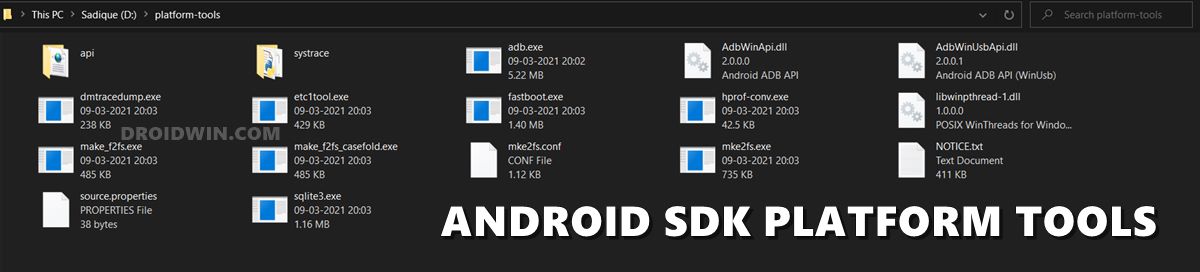
First and foremost, you will have to install the Android SDK Platform Tools on your PC. This is the official ADB and Fastboot binary provided by Google and is the only recommended one. So download it and then extract it to any convenient location on your PC. Doing so will give you the platform-tools folder, which will be used throughout this guide.
STEP 2: Enable USB Debugging
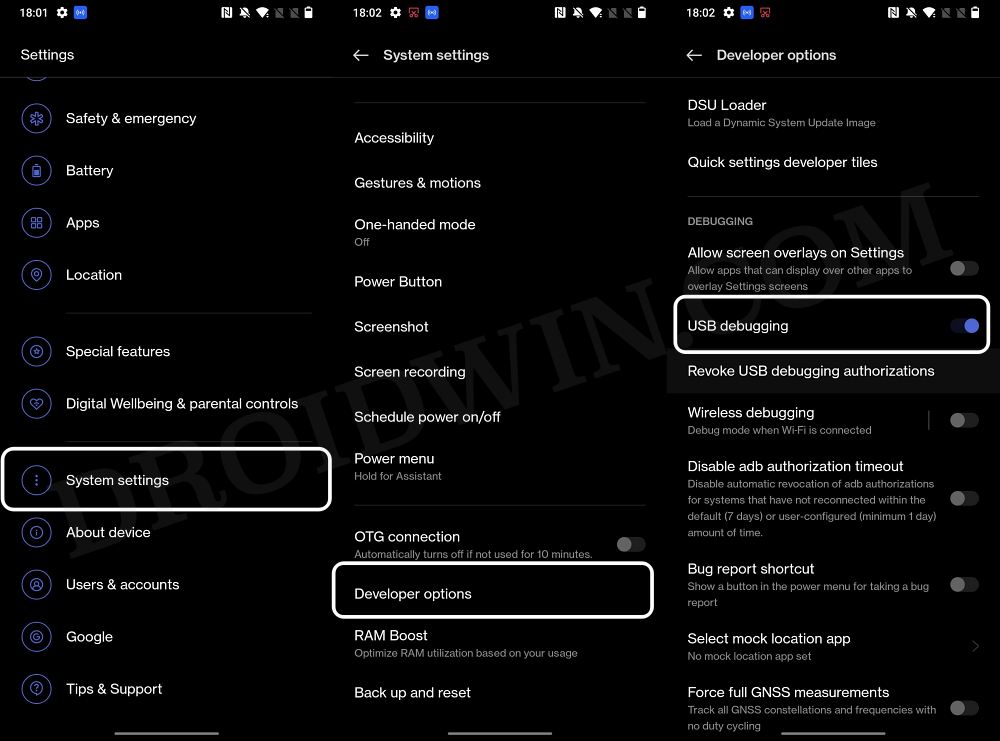
Next up, you will have to enable USB Debugging on your device so that it is recognizable by the PC in ADB mode. So head over to Settings > About Phone > Tap on Build Number 7 times > Go back to Settings > System Settings > Developer Options > Enable USB Debugging.
STEP 3: Establish ADB Shell Connection
- To begin with, connect your device to the PC via USB cable. Make sure USB Debugging is enabled.
- Then head over to the platform-tools folder, type in CMD in the address bar, and hit Enter. This will launch the Command Prompt.
- Now in the following command in the CMD window to verify the ADB connection. If you get the device ID, then the connection stands successful. adb devices
- Now type in the below command to open the Shell environment: adb shell
- It will now list out your device codename, which means that the shell connection has been successfully established as well, and you are good to go ahead to debloat or remove bloatware from your OnePlus 10 Pro.
STEP 4: Debloat/Remove Bloatware from OnePlus 10 Pro
- First and foremost, execute the below command to get the list of all the apps installed and their package names [the bloatware output list has been shared below as well]: pm list packages
- Now, the generic command to uninstall any bloatware from a device is: pm uninstall -k –user 0 PackageName
- For example, if I want to remove the Heytap Accessory with package name com.heytap.cloud, then its removal command will be: pm uninstall -k –user 0 com.heytap.cloud
- In the same manner, you may now remove the desired bloatware apps from your OnePlus 10 Pro.
OnePlus 10 Pro: List of Bloatware Apps
Given here are the list of all the bloatware that we found to be of no use, apart from just hogging additional resources and storage on your device. We have also listed out the tasks that these apps perform, so you may decide accordingly whether or not you wish to remove them [Credits: XDA Senior Member Tilde88 ]. As already discussed, you just need to copy the app package name from below and use it in the “pm uninstall -k –user 0 PackageName” command.
com.android.apps.tag

Stock android fluff


com.android.bips

Stock android fluff


com.android.bluetoothmidiservice

Stock android fluff


com.android.bookmarkprovider

Stock android fluff


com.android.calllogbackup

Stock android fluff


com.android.cellbroadcastreceiver

Stock android fluff


com.android.cellbroadcastreceiver.overlay.common

Stock android fluff


com.android.cts.priv.ctsshim

Stock android fluff


com.android.dreams.basic

Stock android AOD provider. This is needed for AOD to work fully


com.android.dynsystem

Stock android fluff


com.android.egg

Stock android fluff


com.android.managedprovisioning

Stock android fluff


com.android.printspooler

Stock android fluff


com.android.providers.partnerbookmarks

Stock android fluff


com.android.stk

Stock android fluff


com.android.traceur

Stock android fluff


com.coloros.activation

E-warranty card - (iirc only applicable in china)


com.coloros.assistantscreen

realme crap


com.coloros.bootreg

per 1 post i found online : "Warranty doesn't really work outside mainland China"


com.coloros.childrenspace


com.coloros.floatassistant

oneplus assistive ball


com.coloros.operationManual


com.coloros.scenemode

simple mode


com.coloros.smartsidebar


com.coloros.systemclone

system cloner thing to backup/restore settings. meh


com.coloros.weather.service

battery-draining weather service. This is needed for AOD to work fully.


com.daemon.shelper

SPYWARE - realme


com.google.android.adservices.api

introduced in new android OS. idk, but seems ad-related. no issues since uninstall


com.google.android.apps.nbu.paisa.user


com.google.android.apps.photos

Google Photos app. No need for two. I left the oneplus photo app


com.google.android.apps.restore

Be advised. This may or may not break Factory Reset from settings menu. If apps do not restore, you will have to reset from bootloader. Be advised.


com.google.android.apps.wellbeing

Meh


com.google.android.as

Android Intelligent Services. Needed for AOD to work fully.


com.google.android.as.oss

Private Compute Services. May or may not be needed for AOD.


com.google.android.cellbroadcastreceiver


com.google.android.feedback


com.google.android.gms.location.history

Potential battery drain service


com.google.android.marvin.talkback


com.google.android.onetimeinitializer


com.google.android.overlay.modules.documentsui


com.google.android.partnersetup


com.google.android.printservice.recommendation


com.google.android.setupwizard


com.google.ar.core

I don't use Augmented Reality. Maybe people might need only for Pokemon Go type games.


com.google.ar.lens

Google lens. Take pic and google the thing you took a pic of.


com.google.mainline.adservices

introduced in new android OS. idk, but seems ad-related. no issues since uninstall


com.google.mainline.telemetry

I mean, telemetry is right in the name.


com.heytap.accessory

quick device connect "feature". this is a massive battery drain historically.


com.heytap.colorfulengine

Realme crap. This is needed for AOD to work


com.heytap.mcs

quick device connect "feature". this is a massive battery drain


com.mediatek.omacp

Notice "mediatek"... We don't use that chipset at all. This is some spyware to potentially leak carrier registration data.


com.oneplus.account

Useless. Battery drain if account added. This is one of the things that removes the oneplus account annoying setting in the Settings menu.


com.oneplus.filemanager

Crappy file manager that can't get elevated rights (like for some folders in SD card). Use google app or something better.


com.oneplus.membership

Useless. Battery drain if account added. This is one of the things that removes the oneplus account annoying setting in the Settings menu.


com.oneplus.opwlb

Work-Life balance. Annoyance, and potential high battery drain


com.oplus.aod

oneplus selection of AOD. removed since AOD doesnt work without TONS of extra services.


com.oplus.apprecover

system app reinstall bs


com.oplus.atlas

"Realme" spam


com.oplus.bttestmode

?bluetooth test for oneplus? crap


com.oplus.cast

Oneplus screencast. Per post online : #Required if you cast screen to TV or use 3rd part Screen Recording Apps


com.oplus.cosa

"app enhancement service". this is crap that kills battery. This is needed for AOD to work.


com.oplus.crashbox

realme spyware potentially. useless at best


com.oplus.customize.coreapp


com.oplus.deepthinker

"intelligent services". this is crap that kills battery. This is needed for AOD to work


com.oplus.encryption

"private safe" - yea go ahead and trust oppo with your sensitive stuff... (dont)


com.oplus.games

Meh


com.oplus.hamlet

Dont remember. Definitely crap


com.oplus.healthservice

Crapware. Also, I can 100% agree with this info I found online from 1 post : "#Gimmick serves no purpose"


com.oplus.interconnectcollectkit

Guaranteed telemetry/spyware


com.oplus.lfeh

[needed for Gamespace if you use that]


com.oplus.linker

?some oneplus crap


com.oplus.location

Extra location telemetry. not related to any GPS functions


com.oplus.locationproxy

Extra location telemetry. not related to any GPS functions


com.oplus.logkit

spyware...


com.oplus.multiapp

Crappy app cloner. There are better stuff out there.


com.oplus.nhs

NetworkHealthService. nothing changes after removing.


com.oplus.ocs

Potential spyware? Info from 1 post online : "Chinese unique identifier privacy hazard"


com.oplus.olc

Realme crap


com.oplus.omoji

Self emoji. I guess you can leave it on, there are probably safer, better ways to do this. Can be used in AOD. Needed for full AOD functionality.


com.oplus.onet

realme


com.oplus.portrait

Portrait Silhoutte. Idk, might be related to self emoji? Not sure. Can be used in AOD. Needed for full AOD functionality.


com.oplus.postmanservice


com.oplus.qualityprotect


com.oplus.safecenter

"private safe" - yea go ahead and trust oppo with your sensitive stuff... (dont)


com.oplus.sauhelper

auto updates. (still get notices for updates)


com.oplus.securitypermission


com.oplus.smartengine

not really sure. but 1 post online says : "don't like blackbox phone manager". This is needed for AOD to work


com.oplus.sos


com.oplus.statistics.rom

telemetry


com.oplus.stdid

[needed for Gamespace]


com.oplus.stdsp

maybe similar to above


com.oplus.synergy

related to linker. heytap crapware


com.oplus.trafficmonitor

oneplus traffic monitor (monthly data usage, etc). potential telemetry


com.oplus.uiengine

no clue. has been great without it for weeks. This is needed for AOD to work.


com.qti.confuridialer


com.qti.dpmserviceapp


com.qti.qualcomm.datastatusnotification


com.qti.xdivert


com.qualcomm.atfwd

this is antique and unused crap


com.qualcomm.embms

antique qualcomm service


com.qualcomm.location

useless


com.qualcomm.qti.dynamicddsservice


com.qualcomm.qti.lpa


com.qualcomm.qti.modemtestmode

crap. but per 1 online post "Runs in background , not needed for a user"


com.qualcomm.qti.uim

remote "help" tool for them to control your device


com.qualcomm.qti.uimGbaApp

remote "help" tool for them to control your device


com.qualcomm.uimremoteclient

remote "help" tool for them to control your device


com.qualcomm.uimremoteserver

remote "help" tool for them to control your device


com.quicinc.voice.activation

Qualcomm has nothing to do with Google Assistant or always on speech recognition. crap


com.rongcard.eidapi

maybe related to chinese payments like wechat. not for us


com.ses.entitlement.o2

Crap


com.wapi.wapicertmanage

Useless for us. But here is some info from online searching " WAPI (WLAN Authentication and Privacy Infrastructure) is the wireless local area network (WLAN) standard officially supported by the Chinese state government. WAPI was initiated in 2004. In 2006, however, the International Standards Organization (ISO) rejected the incorporation of WAPI as an international WLAN security standard in 2006."


net.oneplus.weather

Oneplus weather service. Battery draining potential. Better altnernatives with google. This is needed for AOD to work fully.
How to Reinstall Bloatware Apps on OnePlus 10 Pro
If you have uninstalled any bloatware app but after that, your device or any of its apps isn’t functioning along the expected lines, then you could easily reinstall that app.
- For that, execute the below command (after executing the adb shell command). Make sure to replace PackageName accordingly: cmd package install-existing PackageName
- For example, if you wish to reinstall Heytap Cloud with package name com.heytap.cloud, then the above command will transform to: cmd package install-existing com.heytap.cloud
- Bypass Login MSM Download Tool OnePlus 10 Pro
- How to Enable Call Recorder on OnePlus 10 Pro/10T/10R
- Convert OnePlus 10 Pro from Chinese ColorOS to International OxygenOS
- How to Install OTA on Rooted OnePlus 10 Pro

- Dave Xnet 2 years ago Reply I noticed if you disable-user or uninstall-user com.google.android.adservices.api, you lose the recent ability to delete your advertising ID at settings/google/ads. It reverts to the way it was before
- kamal 3 years ago Reply very helpful. thanks man.
(Cancel Reply)
Δ
