Root Infinix Note 10 Pro via Magisk Patched Boot
In this guide, we will show you the steps to root your Infinix Note 10 Pro via Magisk patched boot.img. As of now, the budget domain is filled to the brim with a plethora of offerings from various OEMs. But even then, Infnix managed to carve out a rich name for itself. One major reason for the same is the fact that it stuck with its USP of providing feature-rich devices at a price that is affordable to the masses. This equilibrium between price and feature pushed its devices to the epitome of success in recent years.
Moreover, the device is also quite an active player in the custom development. Be it for flashing custom ROMs, installing a custom recovery like TWRP, or gaining administrative level privileges by rooting the device via Magisk, there’s a lot to try out. Among them, it is the latter one that has always been the go-to choice for tech enthusiasts. Once you do so, you will be in a position to welcome abode a plethora of mods and tweaks onto your device. So on that note, let’s get started with the steps to root your Infinix Note 10 Pro via Magisk patched boot.img file.
- Benefits and Risks of Rooting
- How to Root Infinix Note 10 Pro via Magisk STEP 1: Install Android SDK STEP 2: Enable USB Debugging and OEM Unlocking STEP 3: Unlock Bootloader on Infinix Note 10 Pro STEP 4: Get Infinix Note 10 Pro Boot.img STEP 5: Patch Infinix Note 10 Pro Stock Boot.img via Magisk STEP 6: Boot Infinix Note 10 Pro to Fastboot Mode STEP 7: Flash Magisk Patched Boot.img and Root Infinix Note 10 Pro
Benefits and Risks of Rooting
Once you root your device by flashing the Magisk patched boot.img via Fastboot Commands, you will be in a position to try out a plethora of customizations on your device. These include the likes of flashing custom ROMs, installing a custom recovery like TWRP, or flashing a custom kernel. Along the same lines, you could also flash Magisk Modules , Xposed Framework , Substratum Themes , Viper4Android , and the likes. However, this is just one side of the story.
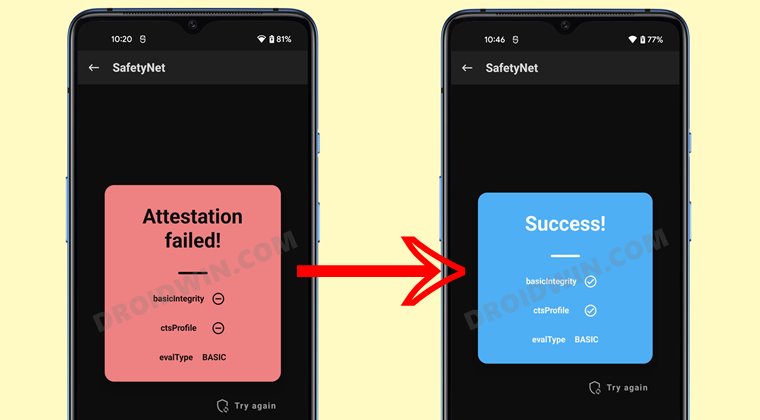
Carrying out this process also has its downsides. First off, the process requires an unlocked bootloader. Doing so will wipe off all the data and could nullify the device’s warranty as well. Likewise, WideVine L1 will be degraded to L3, resulting in the inability to stream Netflix in HD [ FIXED ]. Then the SafetyNet will be triggered, which might cause issues with banking apps [ FIXED ]. So if all that’s well and good, then let’s get started with the steps to root the Infinix Note 10 Pro via Magisk.
How to Root Infinix Note 10 Pro via Magisk
The below instructions are listed under separate sections for ease of understanding. Make sure to follow the same sequence as mentioned. Droidwin and its members wouldn’t be held responsible in case of a thermonuclear war, your alarm doesn’t wake you up, or if anything happens to your device and data by performing the below steps.
STEP 1: Install Android SDK
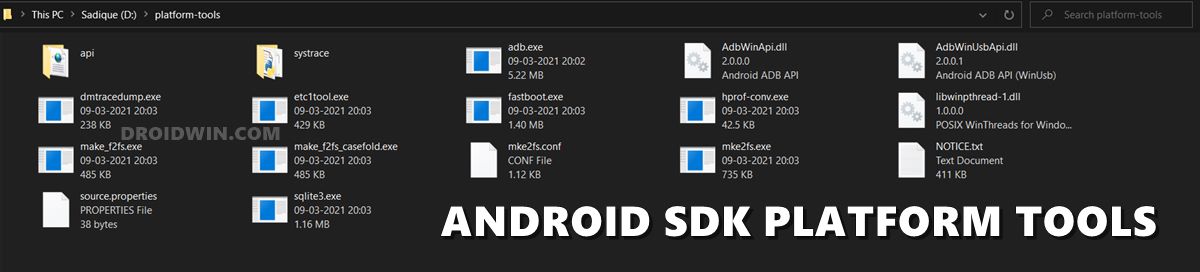
First and foremost, you will have to install the Android SDK Platform Tools on your PC. This is the official ADB and Fastboot binary provided by Google and is the only recommended one. So download it and then extract it to any convenient location on your PC. Doing so will give you the platform-tools folder, which will be used throughout this guide.
STEP 2: Enable USB Debugging and OEM Unlocking
Next up, you will have to enable USB Debugging and OEM Unlocking on your device. The former will make your device recognizable by the PC in ADB mode. This will then allow you to boot your device to Fastboot Mode. On the other hand, OEM Unlocking is required to carry out the bootloader unlocking process.
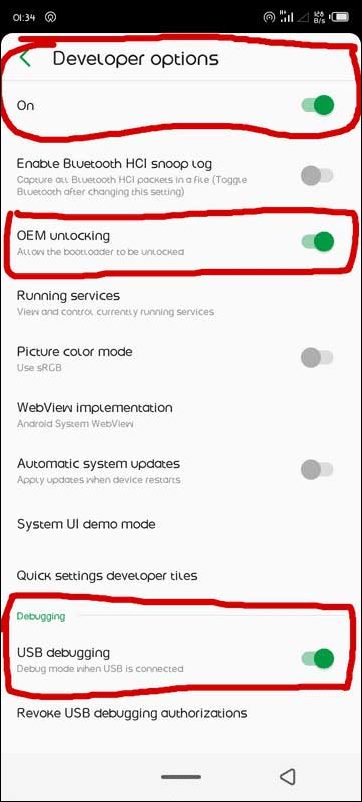
So head over to Settings > About Phone > Tap on Build Number 7 times > Go back to Settings > System > Advanced > Developer Options > Enable USB Debugging and OEM Unlocking.
STEP 3: Unlock Bootloader on Infinix Note 10 Pro
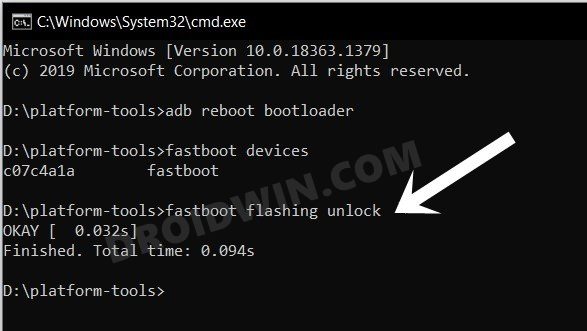
After this, you will have to unlock the bootloader on your Infinix Note 10 Pro. Do keep in mind that this process will wipe off all the data and might nullify the device’s warranty as well. So if that’s all well and good, then refer to our comprehensive guide on Unlock Bootloader on Infinix Note 10/Pro
STEP 4: Get Infinix Note 10 Pro Boot.img
- To begin with, download the stock firmware for your device from a trusted site.
- Make sure to download the same version that is currently installed on your device.
- Once downloaded, extract it to any convenient location on your PC.
- Then copy the boot.img file from the extracted firmware and send it to your device.
STEP 5: Patch Infinix Note 10 Pro Stock Boot.img via Magisk
- First off, install the Magisk App onto your Infinix Note 10 Pro.
- Then tap on the Install button situated next to Magisk.
- From the Method section, choose Select and Patch a file.
- Browse to the extracted boot.img file and select it.
- Then tap on the Let’s Go option situated at the top right.
- Magisk will now load the boot.img file and will patch it accordingly.
- Once that is done, you would get the Download Complete message.
- The patched boot image file will be saved in Internal Storage > Downloads.
- Make sure to rename it to magisk_patched.img, if that is already not the case.
STEP 6: Boot Infinix Note 10 Pro to Fastboot Mode
- Connect your device to the PC via USB cable. Make sure USB Debugging is enabled.
- Then head over to the platform-tools folder, type in CMD in the address bar, and hit Enter. This will launch the Command Prompt.
- Type in the following command in the CMD window to boot your device to Fastboot Mode adb reboot bootloader
- Now type in the below command to verify the Fastboot Connection fastboot devices
- If you get a device ID followed by the fastboot keyword, then the connection stands successful and you may now proceed ahead to root your Infinix Note 10 Pro.
STEP 7: Flash Magisk Patched Boot.img and Root Infinix Note 10 Pro
- To begin with, make sure that you have transferred the magisk_patched.img file to the platform-tools folder.
- Now type in the below command in the CMD window (that is opened inside the platform-tools folder) to flash the Magisk Patched file: fastboot flash boot magisk_patched.img
- Once that is done, reboot your device to the OS via the following command: fastboot reboot
- Install TWRP Recovery on Infinix Note 10 Pro
- Flash Firmware on Infinix Devices using Infinix Flash Tool
- Unlock Bootloader on Infinix Note 10/Pro
- How to Pass SafetyNet on Rooted Android 12/Android 13

(Cancel Reply)
Δ
