Safari New Tab Search Bar Unresponsive: How to Fix
In this guide, we will show you the steps to fix the issue of Safari’s new tab search bar being unresponsive. When it comes to the browser domain, then iPhone users are generally satisfied with the in-house product that the Cupertino giant has to offer. Being able to checkmark all the prerequisites and its deep integration into the Apple ecosystem are just some of the reasons for the user’s inclination towards it. On the flip side though, it isn’t free from its fair share of issues.
As of now, numerous users have voiced their concern that Safari’s new tab search bar is currently unresponsive. When they type in the URL in the search, no suggestions come up and even if they hit Enter, they aren’t taken to that website. The only way out is to close that tab and open a new one. if you are also getting bugged by this issue, then this guide will make you aware of a nifty workaround to rectify it. Follow along.
How to Fix Safari New Tab Search Bar Unresponsive
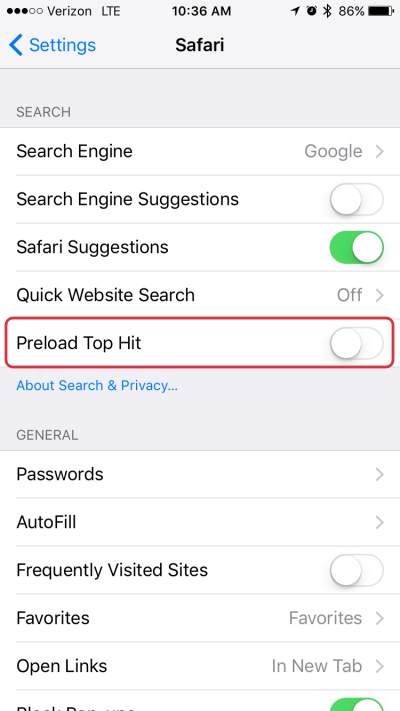
Going by the list of user reports, most of them had one thing in common- they had disabled the Preload Top Hit feature. Moroever, upon re-enabling it, the issue got rectified on their end. So let’s give this fix a try by heading over to Settings > Safari and enabling the toggle next to Preload Top Hit.
- Safari Facebook scrolling issues on macOS, iOS, and iPadOS [Fixed]
- Safari Bring All to Front/Arrange in Front not working/greyed out
- Bug: Merge All Windows Removes Pinned Tabs in Safari
- How to Disable Private Browsing/Incognito Mode in Safari on Mac

(Cancel Reply)
Δ
